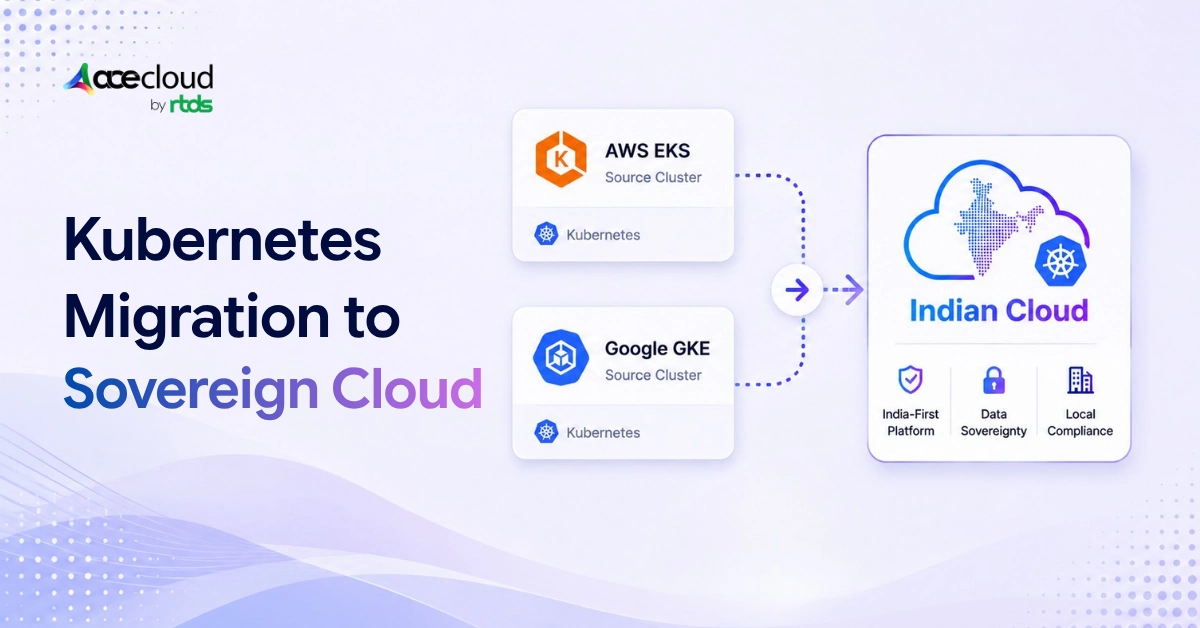
Migrating Kubernetes workloads from EKS or GKE requires more than transferring manifests. Standard Deployments and Services are usually portable when the destination supports the same Kubernetes APIs and networking assumptions, but workload identity, persistent volumes, load balancers, autoscaling, observability, and managed data services typically require replacement or reconfiguration.
Quick Answer:
The safest approach is to classify workloads by cloud dependency, build the Indian-cloud destination in parallel, migrate data separately, validate recovery under failure, and shift traffic gradually with a defined rollback boundary. The migration usually fails in the infrastructure surrounding the YAML, not in the Deployment itself.
Methodology. This guide combines official Kubernetes, AWS, Google Cloud, and storage-migration documentation with AceCloud’s workload-classification and provider-POC framework. Product capabilities and commercial terms should be reconfirmed before implementation.
The broader program should follow an assess, plan, execute, and optimize cloud migration process, while the Kubernetes workstream addresses cluster-specific dependencies.
Which Workloads Should You Migrate?
Not every workload should move at the same time, and some should not move at all in their current form.
The following AceCloud Kubernetes Migration Readiness Framework groups workloads by portability, data dependency, and operational risk. Classifying before touching anything keeps the Kubernetes migration from becoming a panic-driven exercise where everything moves at once and nothing works on the other side.
| Workload class | Typical characteristics | Recommended action |
|---|---|---|
| Portable | Stateless, based on standard Kubernetes APIs | Migrate first |
| Adaptable | Uses cloud-specific ingress, identity, or storage | Replace integrations |
| Data-heavy | Databases, Kafka, Elasticsearch, or large volumes | Use native replication |
| Deeply coupled | Relies on several AWS or Google managed services | Refactor, retain, or exclude |
| Not ready | No tested backup, rollback, or destination DR | Do not migrate yet |
Move portable compute first. Treat persistent data, identity, and managed services as separate migration tracks, not as afterthoughts.
Which EKS and GKE Dependencies Must You Replace?
Kubernetes resources stay portable right up until the moment they depend on provider-specific infrastructure. This command is a fast first-pass detector, not a complete inventory. Run it before any Kubernetes migration planning begins.
kubectl get deploy,statefulset,daemonset,job,cronjob,svc,ingress,\
hpa,pdb,pvc,serviceaccount,networkpolicy -A -o yaml | \
grep -Ei \
'eks.amazonaws.com|karpenter.sh|ebs.csi.aws.com|efs.csi.aws.com|\
service.beta.kubernetes.io/aws|cloud.google.com|networking.gke.io|\
pd.csi.storage.gke.io|filestore.csi.storage.gke.io|\
topology.kubernetes.io/zone'
Then run a separate inventory for cluster-level objects.
kubectl get storageclass,volumesnapshotclass,crd,\
mutatingwebhookconfiguration,validatingwebhookconfiguration
Here is what the most common findings mean in practice.
| Source dependency | Migration problem |
|---|---|
| EKS IRSA | Existing trust policies will not recognize the destination cluster’s OIDC issuer and must be reconfigured |
| GKE Workload Identity | Configuration will not transfer automatically; recreate workload federation or adopt a short-lived identity mechanism |
| EBS or Persistent Disk | Native volume snapshots are tied to the source cloud’s storage implementation and cannot be restored directly through another provider’s CSI driver |
| AWS ALB or GKE Ingress | Destination controllers will likely ignore the source annotations |
| Karpenter or GKE autoscaling | Node-provisioning behavior must be rebuilt on the destination |
| CloudWatch or Google Cloud Monitoring | Alerts, dashboards, and retention must be recreated |
Also check for deprecated Kubernetes APIs before mapping manifests to the destination. Version compatibility should be verified explicitly, as APIs are periodically removed across minor releases.
For every item the audit surfaces, record an owner, migration method, acceptance test, and rollback plan.
How Should You Evaluate an Indian Cloud Provider?
Sales decks and per-node pricing are easy to produce. What is harder to produce, and what actually matters, is whether the platform can handle a real workload under real failure conditions. A comparison of managed Kubernetes providers in India can help build a shortlist, but the final decision should come from workload-specific evidence.
These are the hard qualification gates. For each one, label the evidence type. Publicly documented, provider-confirmed, POC-verified, contractually guaranteed, or not yet verified.
- Managed, highly available Kubernetes control plane with a documented upgrade process
- CNI and NetworkPolicy support
- Block and RWX storage with tested backup and restoration
- Private clusters and controlled egress
- Static IP, ingress, TLS, and load balancing
- Audit-log export
- Infrastructure-as-code support
- Documented P1 escalation path
- Complete workload and data export capability
Evaluate the complete managed Kubernetes platform, not just whether the provider can provision a cluster.
For an Indian-cloud deployment, verify more than the worker-node region. Confirm where the control plane, persistent volumes, backups, logs, encryption keys, and disaster-recovery copies are physically located. Most importantly, establish whether required services are available across independent Indian failure domains, and whether administrative support access stays within India.
How Should You Test an Indian Cloud Before Migrating?
A working NGINX deployment does not validate storage recovery, scaling, networking, or support response.
The test environment should include one stateless API, one StatefulSet, one RWX workload, TLS ingress, NetworkPolicy, an HPA, central logging, and a full backup-and-restore cycle. Run these nine failure scenarios before the destination goes anywhere near production traffic.
- Delete a Pod.
- Drain a node.
- Terminate a worker.
- Scale from minimum to peak.
- Restore a persistent volume.
- Rotate a certificate or secret.
- Rebuild the cluster from infrastructure code.
- Export the workload and its data to outside the destination platform.
- Open a priority support ticket and see what happens.
For high-availability workloads, define workload-specific acceptance criteria before running the tests.
- No customer-visible outage during a single worker-node failure for HA workloads
- Zero detected data-integrity errors
- Restore completed within the defined RTO
- Replication lag maintained within the defined RPO
- p95 latency within the agreed variance from the source
- P1 support acknowledged within the contracted response time
Use up to ₹20,000 in AceCloud free credits to benchmark a representative non-production Kubernetes workload across compute, storage, and networking. Confirm the current trial period, eligibility, covered services, credit expiry, and usage terms before launching resources. Start your free trial!
What is the Safest Kubernetes Migration Order?
Build the destination platform around the application before moving production traffic.
- Build the landing zone through infrastructure as codeRepresent all platform-defining configuration in code, even if early troubleshooting requires controlled manual steps. This covers VPC and subnets, Kubernetes cluster and node pools, container registry, identity and secrets management, StorageClasses, logging and monitoring stack, backup storage, and private connectivity.
- Make deployment configuration portableUse a common Helm or Kustomize base with provider-specific overlays. Replace AWS and GKE annotations, source StorageClasses, cloud-specific service accounts, and hard-coded zones or registry references.
- Move images and persistent dataReplicate container images by immutable digest. Native EBS or Google Persistent Disk snapshots cannot be restored through another provider’s CSI driver. Use database-native replication, application-native backup and restore, or file-level transfer with checksum validation.Benchmark the destination’s block and object storage for IOPS, latency, access modes, snapshots, and restoration before mapping source PVCs to new StorageClasses.Where the application uses RDS, Cloud SQL, Redis, or Kafka, compare self-managed deployment with a destination database-as-a-service platform and verify availability, backups, point-in-time recovery, and export options.
- Rebuild identity and observabilityReplace IRSA or GKE Workload Identity with the target identity system or another short-lived credential mechanism. Enable metrics, logs, traces, alerts, and audit logs before production traffic arrives.
When Does Rollback Become Unsafe?
Pre-write rollback means redirecting traffic back to the source. Post-write rollback requires reconciling or reverse-replicating destination data before switching back. Every Kubernetes migration plan needs to define which state it is in before cutover.
Before cutting over, confirm a defined authoritative environment, a write-authority transition point, a queue and event reconciliation plan, backward-compatible schema changes, and a named decision-maker for the rollback call.
For an extended coexistence window, evaluate AWS-to-AceCloud disaster recovery or the GCP equivalent, while independently validating RPO, RTO, and failback.
Do not decommission EKS or GKE immediately after cutover. Keep the source environment until the destination completes at least one full business traffic cycle, all scheduled jobs, a backup-and-restore test, and the agreed stabilization window.
Will Migration Reduce Cost and Meet Sovereignty Requirements?
Compare the complete operating model, not just worker-node prices.
Annual migration benefit =
Current annual platform cost
− Target annual platform cost
− Additional operating labor
− Amortized migration cost
− Expected risk and downtime cost
Include control-plane charges, storage, IOPS, egress, load balancers, observability, backup, DR, support, and staffing. A Kubernetes migration that saves on compute but adds engineering overhead each quarter is not a savings story.
For a full breakdown, use the EKS, GKE, and AceCloud Kubernetes pricing comparison and the Kubernetes sovereign cloud requirements in India guide.
Final Decision Rule
Choose the provider that proves compatibility, restoration, failure recovery, support responsiveness, data export, and sustainable operating cost. Not the one with the lowest worker-node price on the pricing page.
Bring your dependency inventory, RTO/RPO targets, and target architecture to a free AceCloud consultation. Book a free consultation!
Frequently Asked Questions
Yes. Standard Kubernetes resources and container images are generally portable, but cloud-specific storage, identity, networking, load balancers, autoscaling, and managed services must be reconfigured or replaced.
Start with stateless workloads that use standard Kubernetes APIs and have few cloud-specific dependencies. Migrate databases, large persistent volumes, and applications tied to AWS or Google managed services later.
Usually not. Native snapshots depend on the source provider’s storage implementation. Move the data using database replication, application-native backup and restore, or file-level transfer with checksum validation.
Velero can back up and restore Kubernetes resources between clusters, but provider-native persistent-volume snapshots are not directly portable across clouds. Persistent data may require file-system backup or application-specific migration tooling.
Stateless workloads can often be moved with little or no visible downtime through parallel deployment and gradual traffic shifting. Stateful workloads require data replication, write coordination, and a tested rollback plan.
Use the destination provider’s workload-identity system where available. Alternatives include OIDC federation, Vault-issued dynamic credentials, or another short-lived credential mechanism. Avoid replacing workload identity with permanent access keys.
Test the provider’s control-plane availability, Kubernetes upgrades, networking, storage restoration, autoscaling, audit logs, private connectivity, support response, and data export. Validate critical capabilities through a production-style proof of concept.
No. Compare total operating cost, including compute, storage, IOPS, egress, observability, backup, disaster recovery, support, staffing, migration effort, and parallel cloud operation.

![AWS S3 to Indian Alternative: Complete Migration Guide [2026]](https://acecloud.ai/wp-content/uploads/2026/06/s3-alternative.webp)