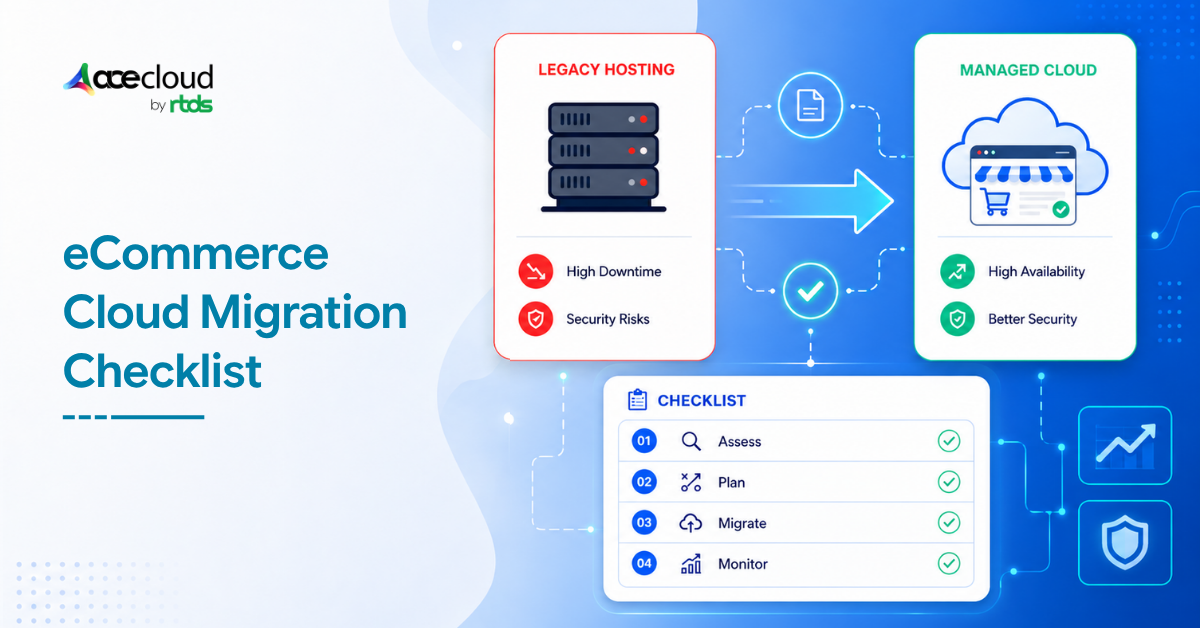
Your online store has come a long way since launch.
Traffic is growing, your product catalog has expanded, you have integrations running in the background, and customers now expect fast, smooth, and reliable shopping experiences every single day.
But here is the problem.
The hosting environment that carried you through the early days was not built for where your business is today. And the longer you stay on legacy infrastructure, the more it costs you, not just in dollars, but in slow load times, failed checkouts, infrastructure headaches, and growth you cannot fully capture.
As a managed cloud and migration partner, we will help you move your online store from legacy hosting to managed cloud safely, practically, and with minimal disruption to your business.
7 Signs Your eCommerce Store is Ready to Migrate
Before you build a migration plan, it helps to understand whether your current environment is genuinely holding you back. Here are the most common signs that it is:
1. Your store slows down during traffic spikes
Legacy hosting is often built around fixed resources. When a flash sale hits, a paid campaign drives a surge of visitors, or a seasonal period like Black Friday kicks in, those fixed resources get stretched.
The result is slow product pages, a poor browsing experience, higher bounce rates, more cart abandonments, and lower conversions. The traffic comes, but the store cannot handle it.
2. Checkout errors increase during peak periods
Infrastructure instability does not just affect page speed. It directly affects your ability to process orders.
When checkout errors increase during high-traffic moments, you lose revenue, frustrate customers, and risk damaging the reputation your store has built.
3. Scaling requires manual intervention
On legacy hosting, adding capacity often means raising a support ticket, waiting for a server resize, or making hardware changes.
By the time the resources are in place, the traffic spike has already cost you.
Managed cloud is built for on-demand scaling so your store can handle changing demand without manual effort.
4. Your backups are inconsistent or untested
A lot of businesses discover backup gaps only when something goes wrong.
If your backup process is not automated, tested, and documented, you are one bad migration or one unexpected outage away from serious data loss.
5. Your team spends too much time managing infrastructure
Server patching, database tuning, security rule updates, monitoring, and backup jobs take time.
If your team is spending more time managing infrastructure than building your business, that is a sign you need a more managed environment.
6. Database performance is becoming a bottleneck
As your order history grows, your customer records multiply, your inventory expands, and your product catalog gets larger, your database has to work harder.
Legacy database environments were not designed to scale alongside this kind of growth, and the slowdowns will eventually affect the entire store experience.
7. You do not have clear recovery targets
Two terms matter here: RTO and RPO.
RTO, or Recovery Time Objective, refers to how quickly your store must be back online after an outage. RPO, or Recovery Point Objective, refers to how much data loss your business can tolerate. If you do not have clear answers to both, your current environment does not have a real business continuity plan.
Migration Risk Matrix: What Can Go Wrong and How to Prevent It
eCommerce migrations carry real risks. Understanding what can go wrong before you start is how you build a plan that actually works.
| Migration Risk | Business Impact | How to Reduce It |
|---|---|---|
| Data mismatch | Incorrect orders, inventory, customer records, or product details | Test migration, data validation, incremental sync |
| Checkout failure | Lost revenue and poor customer experience | End-to-end checkout and payment testing |
| DNS misconfiguration | Store downtime or traffic routing errors | Lower DNS TTL and validate DNS records before cutover |
| SEO disruption | Organic traffic and ranking decline | URL mapping, redirects, sitemap, metadata, and Search Console checks |
| Integration failure | Broken ERP, CRM, shipping, inventory, or marketing workflows | Test all third-party integrations in staging |
| Poor rollback planning | Extended downtime if migration fails | Keep the legacy environment available temporarily |
| Under-sized cloud resources | Slow performance after launch | Performance benchmarking and right-sizing |
| Weak backup strategy | Data loss during migration or rollback | Full backup, recovery testing, defined RTO/RPO |
Our approach to eCommerce or online store migration helps reduce these risks through assessment, architecture planning, workload migration, data validation, performance monitoring, error handling, and post-migration optimization.
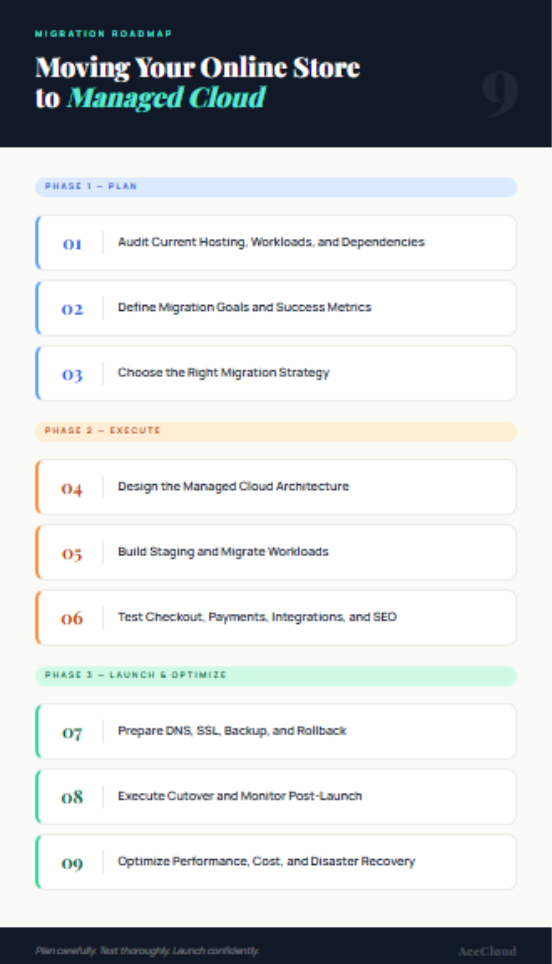
9-Step eCommerce Cloud Migration Roadmap
This is the core of what a safe, structured migration actually looks like. Follow these steps in order and you will have a much stronger foundation going into launch day.
Step 1: Audit current hosting, workloads, and dependencies
Before anything moves, you need a complete picture of what you have. A lot of migration problems happen because teams skip this step or rush through it.
Your audit should cover the following:
- Current hosting type, i.e., shared, VPS, dedicated, on-premise, or unmanaged cloud
- Server configuration and operating system versions
- Application stack and software versions
- Database engine and size
- Product catalog size
- Customer and order data
- File storage and media assets
- SSL certificates and DNS records
- CDN configuration
- Backup process and gaps
- Security rules
- Traffic patterns and peak sales periods
- Third-party integrations
- Existing performance issues
You should not treat this just like a technical checklist. It is the document that shapes every decision in the migration plan that follows.
Step 2: Define migration goals and success metrics
A migration without goals is just a server move. A migration with clear goals is a business improvement.
Some examples of goals worth defining:
- Reduce page load time
- Improve checkout stability
- Support peak traffic without manual intervention
- Reduce downtime risk
- Improve backup and recovery
- Lower infrastructure management effort
- Improve database performance
- Enable future scaling
- Improve cost visibility
- Strengthen disaster recovery
Success metrics should be agreed upon before migration starts, not after. That way, your team can validate the outcome after go-live instead of debating whether it worked.
Step 3: Choose the right migration strategy
Not every online store needs the same migration approach. The right strategy depends on your application complexity, your timeline, and how much change your team can manage.
Rehost
Rehosting means moving your existing application to cloud compute with minimal changes. It is the fastest migration option and works well for stable applications where the hosting environment itself is the main bottleneck.
Replatform
Replatforming means moving selected parts of your environment to managed cloud services, such as a managed database or scalable cloud storage, without redesigning the whole application. This approach is good for reducing operational burden and improving scalability without a full rebuild.
Refactor
Refactoring means redesigning parts of your store for containers, microservices, APIs, or cloud-native architecture. It takes more time and planning but is the right choice for high-growth stores with complex custom applications that need long-term modernization.
AceCloud supports migration across compute, storage, DBaaS, Kubernetes, and DevOps workloads, allowing businesses to choose the right migration path rather than being pushed into a one-size-fits-all approach.
Step 4: Design the managed cloud architecture
Once you know your migration strategy, you can design the target environment. Every component should map to a specific ecommerce need.
| Ecommerce Requirement | Managed Cloud Component |
|---|---|
| Storefront and application hosting | Cloud compute |
| Product images and static files | Cloud storage |
| Customer, order, and product data | Managed database |
| Traffic spikes | Scalable infrastructure |
| Application security | Firewall, VPC, access control |
| High availability | Load balancing and DR planning |
| Containerized workloads | Managed Kubernetes |
| Deployment automation | DevOps integration |
The architecture should also account for private networking, backup and recovery, monitoring, and disaster recovery. Getting the architecture right before migration is much easier than fixing it after.
Step 5: Build staging and migrate workloads
Never migrate directly to production. Build a staging environment that mirrors your live store as closely as possible before anything moves.
Your staging environment should include:
- Application code
- Database copy
- Product images and media
- Plugins or extensions
- Theme or frontend
- Payment gateway sandbox
- Shipping integrations
- Admin workflows
- CDN and cache behavior
- Security rules
- Environment variables
- Cron jobs
Once staging is ready, work through the migration in this order: migrate website files, migrate media assets, migrate the database, sync customer and order data, move configuration files, configure SSL, configure access rules, validate database records, run incremental sync, and prepare the final delta sync before cutover.
Step 6: Test checkout, payments, integrations, and SEO
This is one of the most important steps, and it is also where many migrations cut corners. Do not.
Functional testing should cover:
- Homepage, product listing pages, and product detail pages
- Search and filters
- Add to cart and cart updates
- Checkout including guest checkout and logged-in checkout
- Customer login and account management
- Payment success and payment failure
- Refunds, coupons, shipping rates, and tax calculation
- Order confirmation emails and SMS alerts
- Inventory updates and admin order management
- ERP, CRM, and analytics sync
- Tracking pixels
SEO testing should cover:
- URL structure and redirects
- Canonical tags and robots.txt
- XML sitemap and metadata
- Structured data and SSL
- Page speed and 404 errors
- Search Console issues
A migration should not be considered successful just because the homepage loads. The complete buying journey must work.
Step 7: Prepare DNS, SSL, backup, and rollback
This step is where a lot of teams underinvest and then pay the price during cutover.
Here is what needs to be ready before you flip the switch:
- Lower your DNS TTL several days before migration to minimize propagation time
- Confirm SSL certificate readiness on the new environment
- Take a final full backup immediately before cutover
- Define rollback triggers so your team knows exactly when to use the rollback plan
- Keep the legacy hosting environment temporarily available in case rollback is needed
- Document every step of the rollback process
- Schedule cutover during low-traffic hours, typically late at night or during a slow business day
- Brief your support, operations, and marketing teams before launch
A migration plan is incomplete until the rollback plan is ready.
Step 8: Execute cutover and monitor post-launch
When the time comes, follow the launch sequence in order.
- Pause any high-risk admin activity if needed
- Take a final backup
- Complete the final data sync
- Point DNS to the new cloud environment
- Validate SSL
- Test the storefront
- Test checkout
- Test payments
- Confirm order creation is working
- Monitor logs, performance, and traffic in real time
After launch, monitor closely for at least the first few days. Watch server and database performance, error logs, checkout success rate, payment failures, page speed, traffic changes, Search Console errors, 404 errors, order volume, customer complaints, integration failures, and email or SMS notification delivery.
Most migration issues surface in this window, and catching them early is much easier than dealing with them a week later.
Step 9: Optimize performance, cost, and disaster recovery
Go-live is not the finish line. The work that happens in the weeks after migration often determines the long-term value of the move.
Post-migration optimization should include:
- Right-sizing compute resources based on actual usage
- Database tuning for ecommerce query patterns
- Storage optimization and cleanup
- Caching improvements and CDN tuning
- Security hardening
- Backup policy review and improvement
- Cost optimization based on real usage data
- Autoscaling configuration for peak periods
- Disaster recovery testing and RTO/RPO validation
- Decommissioning legacy hosting only after full validation
Cost and TCO Considerations for Ecommerce Cloud Migration
Cost is a real part of the migration decision, and it helps to understand what drives it before you start evaluating providers.
What affects migration cost?
Migration complexity goes up with store size, database size, media and file volume, number of integrations, traffic volume, checkout complexity, custom code, security requirements, disaster recovery requirements, testing scope, and Kubernetes or DevOps migration needs.
What affects ongoing cloud cost?
Ongoing cloud cost is shaped by compute usage, vCPU and RAM requirements, database resources, storage volume, backup retention, network traffic, monitoring needs, disaster recovery setup, and peak-season scaling.
Why cost visibility matters
eCommerce businesses need predictable infrastructure planning, especially before sales campaigns, seasonal peaks, or expansion into new markets. Surprises in the cloud bill at the wrong moment can create real operational problems.
Questions to Ask Before Choosing a Cloud Migration Provider
Not all migration providers offer the same level of support. These questions will help you separate the ones who just sell infrastructure from the ones who actually help you migrate.
Migration expertise
- Can the provider migrate compute, storage, databases, Kubernetes, and DevOps workloads?
- Do they provide hands-on migration support or only cloud infrastructure?
- Have they handled business-critical workload migrations before?
Planning and architecture
- Will they assess your current hosting environment before migration begins?
- Can they design the target cloud architecture based on your needs?
- Will they identify dependencies and risks before cutover?
Data and validation
- How do they validate migrated data?
- Do they support database migration and incremental sync?
- How do they handle order, customer, product, and inventory data?
Downtime and rollback
- How do they minimize downtime during cutover?
- Is there a documented rollback plan?
- Will the legacy environment stay available during cutover?
Post-migration support
- Do they monitor performance after migration?
- Can they help optimize compute, database, storage, and cost?
- Is support available 24/7?
Pricing
- Are setup or migration fees charged separately?
- Is pricing transparent and easy to understand?
- What factors affect the monthly cloud cost?
Plan a secure, low-risk cloud migration with AceCloud experts across compute, storage, managed databases, Kubernetes, DevOps, backup and disaster recovery.
Complete eCommerce Cloud Migration Checklist
Do not start your ecommerce migration until these essentials are covered.
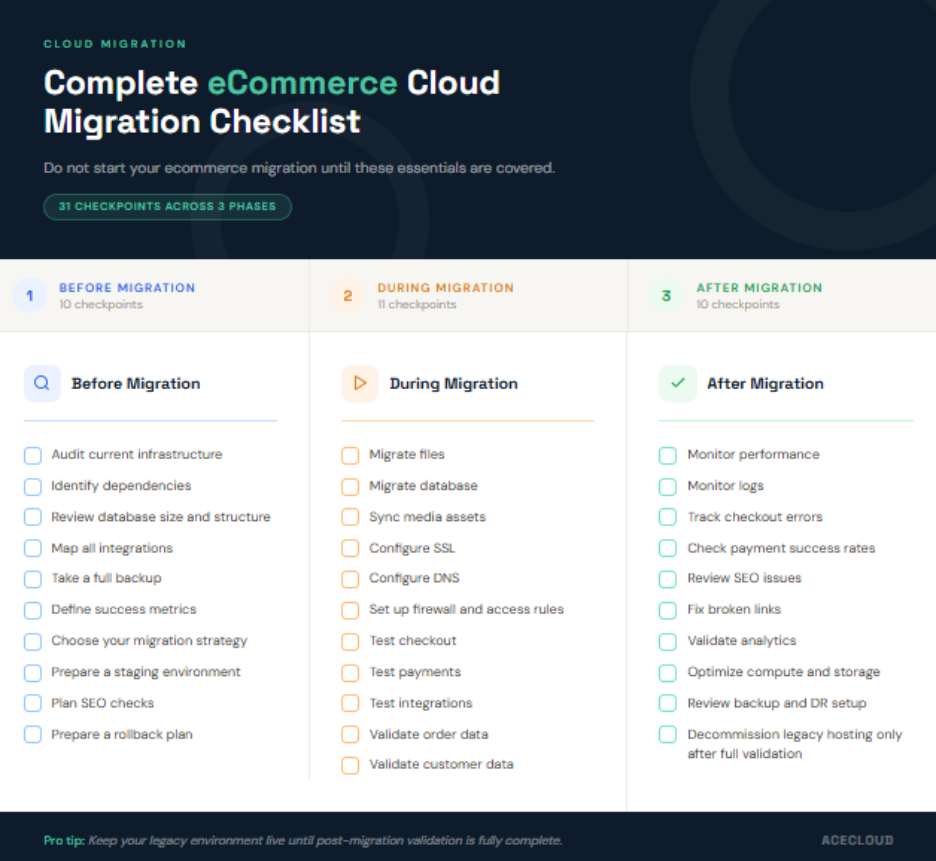
Before migration
- Audit current infrastructure
- Identify dependencies
- Review database size and structure
- Map all integrations
- Take a full backup
- Define success metrics
- Choose your migration strategy
- Prepare a staging environment
- Plan SEO checks
- Prepare a rollback plan
During migration
- Migrate files
- Migrate database
- Sync media assets
- Configure SSL
- Configure DNS
- Set up firewall and access rules
- Test checkout
- Test payments
- Test integrations
- Validate order data
- Validate customer data
After migration
- Monitor performance
- Monitor logs
- Track checkout errors
- Check payment success rates
- Review SEO issues
- Fix broken links
- Validate analytics
- Optimize compute and storage
- Review backup and DR setup
- Decommission legacy hosting only after full validation
Why Choose AceCloud for eCommerce Cloud Migration?
Our managed cloud team is a good fit for online stores that need scalable infrastructure, managed services, and reliable support as traffic grows, order volumes increase, and the store becomes more complex to run.
| Legacy Hosting Challenge | How AceCloud Helps |
|---|---|
| Manual scaling | Managed cloud resources designed for changing demand |
| Server-bound database | DBaaS options for database modernization |
| DIY migration risk | Expert-guided migration support |
| Limited recovery planning | Disaster recovery support |
| Infrastructure maintenance burden | Managed cloud services and expert assistance |
| Unclear migration costs | Transparent pricing approach |
Expert-guided migration support
AceCloud helps businesses move workloads with proper planning, hands-on execution, thorough validation, and post-migration support. You are not handed documentation and left to figure it out.
Support for multiple migration paths
We support compute migration, storage migration, DBaaS migration, Kubernetes migration, and DevOps workload migration. Whether you are rehosting, replatforming, or refactoring, the support matches the path.
Database modernization options
AceCloud DBaaS gives ecommerce teams a way to reduce manual database management and improve operational simplicity. Instead of handling patches, performance tuning, and backups manually, that responsibility shifts to a managed service.
Disaster recovery planning
For eCommerce businesses, downtime is not just an IT problem. It is a revenue problem, an order continuity problem, and a customer trust problem. AceCloud’s disaster recovery support is built with that in mind.
24/7 expert support
Support is available during migration planning, cutover, post-launch monitoring, and optimization. When something unexpected happens at 2 a.m. the night of your cutover, you have someone to call.
Migrate to Managed Cloud with AceCloud
Staying on legacy hosting when your store has outgrown it is not a safe choice. It just feels like one because nothing has broken yet.
The risk is not just in the downtime you have already seen. It is in the traffic you could not convert during your last peak season, the checkout errors that went unresolved, the hours your team spent firefighting infrastructure instead of growing the business, and the backup gaps you have not discovered yet.
Migrating to managed cloud is how you get out in front of those problems instead of reacting to them. And when the migration is planned properly, with the right assessment, the right architecture, thorough testing, a real rollback plan, and post-launch optimization, it becomes one of the most valuable infrastructure decisions your business makes.
AceCloud brings expert-led migration support across compute, storage, managed databases, Kubernetes, DevOps workloads, and disaster recovery. Whether you are moving a straightforward store or a complex multi-integration environment, our goal is to get you to managed cloud without disrupting the business you have built.
Ready to move your online store from legacy hosting to managed cloud? Talk to an AceCloud migration expert and get a clear assessment of your infrastructure, risks, and migration path before you take the first step.
Frequently Asked Questions
eCommerce migration to managed cloud means moving your online store from legacy hosting to a managed cloud environment. It includes website files, databases, product data, customer records, DNS, SSL, backups and integrations.
An eCommerce store should move to managed cloud when legacy hosting causes slow pages, checkout errors, manual scaling, database issues, backup gaps or high infrastructure workload for the internal team.
Plan the migration in stages. Audit your current setup, build staging, test checkout and payments, prepare DNS and SSL, take backups, create a rollback plan and monitor closely after launch.
Downtime depends on store size, database volume, DNS setup and migration complexity. A planned migration can reduce downtime by using staging, incremental sync, low-traffic cutover and a tested rollback plan.
Yes. SEO can be affected if redirects, URLs, metadata, canonical tags, sitemap, robots.txt, SSL or 404 errors are not handled properly. SEO checks should be part of the migration plan.
The checklist should include infrastructure audit, dependency mapping, full backup, staging setup, database migration, DNS and SSL setup, checkout testing, integration testing, SEO checks and post-launch monitoring.
The cost depends on store size, database volume, media files, integrations, traffic, custom code, security needs, disaster recovery setup and testing scope. Ongoing cost depends on compute, storage, database and backup usage.
Choose a provider that supports assessment, architecture planning, migration execution, database migration, backup, rollback, monitoring and post-migration optimization. For eCommerce, checkout stability and data accuracy matter most.

![AWS S3 to Indian Alternative: Complete Migration Guide [2026]](https://acecloud.ai/wp-content/uploads/2026/06/s3-alternative.webp)