
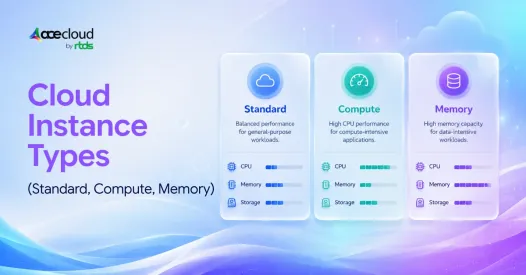
Standard instances are best for balanced or unknown workloads. Compute-Optimized instances are worth the higher ₹/hr when CPU limits throughput or latency. Memory-Optimized instances are worth it when RAM pressure causes swap, OOM errors, cache misses, or tail-latency risk. This guide explains when each type earns its cost, and when upgrading is the wrong move entirely.
The ₹/hr Trap: Upgrading Without Proving the Bottleneck
We’ve seen this play out more times than we’d like to admit. A SaaS team upgrades to Memory-Optimized instances because the app feels slow, only to discover the real culprit was database locks.
A DevOps team moves CI runners to Compute-Optimized instances and celebrates faster builds, until they realize idle runners were the larger cost problem all along. And then there’s the startup that kept adding Standard instances horizontally, when a handful of dedicated CPU instances would have handled the same workload far more predictably.
Cloud cost has quietly become a boardroom conversation. Flexera’s 2025 State of the Cloud report found that 59% of organizations now have dedicated FinOps teams focused on cloud cost optimization strategies, up from 51% the previous year. The pressure is real.
But here’s the thing we keep coming back to: the cheapest instance per hour is not always the cheapest per request. The right instance is the one that removes the proven bottleneck at the lowest cost per useful unit.
Quick Answer: Standard vs Compute vs Memory-Optimized
Use Standard or General Purpose instances when the workload is balanced, low-risk, or still unknown. Move to Compute-Optimized when CPU saturation is limiting your throughput or latency. Move to Memory-Optimized when RAM pressure, swap, cache misses, OOM errors, or GC pauses are threatening stability.
These are workload shapes, not upgrade levels.
| Instance Type | Best Use | Upgrade Trigger |
|---|---|---|
| Standard / General Purpose | Balanced apps, APIs, small databases, dev/test | Workload is stable and balanced |
| Compute-Optimized | CPU-heavy workloads | CPU above 70-80%, memory healthy |
| Memory-Optimized | RAM-heavy workloads | Memory above 75-80%, swap/OOM/cache pressure |
What These Instance Types Actually Mean
Major cloud providers generally group instances by the same underlying logic. AWS EC2, Google Cloud, Azure, and AceCloud Compute all describe instance families around workload fit: balanced, compute-intensive, or memory-intensive.
That’s why the upgrade decision should start with metrics, not naming. General Purpose balances CPU, memory, and networking. Compute-Optimized leans toward CPU-heavy workloads. Memory-Optimized gives you more RAM per vCPU for workloads that need it.
The easiest way to think about it is in ratios. If your app needs 16 vCPU but only 32 GB RAM, Compute-Optimized may help you avoid paying for memory you’re not using. If your database needs 128 GB RAM but modest CPU, Memory-Optimized may help you avoid paying for unnecessary cores.
You’re not getting more machine, you’re getting a better-shaped one.
Cost Per Hour in ₹: Where the Tradeoff Starts
Here’s where it gets interesting for Indian teams. The price difference between instance families is not small.
Below is a representative public-cloud pricing comparison to show how costs typically increase across Standard, Compute-Optimized, and Memory-Optimized shapes. For exact AceCloud pricing, check the AceCloud cloud compute pricing page.
| Instance Class | AceCloud Flavor | Example Config | Hourly Price |
|---|---|---|---|
| Standard / General Purpose | S3a.large | 2 vCPU, 8 GB RAM | ₹4.62/hr |
| CPU Intensive | C3a.large | 2 vCPU, 4 GB RAM | ₹3.89/hr |
| RAM Intensive | M3a.large | 2 vCPU, 16 GB RAM | ₹7.22/hr |
Note: This table is a representative public-cloud example to show the relative cost pattern across instance families. Actual AceCloud pricing, taxes, storage, bandwidth, and discounts may vary.
CPU-Optimized costs roughly 75% more than Basic/Standard for the same vCPU count. Memory-Optimized costs more than 3x the Basic hourly rate. Those numbers look alarming in isolation, but the cheapest hourly instance can quietly become the most expensive one if it needs extra replicas, causes latency spikes, burns CPU credits, or introduces failure risk.
For Indian teams, the ₹/hr calculation should also account for USD-INR movement, GST, support tiers, storage, backups, and committed-use discounts.
Not sure whether your workload really needs a higher-cost instance? AceCloud can help you evaluate CPU, RAM, storage, and usage patterns before you upgrade. Book a free cloud infrastructure consultation or start with a free trial worth ₹20,000.
Why Cost Per Useful Unit Matters More Than Hourly Cost
This is the number we actually care about, and it’s simpler than it sounds.
Cost per useful unit = Instance cost per hour divided by useful work per hour.
That ‘useful work’ looks different depending on what you’re running. Here’s how we’d frame it across common workloads.
| Workload | Better Metric Than ₹/hr |
|---|---|
| API | Cost per 1M requests at target latency |
| CI/CD | Cost per successful build |
| Database | Cost per SLA-compliant query |
| Batch job | Cost per GB processed |
| SaaS | Cost per active user served |
Datadog’s State of Cloud Costs found that 83% of container costs are tied to idle resources, which makes overprovisioning one of the fastest ways to turn a performance fix into a cost problem.
If a ₹6/hr Compute instance does twice the useful work of a ₹4/hr Standard instance, Compute is actually cheaper in business terms. For containerized workloads, Kubernetes autoscaling can sometimes reduce cost per useful unit more effectively than moving every workload to a larger VM.
When Standard or General Purpose Is Enough
Standard or General Purpose handles a lot more than teams give it credit for. It’s the right choice when CPU is not consistently saturated, memory is stable, P95/P99 latency is acceptable, and the workload is balanced. Dev, test, staging, internal tools, MVPs, and typical web apps all fit here comfortably.
For typical web apps, APIs, and test environments running on public cloud infrastructure, Standard or General Purpose is often enough until your metrics prove otherwise.
One thing worth saying out loud: if CPU, RAM, disk, and network are all healthy, changing instance family will not fix the real problem. Something else is going on.
When Compute-Optimized is Worth the Upgrade
Short answer: Choose Compute-Optimized when CPU stays above 70-80%, P95/P99 latency rises with CPU load, and memory remains healthy.
Here’s where it tends to pay off.
| Workload | Compute-Optimized Makes Sense When |
|---|---|
| CI/CD runners | CPU is pegged and build queues are growing |
| Media processing | Encoding time directly affects cost or SLA |
| High-throughput APIs | P95/P99 latency rises with CPU |
| Batch jobs | More CPU reduces cost per completed job |
| Game servers | CPU saturation causes real-time lag |
| Analytics workers | Processing throughput scales with vCPU |
One nuance worth flagging: Compute-Optimized does not always mean dramatically faster single-core performance. Often, it means better CPU-to-memory economics or more predictable sustained CPU. Benchmark before migrating the fleet.
When Memory-Optimized is Worth the Upgrade
Short answer: Choose Memory-Optimized when memory pressure causes swap, OOM kills, cache misses, Redis evictions, GC pauses, or database working-set problems.
Below are the workloads where we see this come up most often.
| Workload | Memory-Optimized Makes Sense When |
|---|---|
| PostgreSQL / MySQL | Cache hit ratio drops or disk reads rise |
| Redis | Evictions increase or memory fragmentation hurts latency |
| Elasticsearch / OpenSearch | Heap pressure or GC pauses increase |
| JVM apps | GC pauses rise under heap pressure |
| Analytics workloads | Working set no longer fits in memory |
| MongoDB | Hot data and indexes exceed available RAM |
Memory issues have a sneaky way of looking fine until they suddenly aren’t. Swap, OOM kills, degraded cache performance, unpredictable tail latency. It tends to show up at the worst possible time.
For RAM-intensive workloads like databases, analytics, and in-memory processing, the upgrade decision should focus on cache behavior, swap, and tail latency rather than raw throughput numbers. Memory-Optimized is often a risk-reduction purchase, not just a speed purchase.
Don’t Upgrade Yet: Rule Out These False Bottlenecks
Before assuming the instance family is the problem, we’d recommend ruling out a few usual suspects first.
The real issue might be slow SQL queries, missing indexes, database locks, high disk I/O wait, network latency, memory leaks, oversized Kubernetes requests, poor autoscaling rules, idle non-production workloads, or burstable CPU credit charges.
The most expensive upgrade is the one that fixes the wrong problem.
If disk I/O wait is high, a Compute-Optimized instance is not going to help. If CPU and RAM are both low but latency is high, the problem is likely application, database, or network-related and no instance type is going to fix it.
For container-related false bottlenecks, Kubernetes autoscaling is often a better first lever. For cost-related issues, a rightsizing or cost-optimization review may surface a better fix than changing instance families.
Workload-Specific Decision Table
When teams ask us where to start, this is usually what we share. It’s a rough guide based on workload type, not a strict rule.
| Workload | Start With | Upgrade When |
|---|---|---|
| SaaS API | General Purpose | CPU drives P95/P99 latency |
| Static / internal app | Standard | Usually avoid upgrade; autoscale or downsize |
| PostgreSQL / MySQL | General Purpose | Cache hit ratio drops, disk reads rise |
| Redis | Memory-Optimized | Evictions or memory pressure increase |
| CI/CD runners | Compute-Optimized | CPU is pegged and queue time matters |
| Elasticsearch / OpenSearch | Memory-Optimized | Heap pressure or GC pauses rise |
| Batch processing | Compute-Optimized | Cost per job falls with more CPU |
| Dev / test | Standard | Schedule shutdown before upgrading |
| Kubernetes workloads | General Purpose nodes | Autoscale before oversizing nodes |
For container-heavy environments, managed Kubernetes pricing can change the total cost picture because worker nodes, block storage, load balancing, monitoring, and logging all affect the final bill.
Benchmark Before Switching Instance Families
We’d be cautious about any advice that says to just switch and see. Before making a fleet-wide change, test your current instance, a newer generation of the same family, your Compute-Optimized candidate, your Memory-Optimized candidate, and an ARM or AMD alternative if your stack supports it.
Compare throughput, P95/P99 latency, error rate, CPU utilization, memory utilization, disk I/O wait, and cost per useful unit across all of them.
Cloud provider documentation, FinOps research, and practitioner discussions point to the same rule: benchmark the workload before changing instance families. A family switch is not always the first or best lever. On-demand cloud infrastructure makes it easier to test multiple instance shapes before committing to a full migration.
Takeaway: Vendor documentation classifies instance families by workload shape, while FinOps research shows idle capacity is a major source of waste. The practical rule is simple: choose the instance family only after identifying whether CPU, memory, storage, or scaling is the real bottleneck.
Final Recommendation
Don’t upgrade by instance name. Upgrade by bottleneck.
Standard or General Purpose is the safest choice when workload needs are balanced or unknown. Compute-Optimized is worth the higher ₹/hr when CPU limits throughput. Memory-Optimized is worth it when RAM pressure threatens stability, cache performance, or tail latency.
The right choice is the one that lowers cost per useful unit without increasing operational risk. Before paying more per hour, ask one question: will this reduce cost per request, job, query, or SLA breach?
Validate your workload before you upgrade. Book a free AceCloud Compute consultation or start a ₹20,000-worth free trial to test the right cloud infrastructure for your application.
Frequently Asked Questions
No. Compute-Optimized instances are best for CPU-bound workloads, but they may not always deliver dramatically faster single-core performance. Benchmark your actual workload before migrating.
Choose Memory-Optimized when memory pressure causes swap, OOM kills, cache misses, Redis evictions, GC pauses, or database working-set problems.
Compare cost per useful unit, not just cost per hour. Use cost per request, build, query, GB processed, job completed, or active user served.
If the workload is bursty and stateless, autoscaling is almost always the better answer. If the bottleneck is steady and resource-specific, upgrading the instance family may help. For containerized workloads, evaluate Kubernetes autoscaling before making any instance-family change.


