A flash sale goes live and checkout slows. During a streaming event, thousands reconnect while a few servers melt and others look suspiciously relaxed. The load balancer may stay healthy while everything behind it struggles.
Quick Answer:
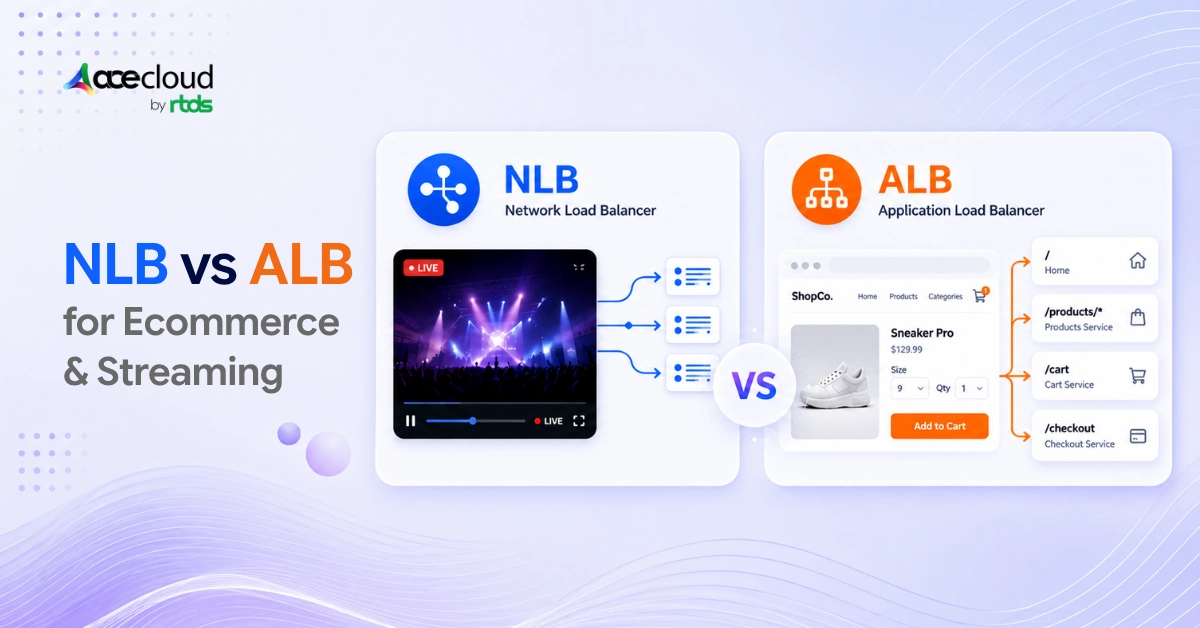
We usually choose AWS Application Load Balancer, or ALB, for ecommerce, HTTP APIs, gRPC, and WebSockets that need request-aware routing and AWS WAF. We choose AWS Network Load Balancer, or NLB, for TCP, UDP, QUIC, static IP addresses, PrivateLink, and opaque protocols. For HLS, DASH, and video on demand, we place CloudFront before the media origin.
Ecommerce usually needs ALB, viewer-facing video usually needs CloudFront, and raw transport or ingest usually needs NLB.
Why AWS NLB vs ALB Decisions Go Wrong?
NLB forwarding does not remove database contention, slow payments, authentication bottlenecks, or origin limits. Our guide to the types of cloud load balancing explains why transport efficiency and application resilience differ.
Streaming also spans several workloads that do not belong behind the same architecture.
Autoscaling adds another surprise. New targets accept new traffic, but established TCP and WebSocket sessions stay attached to their selected targets. Long-lived connections turn autoscaling into a distribution problem.
Is ALB or NLB Better for Ecommerce Traffic Spikes?
For most ecommerce platforms, ALB is the stronger front door because the workload is HTTP-based and benefits from request-aware routing.
During a flash sale, CloudFront absorbs static traffic while product, cart, account, and checkout requests reach ALB. Inventory and payment systems slow, requests stay open longer, and retries can exceed the original surge.
ALB lets each service use a separate target group, helping protect checkout capacity when catalog browsing absorbs most traffic. AWS WAF can also protect the HTTP entry point through direct ALB integration.
The cloud infrastructure needs of retail and ecommerce extend beyond load balancing. Our guide to ecommerce database bottlenecks covers the data tier, while managed RabbitMQ can decouple order updates.
Replacing ALB with NLB does not remove inventory contention, payment latency, database saturation, or retry amplification.
Preparing for a flash sale? Book a free cloud consultation with AceCloud to review the application, database, network, and scaling architecture.
Which AWS Load Balancer Is Best for Streaming?
The answer depends on whether we are distributing cached media, maintaining HTTP-based sessions, or accepting raw transport traffic.
HLS, DASH, and Video on Demand Delivery
For viewer-facing media, we place Amazon CloudFront and Origin Shield before the origin to reduce repeated requests and protect origin capacity.
A load balancer forwards origin requests. A CDN prevents many from reaching the origin. For HTTP video delivery, caching matters more than Layer 4 forwarding. The Vision IAS streaming case study shows the approach.
WebSockets and gRPC
We lean toward ALB when the handshake needs HTTP routing, AWS WAF, gRPC, or multiple services. Each established WebSocket stays attached to its selected target, so adding servers helps new sessions but does not move old ones.
RTMP, TCP, UDP, and QUIC Ingest
We lean toward NLB for protocols that ALB does not interpret. Expensive streams may cluster on one target while fleet-average CPU looks healthy. If it fails, reconnects create fresh connection and authentication work.
NLB distributes flows, but it cannot judge how expensive each stream is to process.
What Breaks First During an AWS Traffic Spike?
A useful AWS NLB vs ALB comparison connects each traffic pattern to its likely failure point.
| Traffic pattern | Likely first failure | Why the load balancer cannot fix it |
|---|---|---|
| Ecommerce flash sale | Database, inventory, or payment service | It does not add dependency capacity |
| Product launch | Cache-miss surge | Every miss reaches the origin |
| HLS or DASH event | Media origin or packager | ALB and NLB do not cache content |
| WebSocket reconnect | Authentication and connection handling | Clients reconnect together |
| RTMP or TCP ingest | Individual ingest target | Flows stay pinned and vary in cost |
| Availability Zone loss | Remaining zonal capacity | Traffic may not redistribute evenly |
Slower targets increase request duration. Longer requests increase concurrency. Higher concurrency creates timeouts. Retries enlarge the original spike.
A healthy load balancer cannot rescue an unhealthy dependency chain.
Why Additional Targets May Not Resolve the Bottleneck?
New targets cannot absorb established connections, repair a database, or instantly populate cold caches. They also need time to start and pass health checks.
Autoscaling policies help only when constrained work can move. Adding servers can even create more database connections and increase pressure on the data tier.
New capacity helps only when the constrained work can move to it.
Capacity Planning for Planned Traffic Spikes
Older comparisons often say ALB needs prewarming while NLB handles every spike automatically. That advice is incomplete.
AWS now offers capacity reservations for ALB and capacity reservations for NLB. These reservations matter when a planned spike may arrive faster than reactive scaling, while AWS credits can help offset the cost of reserving capacity ahead of planned events.
They do not scale applications, databases, caches, or origins. Without backend scaling, they only move the bottleneck downstream.
Testing Realistic Failure Patterns
A gradual traffic ramp can look beautiful while hiding the event we actually fear.
For ecommerce, we test a traffic jump, cold caches, slow payments, database exhaustion, and retries. For streaming, we test mass reconnects, target loss, zonal loss, unequal stream cost, and cache misses.
We compare workload per target and zone rather than relying on fleet-average CPU alone. A successful test keeps latency, error rates, dependency saturation, and recovery time within agreed thresholds.
AWS NLB vs ALB Decision Framework
ALB manages application traffic. NLB forwards transport traffic. CloudFront absorbs content delivery. The architecture behind all three determines what survives the spike.
| Workload | Our usual choice |
|---|---|
| Ecommerce and HTTP applications | ALB |
| Cacheable mass media delivery | CloudFront |
| TCP, UDP, QUIC, and specialized ingest | NLB |
| Static IP plus Layer 7 routing | NLB in front of ALB |
| A general concern about high traffic | Identify the real bottleneck first |
Frequently Asked Questions
ALB uses the highest LCU dimension among new connections, active connections, bytes, and rule evaluations. NLB uses protocol-specific NLCUs for flows and bytes.
For ALB, we compare latency, 5xx errors, connection errors, and healthy targets. For NLB, we review flows, resets, port-allocation errors, and healthy targets.
An ALB 502 often signals a reset or malformed target response. An ALB 504 usually signals a connection or response timeout.
ALB defaults to 60 seconds and supports 1 to 4,000 seconds. NLB TCP defaults to 350 seconds and supports 60 to 6,000 seconds. NLB TLS remains fixed at 350 seconds.
If every registered target is unhealthy across enabled zones, ALB can fail open. NLB can also fail open, including when a target group is empty.
No. Client IP preservation depends on target type, protocol, network path, and configuration. Proxy Protocol v2 can carry client details when direct preservation is unsuitable.
ALB supports native mutual TLS. NLB can terminate TLS, but target-side certificate validation requires TCP passthrough.
NLB cross-zone balancing is disabled by default. Enabling it can smooth zonal imbalance, but cross-zone traffic can incur regional data-transfer charges.
Yes. When client IP preservation is disabled, NLB can encounter port-allocation errors above roughly 55,000 connections per minute for each combination of NLB IP address and unique target IP address and port. We monitor PortAllocationErrorCount.
ALB stickiness supports local sessions but can create uneven target use. External session storage usually improves scaling and recovery.