
NVIDIA CUDA Cores are often the first spec people notice when comparing NVIDIA GPUs. A higher CUDA core count can suggest stronger parallel processing, but it does not automatically mean better gaming FPS, faster AI inference or smoother rendering.
GPU performance also depends on Tensor Cores, RT Cores, VRAM, memory bandwidth, clock speed, DLSS support, architecture, drivers and software optimization. That is why the real question is not only how many CUDA cores a GPU has, but how well the complete GPU architecture fits your workload.
In this blog, we explain what CUDA cores are, how they work, how they differ from Tensor Cores and RT Cores and how to evaluate CUDA core count for gaming, AI, rendering, workstations and cloud workloads.
What Are CUDA Cores?
CUDA cores are small parallel processors inside NVIDIA GPUs. They help the GPU split large workloads into thousands of smaller operations and process them at the same time.
This parallel computing approach makes CUDA cores useful for graphics, rendering, simulations, video processing, analytics, machine learning pipelines and other workloads that can run many similar operations together.
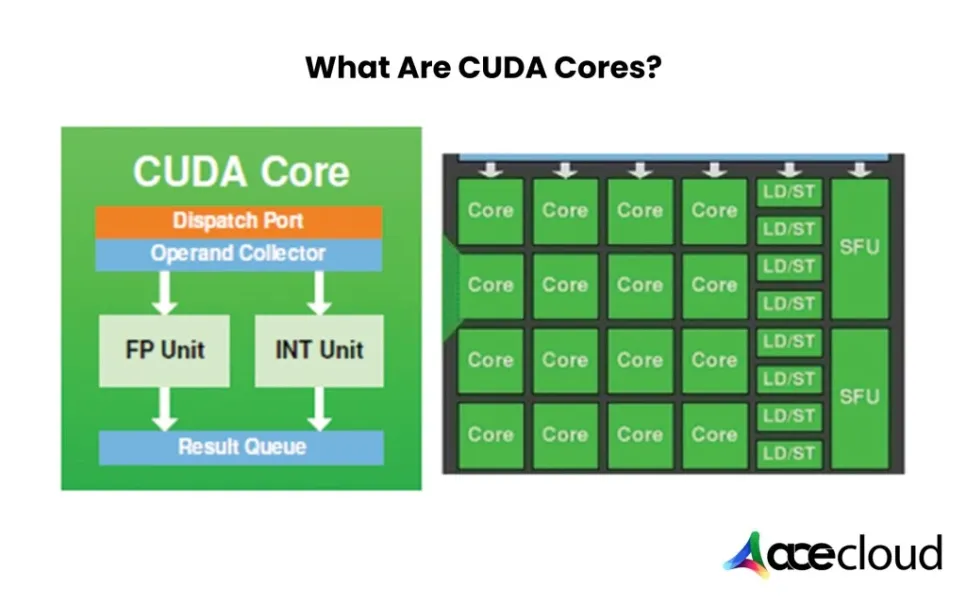
Unlike traditional CPU cores that handle fewer complex tasks sequentially, CUDA cores focus on high-throughput parallel execution. For businesses running AI models, data-heavy applications or GPU-accelerated SaaS workloads, CUDA cores provide the raw parallel compute layer that CPUs alone cannot deliver efficiently.
What Do CUDA Cores Actually Do?
CUDA cores execute parallel compute tasks on NVIDIA GPUs. They process many small operations at once instead of running one task after another.
In real workloads, CUDA cores help with shader processing, image rendering, simulations, video processing, data analytics, custom GPU kernels and parts of AI pipelines that need general-purpose parallel compute.
CUDA cores are especially useful when a workload can be divided into many similar operations. For example, a GPU can process pixels in an image, frames in a video, elements in a matrix or data points in a simulation at the same time. This is why CUDA cores matter in workloads where throughput matters more than single-core speed.
How Do CUDA Cores Work?
CUDA cores work through parallel execution. Instead of asking one processor to complete a task step by step, the GPU breaks the workload into many smaller threads and runs them across thousands of CUDA cores.
- Threads: A thread is a small unit of work assigned to the GPU.
- Blocks: Groups of threads are organized into blocks.
- Grids: Blocks are arranged into grids so the GPU can manage large workloads efficiently.
- Streaming Multiprocessors: CUDA cores are grouped inside Streaming Multiprocessors, also known as SMs. These SMs schedule and execute groups of GPU threads.
- Warps: NVIDIA GPUs usually execute threads in groups called warps. A warp commonly contains 32 threads that run together.
This structure helps NVIDIA GPUs process large volumes of similar work in parallel. It supports rendering, simulations, AI preprocessing, analytics and custom GPU-accelerated applications.
CUDA Cores vs CPU Cores: Which One Fits Your Application Better?
CPU cores are optimized for handling fewer complex tasks with strong single-threaded performance. This makes them useful for operating systems, application logic, databases, web servers and low-latency decision processes.
CUDA cores are designed for parallel computing. They excel when a workload can be split into thousands of threads and processed together. This makes them useful for AI model training, inference support tasks, data analytics, rendering, simulations and compute-heavy SaaS applications.
If your workload depends on parallel processing, such as machine learning, simulations or video rendering, CUDA cores can provide better throughput. If your task relies on complex decision-making, branching logic or varied instructions, CPU cores remain more suitable.
CUDA Cores vs CPU Cores: A Quick Breakdown
| Feature | CPU Cores | CUDA Cores |
|---|---|---|
| Design | Fewer powerful cores for complex tasks | Thousands of lightweight cores for parallel execution |
| Task Handling | Best for sequential logic, OS operations and app processing | Best for repetitive, high-volume data workloads |
| Performance Focus | Per-core speed, latency and instruction diversity | Massive throughput, task parallelism and thread density |
| Ideal Use Cases | Web servers, business logic, scripting and control tasks | Machine learning, rendering, simulations and batch jobs |
CUDA Cores vs Tensor Cores: Which One Drives AI Faster?
Tensor Cores usually deliver faster performance for deep learning workloads because they are built to accelerate matrix operations used in neural networks. They handle large batches of data using precision formats such as FP16, BFLOAT16, TF32 and INT8.
CUDA cores are more flexible. They handle general-purpose parallel tasks, custom kernels, logic, control flow, preprocessing and workloads beyond AI. In many AI pipelines, CUDA cores and Tensor Cores work together instead of replacing each other.
If your focus is neural network training or inference, Tensor Cores usually drive the largest acceleration. If your workload includes broader parallel compute, data preparation, simulations or custom GPU logic, CUDA cores remain essential.
CUDA Cores vs Tensor Cores: Task-Level Comparison
| Feature | CUDA Cores | Tensor Cores |
|---|---|---|
| Purpose | General-purpose parallel processing | Deep learning acceleration |
| Best At | Logic, control flow, custom kernels and non-matrix tasks | Matrix math, neural network operations and transformer workloads |
| Precision Formats | FP32, FP64 and general compute formats | FP16, INT8, BFLOAT16 and TF32 |
| Use Cases | Simulations, analytics, rendering and batch jobs | Model training, inference and AI workloads |
Also Read: CUDA cores vs Tensor cores: Choosing the Right GPU for Machine Learning
CUDA Cores vs Tensor Cores vs RT Cores
NVIDIA GPUs use different types of cores for different tasks. CUDA cores handle general-purpose parallel computing, Tensor Cores accelerate AI math and RT Cores speed up ray tracing workloads.
| Core Type | Primary Role | Best For | Where It Matters |
|---|---|---|---|
| CUDA Cores | General-purpose parallel processing | Rendering, simulations, analytics and custom GPU kernels | Workloads that can be split into many parallel operations |
| Tensor Cores | Matrix acceleration for AI workloads | Model training, inference, LLMs and deep learning | Neural networks and transformer-based workloads |
| RT Cores | Ray tracing acceleration | Real-time rendering, lighting, shadows and reflections | Gaming, 3D visualization, VFX and graphics workflows |
For AI teams, Tensor Cores usually drive the largest model performance gains. For rendering and visual workloads, CUDA Cores and RT Cores both matter. For general parallel compute, CUDA Cores remain important, but they should not be evaluated alone.
Do More CUDA Cores Mean Better GPU Performance?
More CUDA cores can improve performance, but only when the workload can use them effectively. GPU performance also depends on architecture, clock speed, VRAM, memory bandwidth, Tensor Cores, RT Cores, drivers, frameworks and software optimization.
A GPU with fewer CUDA cores can outperform a higher-core GPU if the workload needs more memory, stronger AI acceleration, better bandwidth or better software support.
CUDA core count is useful when comparing GPUs within the same generation and workload category. It becomes less reliable when comparing different architectures, different GPU classes or workloads that depend heavily on memory, AI-specific cores or software frameworks.
Where Do CUDA Cores Matter Most for AI and LLM Workloads?
CUDA cores matter most when an AI workload can be split into thousands of parallel operations. In modern LLM and GenAI pipelines, they support preprocessing, token-related operations, custom CUDA kernels, retrieval pipelines, post-processing, simulations and parts of model execution that do not run only on Tensor Cores.
LLM Inference and Model Serving
In LLM inference, the GPU loads model weights, processes prompts, builds KV cache and generates tokens step by step. Tensor Cores accelerate the large matrix operations inside transformer layers. CUDA cores support surrounding GPU work such as elementwise kernels, sampling, data movement helpers and custom operations that keep inference pipelines responsive.
This is why GPU selection should consider CUDA cores, Tensor Cores, VRAM, memory bandwidth, quantization support and the serving framework together.
RAG, Embeddings and Vector Search
Retrieval-augmented generation workloads are not only about the LLM. They also include embedding generation, document chunking, reranking, vector search, prompt assembly and post-processing.
CUDA acceleration can help some stages run faster, especially embedding generation, reranking or GPU-enabled vector search. However, document chunking, prompt assembly and business-rule processing may still depend on CPU, storage or database performance.
Multimodal AI and Video Analytics
For workloads involving video, images, OCR, speech or multimodal models, CUDA cores can help accelerate frame processing, image transformations, feature extraction and custom kernels. Tensor Cores accelerate the deep learning model execution itself.
GPUs such as NVIDIA L4 and L40S are relevant for these workloads because they combine AI acceleration with media and graphics capabilities.
Real-Time AI Decisioning
Fraud detection, recommendation engines, predictive maintenance and agentic workflows often need low-latency responses. CUDA cores help execute many parallel operations at once, allowing AI systems to process large volumes of signals and return decisions quickly.
For production use, the key is not only peak compute. Teams also need consistent throughput under concurrent requests.
How Do CUDA and Tensor Cores Work Together in AI Workloads?
CUDA cores and Tensor Cores are not competing technologies. In modern NVIDIA GPUs, they work together across different stages of an AI pipeline.
Tensor Cores handle matrix multiplications, neural network training and fast inference using optimized precision formats. CUDA cores support the surrounding work, including preprocessing, activation functions, model logic, memory handling, custom kernels and GPU task coordination.
Tensor Cores deliver specialized AI acceleration, while CUDA cores keep the broader pipeline running efficiently. Together, they make GPU-based AI workloads faster, more scalable and more practical for cloud deployment.
How to Choose a GPU for AI, LLM and CUDA Workloads?
The right GPU depends less on a generic CUDA core range and more on the workload you are running. LLM inference, model fine-tuning, rendering, simulation and video AI all stress different parts of the GPU.
| Workload | What Matters Most | Recommended GPU Class |
|---|---|---|
| Small model inference, AI development and testing | Low cost, enough VRAM and CUDA support | L4 24GB, A30 24GB |
| 7B LLM inference | VRAM, latency, batching and Tensor Cores | L4 24GB, L40S 48GB |
| 13B LLM inference | More VRAM, Tensor Cores and memory bandwidth | L40S 48GB, RTX A6000 or RTX 6000-class GPUs |
| 70B quantized inference | High VRAM, Tensor Cores and serving optimization | H100 80GB, H200 141GB or multi-GPU A100/H100 |
| Fine-tuning and training | VRAM, Tensor Cores, bandwidth and interconnect | A100 80GB, H100 80GB, H200 141GB |
| Rendering, VFX, 3D and simulation | CUDA cores, RT Cores, VRAM and graphics stack support | L40S 48GB, RTX A6000, RTX PRO 6000 |
| Enterprise AI factory workloads | High VRAM, high bandwidth, cluster scaling and reliability | H100, H200 or Blackwell-class infrastructure |
Key Takeaways:
- Choose GPUs by workload, not CUDA core count alone.
- LLM inference needs VRAM, Tensor Cores, batching and latency optimization.
- 70B models usually require H100, H200 or multi-GPU setups.
- Fine-tuning and training need memory capacity, Tensor Core throughput, memory bandwidth, optimizer planning, checkpointing strategy and interconnect performance.
- Rendering and simulation workloads benefit from CUDA cores, RT Cores, VRAM and graphics stack support.
Deploy CUDA-ready NVIDIA GPUs on AceCloud for LLM inference, RAG, fine-tuning, rendering and sovereign AI workloads with the right balance of VRAM, bandwidth, latency and cost.
How Much VRAM Do You Need for 7B, 13B and 70B LLMs?
CUDA core count is not enough when choosing a GPU for LLM inference. The first practical filter is usually usable GPU memory. This includes model weights, KV cache, activations, framework overhead and batch or concurrency requirements.
If the model, KV cache, context window and runtime overhead do not fit into GPU memory, more CUDA cores will not solve the problem.
A simple rule of thumb for model weights is:
FP16/BF16 memory ≈ parameters × 2 bytes
INT8 memory ≈ parameters × 1 byte
INT4/4-bit memory ≈ parameters × 0.5 bytes
Hugging Face provides a model memory estimator that helps estimate memory across float32, float16, int8 and int4 formats. It also notes that inference can require extra memory beyond loading model weights.
Practical VRAM Reference for LLM Inference
| Model Size | FP16/BF16 Weight Memory | INT8 Weight Memory | 4-bit Weight Memory | Practical GPU Guidance |
|---|---|---|---|---|
| 7B | 14 GB | 7 GB | 3.5 GB | L4 24GB or L40S 48GB for comfortable inference |
| 13B | 26 GB | 13 GB | 6.5 GB | L40S 48GB or RTX A6000/RTX 6000-class GPUs |
| 70B | 140 GB | 70 GB | 35 GB | H200 141GB, multi-GPU H100/A100 or quantized deployment on high-memory GPUs |
Note: These numbers are practical estimates, not fixed guarantees. Real VRAM usage depends on model architecture, context length, batch size, KV cache, quantization method, framework and serving engine. NVIDIA’s TensorRT-LLM documentation notes that inference memory includes weights, activation tensors, I/O tensors and KV cache, with KV cache becoming a major memory consumer in LLM serving.
For production LLM inference, also consider:
- Expected context length
- Batch size and concurrent users
- Latency target
- Quantization format
- Framework support
- Tensor parallelism or pipeline parallelism
- Cost per token or cost per request
What Are Some Common CUDA Core Myths?
Many developers assume CUDA cores work like CPU cores or that more CUDA cores always mean better performance. GPU performance does not work that way. Here are the most common misconceptions teams should understand before making hardware decisions.
Myth 1: CUDA Cores Are Just Like CPU Cores
CUDA cores and CPU cores are built for different types of work. A CPU core is powerful and versatile. A CUDA core is simpler and performs best when it runs as part of a large group.
You cannot directly compare a few CPU cores with thousands of CUDA cores because they solve different performance problems.
Myth 2: More CUDA Cores Always Mean More Performance
More CUDA cores help only when the workload can scale across them. If your code is not parallelized properly or your application is limited by memory bandwidth, storage, CPU performance or inefficient kernels, a higher CUDA core count may not improve results.
In some cases, a GPU with fewer CUDA cores can outperform a higher-core GPU because it offers better memory capacity, architecture efficiency or workload-specific acceleration.
Myth 3: CUDA Cores Handle All AI Workloads Alone
CUDA cores support many parts of AI pipelines, but Tensor Cores usually handle the most compute-intensive neural network operations. Training and inference workloads often depend heavily on matrix math, precision formats, memory bandwidth and framework optimization.
For AI workloads, evaluate CUDA cores together with Tensor Cores, VRAM, bandwidth, quantization support and software compatibility.
Myth 4: Hardware Alone Guarantees Performance
Poorly optimized software can limit even high-end GPU performance. Inefficient CUDA kernels, memory-bound code, sequential operations and slow data pipelines can reduce GPU utilization.
GPU performance depends on both hardware capability and software execution quality.
What Actually Matters?
- How parallel your workload really is
- Whether your AI workload uses Tensor Cores effectively
- VRAM capacity, memory bandwidth and GPU architecture
- How optimized your GPU code and frameworks are
- Whether your data pipeline can keep the GPU fully utilized
CUDA cores are important, but they are not the full performance story. Teams should evaluate the complete GPU architecture and the behavior of the workload they plan to run.
When Do CUDA Cores Matter Most and When Do They Matter Less?
CUDA cores matter when your workload is compute-heavy, parallel and designed to scale across many GPU threads. They matter less when the bottleneck sits in memory, storage, I/O, model size, specialized acceleration or unoptimized code.
| CUDA Cores Matter Most When | CUDA Cores Matter Less When |
|---|---|
| Your workload can be split into many parallel tasks | Your workload is mostly sequential or logic-heavy |
| You are running simulations, rendering or batch processing | Your application is bottlenecked by memory bandwidth or storage I/O |
| Your code uses optimized CUDA kernels | Your code is not built to scale across GPU threads |
| You need high throughput across many similar operations | Your workload depends more on Tensor Cores, RT Cores or VRAM capacity |
| Your pipeline can keep the GPU fully utilized | The GPU stays idle because the CPU or data pipeline is too slow |
Use CUDA cores when your task is compute-heavy, parallel and designed to scale. Do not rely on CUDA core count alone if your workload depends more on memory, model size, specialized AI acceleration or software optimization.
How Do AMD Stream Processors Compare to CUDA Cores?
CUDA cores and AMD Stream Processors both support parallel processing on GPUs, but they are not directly comparable. CUDA cores run inside NVIDIA’s CUDA ecosystem, while AMD Stream Processors operate within AMD’s GPU architecture and software stack.
The difference matters because GPU performance is not only about hardware. It also depends on drivers, libraries, frameworks, developer tools and cloud availability.
| Comparison Point | NVIDIA CUDA Cores | AMD Stream Processors |
|---|---|---|
| GPU Ecosystem | NVIDIA GPU architecture and CUDA platform | AMD GPU architecture with ROCm, OpenCL and related tools |
| Software Maturity | Strong support across AI, HPC, rendering and cloud workloads | Improving support, but availability can vary by workload and framework |
| AI Framework Support | Widely supported across major machine learning frameworks | Supported in selected frameworks and environments |
| Cloud Availability | Common across GPU cloud and AI infrastructure platforms | Available in fewer cloud GPU environments |
| Best Fit | AI, deep learning, CUDA applications, rendering and enterprise GPU workloads | Graphics, parallel compute and workloads optimized for AMD’s software stack |
Why it matters: If you are building compute-heavy SaaS or AI platforms, CUDA is not only a hardware spec. It also gives you access to a mature developer stack, libraries and cloud ecosystem. AMD Stream Processors can work well in the right environment, but tooling and framework support need closer validation before deployment.
Also Read: AMD Vs NVIDIA: Which GPU Fits Your Business?
A Brief History of CUDA Technology
In the early 2000s, GPUs were mainly used for rendering graphics. Researchers then started exploring how GPUs could support general-purpose computing by processing many operations in parallel.
NVIDIA launched CUDA in 2006, giving developers a way to program GPUs directly using familiar programming models. This changed how teams approached heavy parallel workloads in scientific computing, simulations, AI and cloud-based applications.
Since then, CUDA has evolved across multiple NVIDIA GPU architectures, from early Tesla and Fermi generations to Ampere, Hopper and newer AI-focused infrastructure.
The Future of CUDA in Cloud-Based Computing
CUDA remains a major part of modern AI and GPU-accelerated computing. Many teams use CUDA-supported infrastructure for model training, inference, analytics, video processing, simulations and high-performance computing.
As SaaS platforms become more AI-native, CUDA-enabled GPUs will continue to support workloads that need high parallel throughput. This includes LLM inference, RAG pipelines, multimodal AI, real-time analytics and GPU-accelerated application features.
At the same time, teams should evaluate long-term infrastructure flexibility. CUDA has strong ecosystem maturity, but organizations may still need to consider portability, framework compatibility, abstraction layers and workload-specific requirements before standardizing their GPU stack.
The future of CUDA in cloud computing is not only about raw performance. It is also about choosing infrastructure that supports scalability, cost control, governance and production reliability.
Why Running CUDA Workloads on an Indian Sovereign Cloud Matters
For Indian enterprises, GPU selection is no longer only about performance. It is also about where data is processed, who controls the infrastructure and how easily teams can meet compliance, security and governance expectations.
This matters for CUDA workloads because AI and LLM pipelines often process sensitive enterprise data, such as customer records, financial data, healthcare information, internal documents, support conversations, legal data and proprietary code.
India’s Digital Personal Data Protection Act, 2023 creates a framework for processing digital personal data in India. The 2025 DPDP Rules operationalize the Act with requirements around responsible data use, security safeguards, breach notifications, transparency and accountability.
Running CUDA workloads on an India-hosted or sovereign-aligned cloud can help enterprises keep GPU workloads closer to Indian users, internal governance teams and regulated data-handling processes. However, sovereignty depends on legal, operational, access-control and audit arrangements, not location alone.
AceCloud positions its GPU cloud around India-based GPU availability, predictable billing and 24/7 human support. Customers should still validate the exact region, GPU stock, SLA, support scope, bandwidth, storage throughput and compliance evidence for their workload.
Deploy the Right GPU for AI, LLMs and Sovereign Workloads
CUDA cores matter, but AI infrastructure decisions need a broader lens. For LLM workloads, the real question is not “How many CUDA cores do I need?” It is “Which GPU can run my model reliably at the right latency, context length, precision and concurrency?”
- L4 may fit small models, embeddings and cost-sensitive inference.
- L40S or A100-class GPUs can support many 7B and 13B inference workloads.
- H100, H200 or Blackwell-class infrastructure is better suited for larger models and enterprise-scale deployments.
AceCloud helps enterprises evaluate and deploy NVIDIA GPU infrastructure for AI, LLM inference, RAG, fine-tuning and sovereign-aligned workloads by sizing GPU memory, storage throughput, bandwidth, latency, security and cost requirements before deployment.
Not sure which GPU fits your LLM inference workload? Talk to an AceCloud engineer.
Frequently Asked Questions
A CUDA core is a small parallel processor inside an NVIDIA GPU. It helps run many simple compute operations at the same time, which makes it useful for graphics, rendering, simulations, analytics and GPU-accelerated applications.
CUDA cores are the parallel processing units inside NVIDIA GPUs. They work together to process large workloads by splitting them into smaller tasks and executing those tasks across many GPU threads.
CUDA cores execute parallel computing tasks on NVIDIA GPUs. They help process graphics, video, simulations, data operations, custom CUDA kernels and parts of AI workflows that need general-purpose GPU acceleration.
No. CPU cores are fewer and more powerful for complex sequential tasks. CUDA cores are smaller and built in large numbers to handle parallel workloads across thousands of threads.
No. More CUDA cores can help when the workload is highly parallel, but performance also depends on architecture, VRAM, memory bandwidth, Tensor Cores, RT Cores, drivers and software optimization.
CUDA Cores handle general-purpose parallel computing. Tensor Cores accelerate AI and matrix math. RT Cores accelerate ray tracing for graphics, lighting, shadows and reflections.
Yes. CUDA cores are part of NVIDIA GPU architecture. AMD GPUs use Stream Processors, which also support parallel computing but work through a different hardware and software ecosystem.
CUDA stands for Compute Unified Device Architecture. It is NVIDIA’s parallel computing platform and programming model that lets developers use NVIDIA GPUs for general-purpose computing.
There is no fixed number that works for every workload. A good CUDA core count depends on your use case, GPU generation, VRAM, memory bandwidth, Tensor Core performance and software optimization.
A GPU can have hundreds, thousands or tens of thousands of processing cores depending on the model, architecture and manufacturer. NVIDIA GPUs use CUDA cores, while AMD GPUs use Stream Processors.
CUDA cores are NVIDIA’s parallel processing units, while Stream Processors are AMD’s equivalent GPU compute units. They both support parallel workloads, but they use different architectures, software tools and developer ecosystems.
Yes, but they are not the only factor. CUDA cores support general GPU tasks around AI pipelines, while Tensor Cores usually accelerate the main matrix operations used in deep learning, training and inference.


