An increasing number of organizations (including new-age startups) have either integrated or are planning to integrate Large Language Models (LLMs) in their workflows. Though LLMs have been around since 2017, it is now that they have become more mainstream with wider usage in applications like conversational agents, code generators, and more.
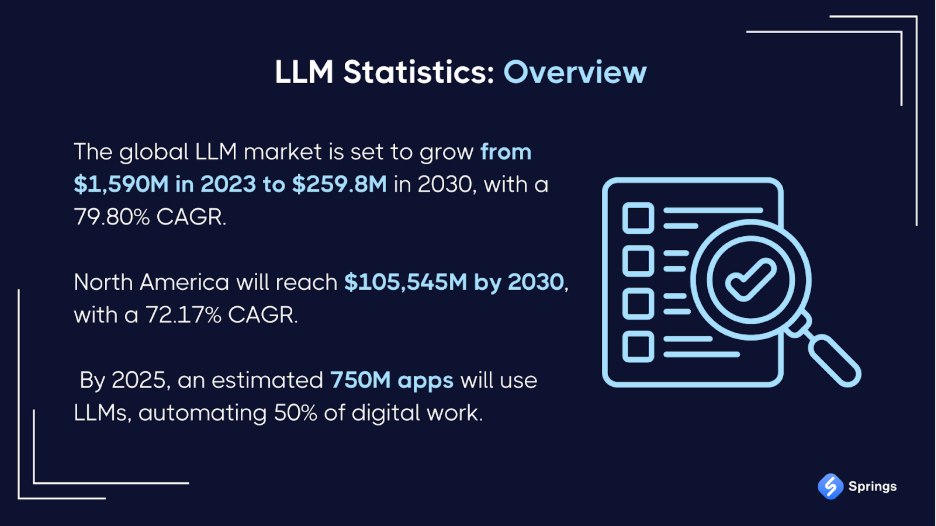
Figure 1: LLM Market Overview
When it comes to deploying LLMs there is an option to deploy them on the cloud or host them locally (on-premise). There have been cases in the past where sensitive information (e.g., source code, credentials, etc.) were unknowingly leaked when using publicly hosted LLMs.
A local or on-prem deployment of LLMs comes handy in scenarios where enterprises want to maintain a tighter control over data privacy, LLM performance, and all the aspects related to security. However, running LLMs on an in-house infrastructure comes along with its own set of technical challenges – performance, scalability, costs, and more.
In this blog, we look at the nuances of LLM optimization along with covering various tools that can help with benchmarking LLMs.
What is a Local LLM?
As the name suggests, a local LLM is a machine learning model that is deployed on a local infrastructure (or locally) instead of using cloud-based services for deployment. As the information is hosted locally, it results in lower latency (or faster responses) and better control over the customizations.
Here are a few critical steps involved in local deployment of LLM:
Assessing hardware requirements
Setting up the hardware infrastructure is the very first step of local LLM deployment. Open-source LLMs like LLaMA, Mistral, etc. also provide various powerful inference frameworks for running the respective models locally. For instance, Ollama, LM Studio, and llama.cpp are some of the open-source LLM frameworks that help in deploying LLaMa models locally.
LLMs of smaller model sizes (e.g., under 4 GB), quantized versions (e.g., 4-bit or 8-bit), or ones with efficient inference engines like llama.cpp might not require GPUs for execution! However, the trade-off here would be slower execution speed.
Assess the hardware requirements based on the model specifications, as the VRAM (Video RAM) requirement largely depends on the model precision (FP32, FP16, etc.), Inference backend (PyTorch, llama.cpp, Hugging Face Transformers, etc.), batch size, and context length.
A compatible NVIDIA GPU can be a huge plus since it leads to smoother and faster LLM performance. Do check out this NVIDIA GPU comparison blog that deep dives into the features of popular GPUs. Disk space is another critical factor for storing the model weights.
Setting up the environment
With the hardware configuration zeroed-in, the next step is to install the relevant packages (or dependencies). Choose the appropriate programming language and operating system (i.e., Linux, macOS, or Windows with WSL2).
GPU is considered the backbone of the local LLMs, as the right combination of GPUs will help achieve parallelized execution, minimum latency, and higher throughput. Depending on the use case being perceived, GPUs like NVIDIA’s A100 or H100 with thousands of CUDA cores can be opted for computational & execution requirements.
Install Libraries, Frameworks, and Configure Model
Install the libraries for running the LLMs. Download the appropriate model weights from platforms like Hugging Face, GitHub, or other official repositories.
Load and configure the downloaded model, run Inference on it, and fine-tune if required for your use case.
For simplified setup, you can also opt for all-in-one tools that handle model management, processing, along with a built-in visual interface for interacting with the LLMs. They are best-suited for someone who requires a simplified setup. GPT4All and Jan are some of the GUI-based solutions for local deployment of LLMs.
Why Choose Local Deployment of LLMs?
As per a Gartner report, close to 80 percent enterprises are expected to deploy Gen-AI based applications in their production environments. There is an increased preference for deploying LLMs locally (or on local infrastructure) owing to benefits related to control, privacy, speed, and flexibility.
With this approach, everything related to LLM execution & its associated data stays private and well within the enterprise’s control. Here are some of the key drivers behind local deployment of LLMs:
Improved Data Privacy & Compliance
Local execution of LLMs ensures that none of the sensitive information leaves the infrastructure. Enterprises in domains like healthcare, finance, fintech, e-commerce, etc. that are governed by strict regulations can make the best use of local LLMs.
Regulations like GDPR, HIPAA, or CCPA impose strict requirements on data handling. As stated earlier, local deployment of LLMs enables organizations to have full custody of data, thereby avoiding potential compliance and security risks.
As the inference and fine-tuning (if required) of the LLM are done locally, there is zero risk of any critical information – not even debug logs are available for any exploitation.
Offline Functionality for Disconnected Environments
Local LLMs not only offer much tighter control over the model’s configuration (e.g., temperature, token limits). There are several frameworks like Ollama and GPT4All that enable users to download and run LLMs on their own machines, without the need for constant internet access.
For resource-constrained environments, lightweight LLMs both distilled & quantized models can be deployed on edge devices, minimising the dependency on external servers.
Faster Performance and Lower Latency
An LLM deployed locally does not need any internet connectivity, due to which it provides responses much faster speeds when compared to their cloud-LLM equivalents. There are no network round trips in case of local LLMs.
Here are some of the most popular open-source models that can be run locally:
- Meta’s Llama 2 (7B-70B parameters, ~4-40GB)
- Mistral AI’s Mixtral 8x7B (~13GB)
- Google’s Gemma 2B/7B (~1.5-4GB)
- Microsoft’s Phi-4 (14B parameters)
However before local deployment, it is suggested to take a detailed look at the hardware requirements (i.e., CPU/GPU/TPU requirements), operating system requirements, etc. to ensure compatibility and optimal performance. For example, it is possible to spin up a quantized LLaMA 3 model in a few minutes on your computer. Projects like vLLM, TGI (Text Generation Inference), and llama.cpp deliver inference that’s fast, efficient, and highly user-friendly.
One of the most pivotal moments in the AI industry is the release of gpt-oss-120b and gpt-oss-20b – state-of-the-art open-weight language models primarily designed for powerful reasoning, agentic tasks, and versatile developer use cases. As per the official announcement, both these open-source LLMs can be seamlessly run on Apple Silicon MacBooks with just 16GB RAM!
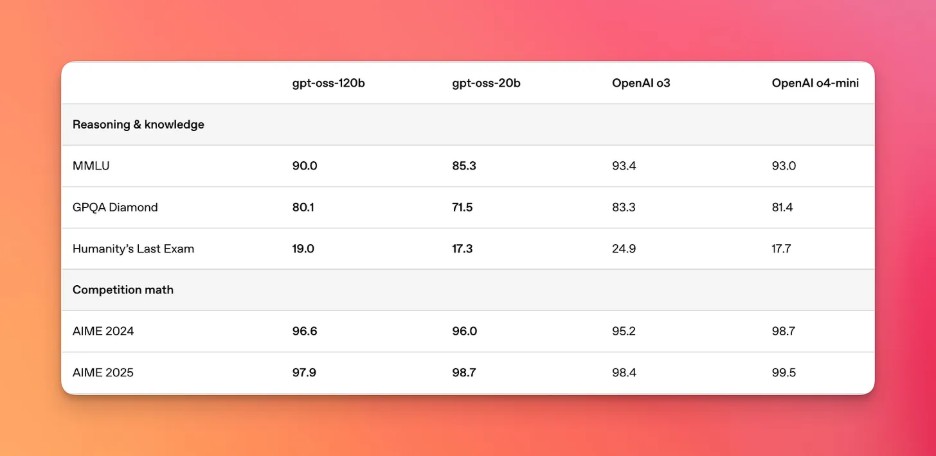
Figure 2: Model Comparison (Source: Ollama.com)
Locally deployed LLMs enable faster inference for chatbots, virtual assistants, edge computing, IoT, and automated decision-making in comparison to cloud-based models.
Cost Efficiency for High-Volume Workloads
Irrespective of the chosen LLM model, fine-tuning and hosting LLMs locally involves an upfront investment. Model integration and fine-tuning with internal datasets is typically an on-going activity for ensuring optimal relevance and performance.
On the other hand, long-term savings can be significant as there are zero expenses on recurring per-API call charges. As per Quinnox, many enterprises are also shifting to local and/or hybrid AI infrastructure specifically for reaping long-term ROI. This is where enterprises can leverage the offerings of AceCloud to transition with flexible deployment options that combine on-premise control with cloud-scale efficiency.
Also Read – Hybrid Cloud vs. Multi-Cloud LLM Model
Overprovisioning widely observed in cloud environments, no per-token call charges, and predictable need-based scaling are some of the reasons why enterprises are opting for local or hybrid AI infrastructure for deploying LLMs.
Better Customisation and Model Fine-Tuning
Local LLMs are built to serve specific use cases, hence the existing models are fine-tuned on proprietary datasets. The process of customization and fine-tuning ensures that the LLM is tailor-made and accurate enough for the domain specific tasks.
Seamless integration with internal data pipelines, improved security, and tighter control over the model updates help maintain and fine-tune the model’s overall behavior. PyTorch, Sloth AI, and Torchtune are some of the many tools that can help with fine-tuning the LLM.
On the whole, deployment of local LLMs should be prioritized by enterprises looking for tighter control over the infrastructure, enhanced data privacy, and improved customization to meet specific business needs.
Best Ways To Deploy and Run LLMs Locally
As seen so far, local LLM deployment is the process of taking a popular LLM like LLaMA 2, Mistral, or GPT4All, configuring, and installing the same in a local environment. Model weights in LLM files in the .bin or .gguf formats can be downloaded from Hugging Face or alternate download sources.
The LLM needs to be optimized for optimal performance and reduced latency to realize faster response times and efficient resource utilization. All of this needs to be achieved without compromising on the accuracy front. Depending on the use (e.g., chat, code generation, research, summarization, etc), you need to pick up the appropriate LLM and the model weight.
Some of the popular open-source models for local LLM deployment are shown below:
| Model | Suitability | Download Link |
|---|---|---|
| LLaMA 2 (7B/13B/70B) | General-purpose tasks, high accuracy | https://huggingface.co/meta-llama |
| Mistral 7B | Lightweight, fast, high-quality | https://huggingface.co/mistralai |
| Falcon (7B/40B) | Open-weight research, multilingual | https://huggingface.co/tiiuae |
| Vicuna (7B/13B) | Chat-optimized, conversational AI | https://huggingface.co/lmsys |
| OpenHermes 2.5 | Instruction-tuned, general chatbot | https://huggingface.co/teknium |
| CodeLLaMA (7B/13B/34B) | Code generation & debugging | https://huggingface.co/codellama |
Once you have chosen the best-suited LLM, the next step is deploying the deploying the LLM – a process that makes it easy to download, run, and interact with LLMs locally. Here are some of the popular libraries/tools/frameworks for running LLM locally:
GPT4All
GPT4All is an LLM framework and a chatbot application that is available for major operating systems (i.e., Windows, macOS, and Linux). As stated in the official documentation, GPT4All does not require any powerful GPUs for running LLMs locally. In fact, it can also run LLMs on desktops and laptops!
You can either download the installer from their GitHub repo or simply send pip3 install gpt4all (or pip install gpt4all) on the terminal for installing the same.
When you open the GPT4All desktop application for the first time, you’ll see options to download models that are specifically configured to work with GPT4All. You can also find and download models from HuggingFace.
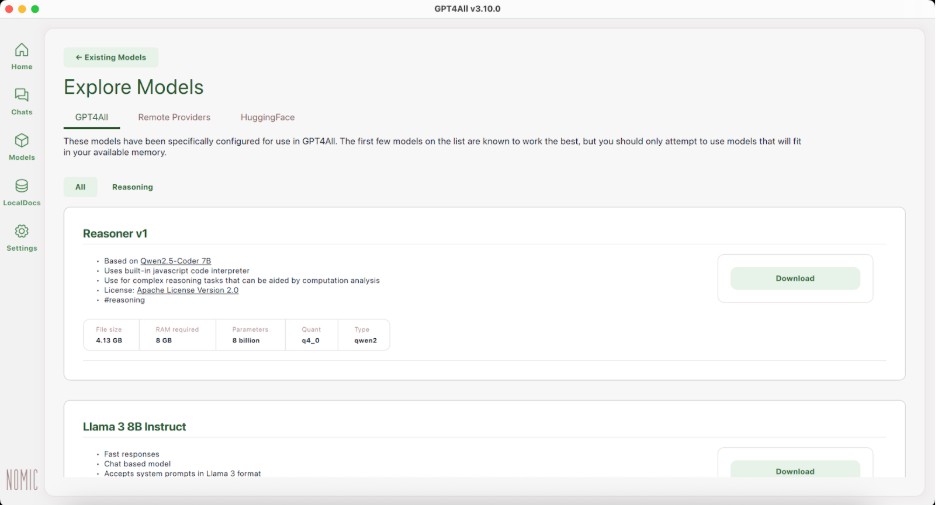
Figure 3: GPT4All
At the time of writing this blog, the latest version of GPT4All is v3.0.0. Shown below is a sample snippet that loads a quantized Meta-LLaMA 3 (8B) instruction-tuned model locally and starts a conversational context about about running LLMs efficiently on a laptop.
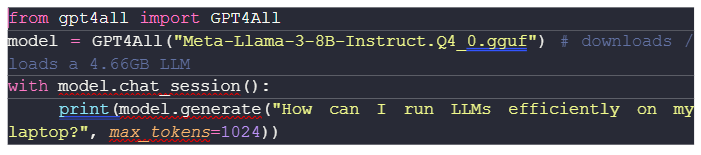
GPT4All also offers the server mode that helps in interacting with the local LLM through HTTP APIs that follow a structure similar to that of OpenAI’s.
LM Studio
A good alternative to GPT4All is the LM Studio, a desktop app that lets you run a variety of models locally. You have the flexibility to choose from a range of LLMs and SLMs, namely Qwen3, gpt-oss, Deepseek R1, Mistral, to name a few.
Here are some of the key characteristics of LM Studio:
- Familiar chat interface
- Facility to download models from Hugging Face
- Local server listens on OpenAI-like endpoints
- Systems for managing local models and configurations
Before downloading the model, it is important that you also have a look at the minimum machine configuration for installation.

Figure 4: LM Studio Installation
In case you face any hurdles with installation of models from Hugging Face, do check out this Hugging Face LLM installation video for more information. Starting v0.3.17, LM Studio acts as an Model Context Protocol (MCP) Host, owing to which you can also connect MCP servers to the app and make them available to your models.
Llama.cpp
llama.cpp is a popular open-source LLM framework that is written entirely in C/C++. The primary goal of llama.cpp is enabling LLM inference with very minimal setup and optimal performance on a wide range of hardware – locally and in the cloud.
You can install llama.cpp on macOS, Linux, and Windows, more details can be found in the llama.cpp installation documentation. We tried installing llama.cpp on an Intel Silicon (macOS) and the installation was successful. Simply trigger the brew install llama.cpp command on the terminal to install llama.cpp on your machine.
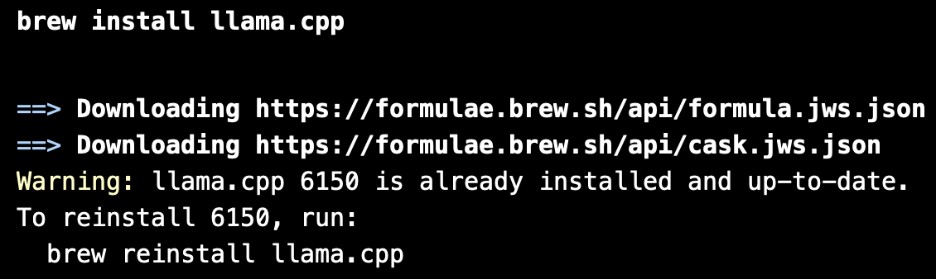
For Intel-based mac’s, llama.cpp is normally installed in the /usr/local/Cellar/ folder.
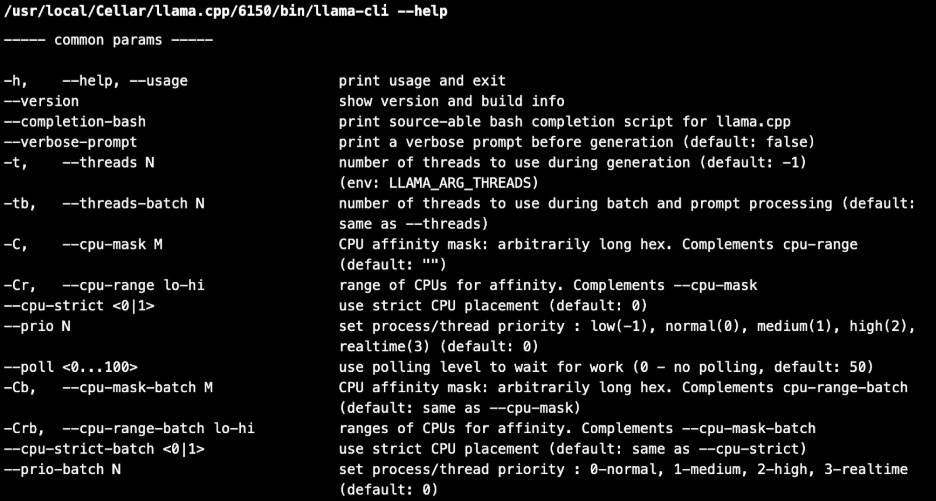
For demonstration, we also tried running it with a small test model, like TinyLlama. The model that is approximately 600 MB in size, was also tested with a simple prompt.
mkdir -p ~/llama-test && cd ~/llama-test

curl -L -o tinyllama.gguf \
https://huggingface.co/TheBloke/TinyLlama-1.1B-Chat-v1.0-GGUF/resolve/main/tinyllama-1.1b-chat-v1.0.Q4_K_M.gguf
Alternatively, you can clone the llama.cpp GitHub repo and follow the build steps mentioned in the llama.cpp build guide. We followed the steps mentioned in the guide and we were able to install llama.cpp on the macOS machine:
git clone https://github.com/ggml-org/llama.cpp.git
cd llama.cpp
mkdir build
cd build
cmake -DLLAMA_BUILD_SERVER=ON ..
cmake –build . –config Release

Once the build is successful, download the model (e.g., Tiny Llama from Hugging face) and start the llama.cpp server (default port – 8080) by triggering the following command on the terminal:
curl -L -o tinyllama.gguf \
llama-server -m tinyllama.gguf –port 8080
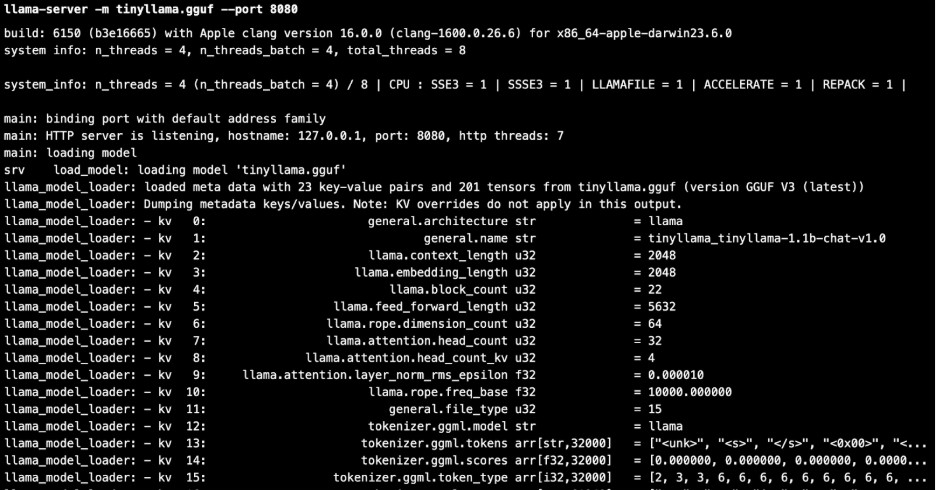
Next enter http://127.0.0.1:8080/ in the browser to start using the llama.cpp with the downloaded LLM.
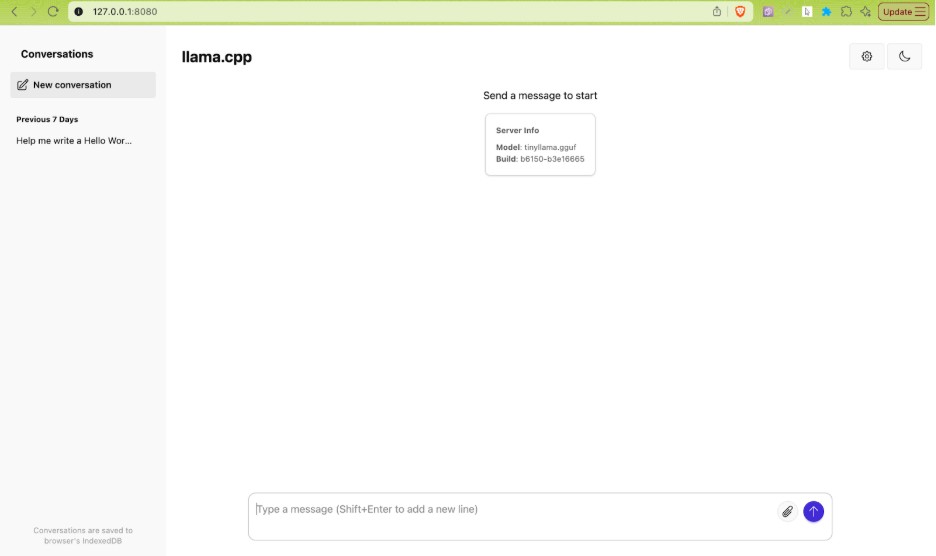
Figure 5: llama.cpp in action
llama.cpp is optimized for LLaMA architecture models and other derivatives like Mistral, TinyLlama, Vicuna, etc. Hence, you can run llama.cpp with almost any LLaMA-architecture model (and some others) as long as it can be converted to the GGUF (GPT-Generated Unified Format) format that is supported by the LLM.
Ollama
Ollama is another popular open-source option for running LLMs locally. It is built on top of llama.cpp and does not contain any inference code. It is more user-friendly in comparison to llama.cpp and makes the overall experience of running LLMs locally very simple and user-friendly.
Ollama comprises a CLI, a web server, and a well-documented model library that contains the most popular GGUF models together with their respective prompt templates. Once you have installed Ollama on your machine, start the application and download the appropriate LLM (e.g., gpt-oss, deepseek-r1, gemma3, etc.) from the internet.

Figure 6: Ollama in action
Alternatively, you can also trigger the command ollama run <supported-LLM> on the terminal to install one of the models from theollama model library. You can also find several versions of Llama-based models like Llama 3, Code Llama, CodeUp, and medllama2, that are fine-tuned to answer medical questions.
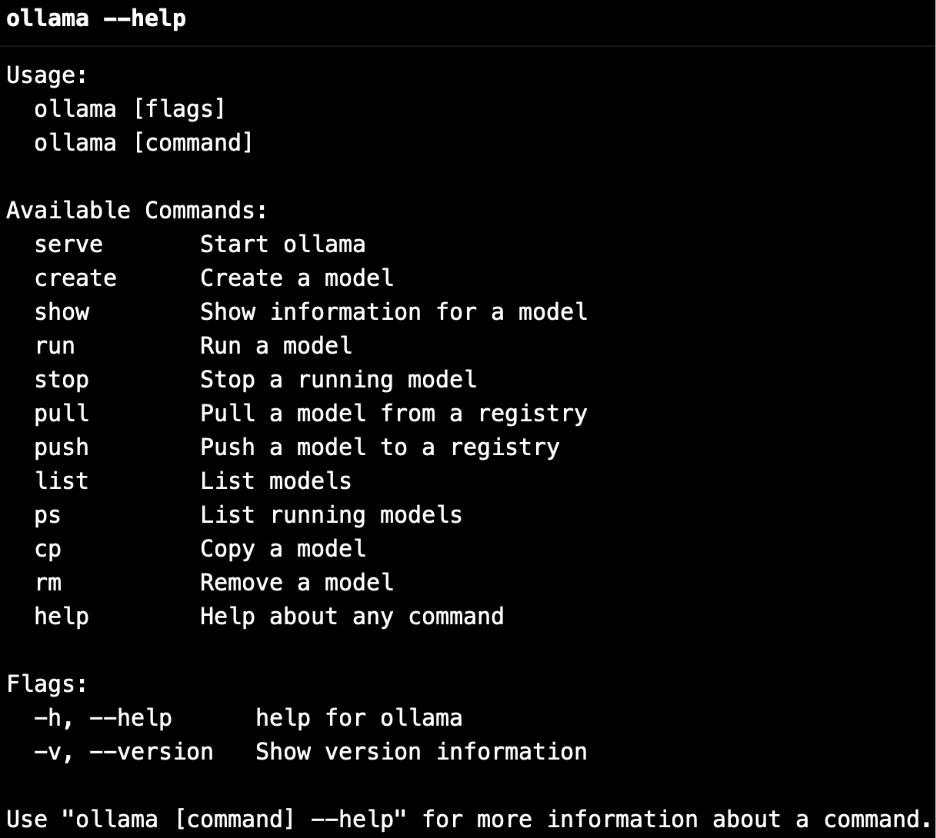
Trigger the command ollama run <model-name> <prompt> on the terminal to use the LLM from the console. Shown below is an example where we prompted Ollama DeepSeek-R1 with “What are LLMs”, here is the response:
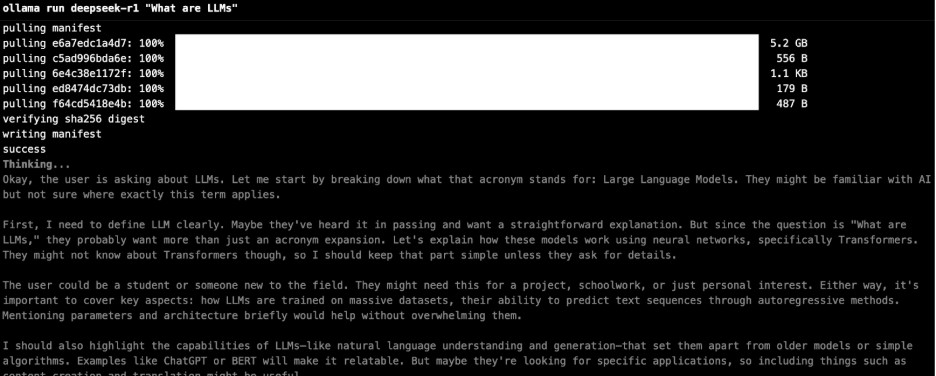
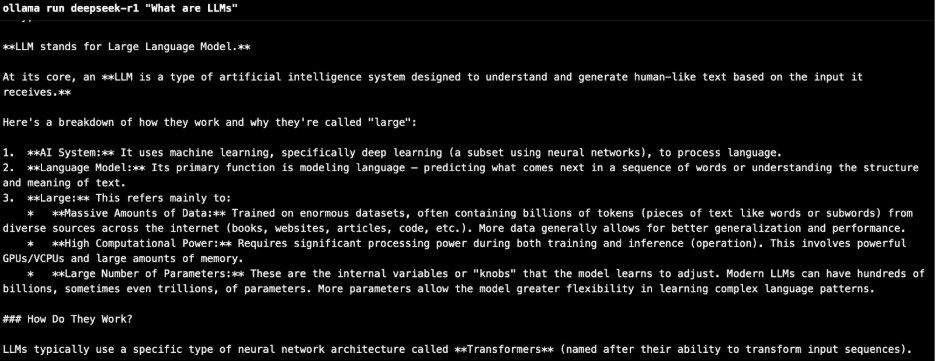
You can also customize the LLM models with the Ollama modelfile, more details can be found in the official documentation.
Jan
Jan is another popular open-source alternative to ChatGPT that runs locally on the machine. Jan.ai is built on top of llama.cpp, using it as the local inference engine for running AI models on the machine/device.
Like other options, Jan also provides options to install Jan, the AI assistant by installing the appropriate version for macOS, Linux, and Windows.
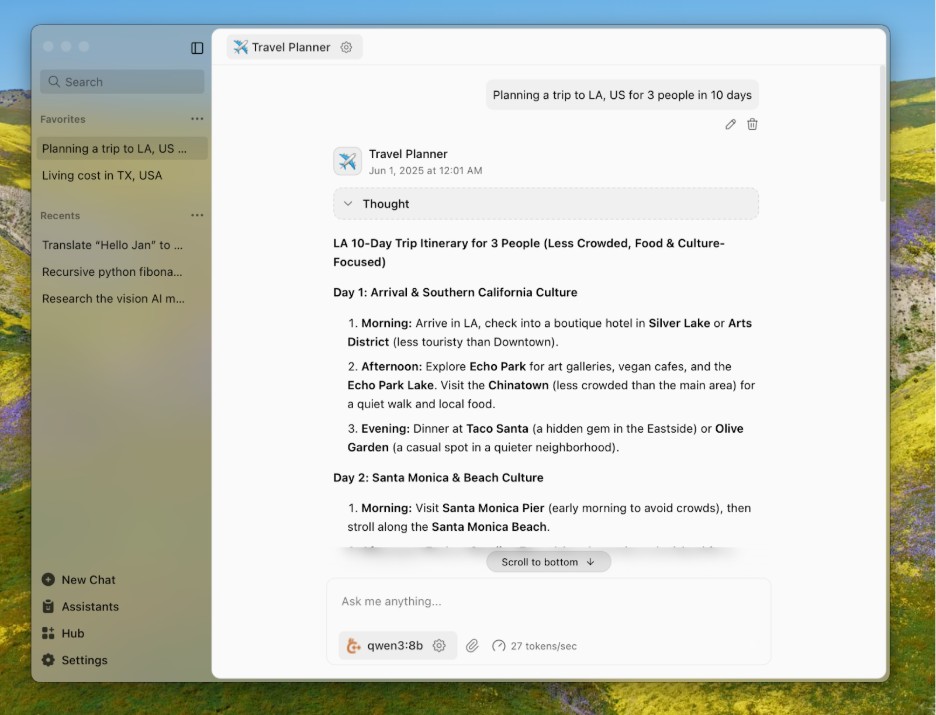
Figure 7: Jan.ai in action
Alternatively, you can also clone, build, and run Jan from the terminal. Since we already downloaded TinyLlama and DeepSeek-R1 on the machine, we could use the same with Jan as well.
git clone https://github.com/menloresearch/jan
cd jan
make dev
Here are some of the salient features of Jan:
- Ability to download and run LLMs (Llama, Gemma, Qwen, etc.) from HuggingFace
- Provision to connect to OpenAI, Anthropic, Mistral, Groq, and others
- OpenAI-Compatible API
Jan also supports the Model Context Protocol (MCP) that lets language models interact with external tools and data sources, more details in the Jan.AI MCP documentation. Like LM Studio and GPT4All, Jan also provides a local API server that further helps in having a tighter control over the LLM response.
llamafile, LangChain, NextChat, and Text generation web UIare some of the other prominent options that can be considered for running LLM locally on a device (or machine).
What is LLM Benchmarking?
Merely training the best-suited LLM for your use case is just half the job done! Before deploying the LLM, it is important to check if the chosen LLM does well on accuracy, performance, reliability, security, and other important aspects. It is more like taking a test drive before you have made up the decision to buy the car 🙂
LLM benchmarking is a standardized assessment plan for evaluating the capabilities of the AI models. Akin to software benchmarking, LLM benchmarking is also done on a subset of a large dataset to verify the following:
- Performance – Ensure that the LLM is functioning optimally for the optimal workload. Also, its performance (speed and accuracy) should not deteriorate with more consequent requests.
- Accuracy – Check if the model produces accurate answers in-line with the domain and does not hallucinate by generating false, fabricated, or unsupported information.
- Model Comparison – Helps identify how the model performs in comparison with other available LLMs.
In short, LLM benchmarking makes it easier to compare models and, ultimately, select the best one for your proposed use case. The LLMs can be benchmarked against tasks associated with the following:
- Knowledge and language understanding – These include benchmarks like MMLU, ARC, GLUE, Natural Questions, LAMBADA, HellaSwag, MultiNLI, SuperGLUE, TriviaQA, WinoGrande, and SciQ, each tests various aspects related to comprehension, world knowledge, and reasoning.
- Reasoning abilities – This includes benchmarks like GSM8K (grade-school math), DROP (discrete reasoning in reading comprehension), CRASS (counterfactual reasoning), RACE (exam-style reading comprehension), Big-Bench Hard (BBH), and AGIEval (standardized test formats), along with BoolQ for binary QA.
- Conversational and multi-turn performance – This includes benchmarks like MT-Bench and QuAC that are designed for evaluating chat assistant coherence and dialogue understanding.
- Code Intelligence – This includes benchmarks like CodeXGLUE, HumanEval, and MBPP for checking proficiency in tasks related to code generation, understanding, and program synthesis.
In the interest of time, we suggest checking out this insightful LLM Benchmarks GitHub Repo that comprise a collection of benchmarks and datasets for evaluating LLMs.
Top Frameworks for Benchmarking Local LLMs
Now that we have covered the ‘what’ & ‘why’ of benchmarking LLMs, let’s look at ‘how’ part of benchmarking LLMs. Here are the top 5 frameworks for benchmarking local LLMs:
DeepEval
DeepEval is an easy-to-use open-source LLM evaluation framework that is majorly used for benchmarking and testing systems built on LLMs. The framework is very much similar to PyTest (or pytest), the only difference is it is used for unit testing of LLM outputs. As stated in the official documentation, DeepEval uses the latest research to evaluate LLM outputs based on metrics like G-Eval, hallucination, answer relevancy, RAGAS, etc.
It covers a range of LLM applications such as RAG pipelines, chatbots, AI agents, implemented via LangChain or LlamaIndex. DeepEval integration with Hugging Face can be harnessed for enabling real-time evaluations during LLM fine-tuning.
Trigger the command pip3 install -U deepeval (or pip install -U deepeval) for installing DeepEval in your machine. To confirm the install, enter the command pip3 list | grep deepeval on the terminal. At the time of writing this blog, the latest version of DeepEval is 3.3.9.
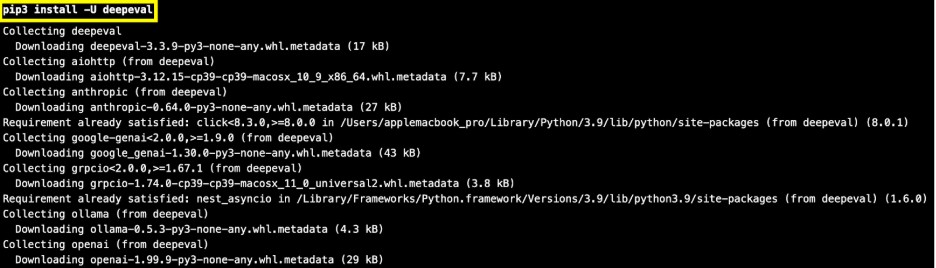

Also, DeepEval’s test results on the cloud directly on Confident AI’s infrastructure. This lets you keep track of evaluation experiments, debug evaluation results, centralize benchmarking datasets for evaluation, and track production events to continuously evaluate LLMs via different reference-less metrics [Source].
Shown below is an example script that demonstrates the usage of the DeepEval framework:
FileName – test_deepeval.py
from deepeval.metrics import AnswerRelevancyMetric as AnswerRelevanceMetric
from deepeval.test_case import LLMTestCase
from deepeval import evaluate
# Define your test case with multiple expected outputs
test_case =LLMTestCase(
input=”What is the capital of India?”,
actual_output=”New Delhi is the capital of India.”,
expected_output=[“New Delhi”, “Delhi”]
)
# Choose a metric (Answer Relevance)
metric =AnswerRelevanceMetric(threshold=0.8)
# Run evaluation
evaluate([test_case], [metric])
Run the command pip3 install -U “deepeval[all]” on the terminal for installing or upgrading DeepEval to the latest version, along with every optional dependency (all integrations and extras). Export the OpenAI API Key using the export OPENAI_API_KEY=<OPENAI_API_KEY> command on the terminal.
The threshold of 0.8 indicates that semantic similarity is taken into account, hence a semantic similarity of 80 percent in the model’s response is considered an expected answer. In such cases, the benchmark test is considered a Pass!
DeepEval, a lightweight framework, should be considered for evaluating LLM outputs using metrics such as relevancy, faithfulness, and coherence. It helps ensure your model’s responses are both accurate and contextually reliable.
PromptBench
PromptBench by Microsoft is a popular PyTorch-based Python package (or unified library) for evaluating and understanding LLMs. As stated in the official GitHub repository, PromptBench provides user-friendly APIs that can be used by researchers for evaluating LLMs.
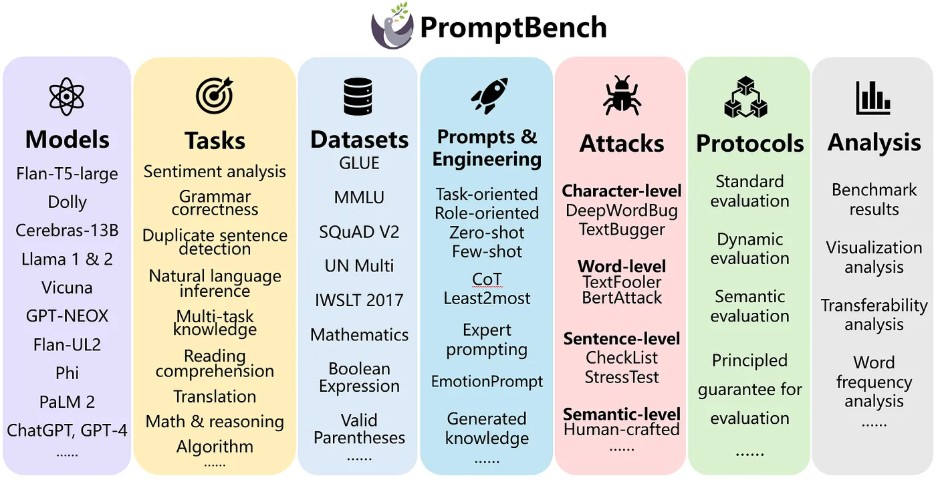
Figure 8: Microsoft PromptBench
Similar to other benchmarking frameworks like HELM and Harness, PromptBench also supports popular LLM frameworks like Hugging Face, VLLM, etc. Apart from evaluation of tasks, PromptBench can be extensively used for evaluating different Prompt Engineering tasks.
PromptBench is equipped with built-in support for common benchmarks like GLUE, MMLU, SQuAD v2, IWSLT2017, BBH, DROP, ARC, and more. Over and above, it also supports seamless integration with popular models like GemIni, Mistral, Mixtral, Baichuan, and Yi. It also helps in evaluating LLMs on different prompt-level adversarial attacks.
Run the command pip3 install promptbench (or pip install promptbench) on the terminal to install this Python package. At the time of writing this blog, the latest version of PromptBench is 0.0.4
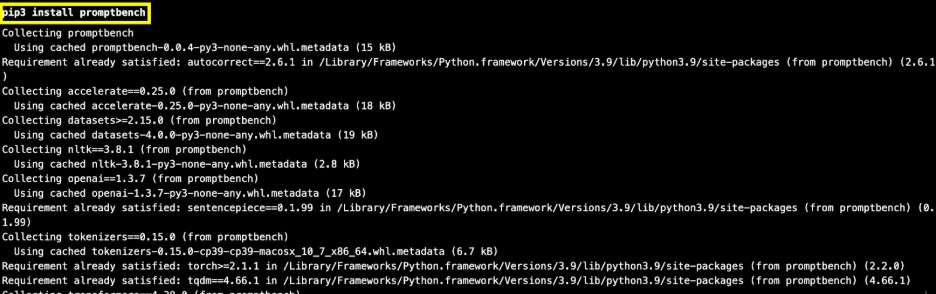

Here is a port of the DeepEval example which now uses the PromptBench framework for evaluation:
FileName – test_promptbench.py
from promptbench.metrics import Metric
from promptbench.tasks import Task
from promptbench.evaluation import evaluate
# Define a simple Task with input and ground truth answers
task =Task(
input=”What is the capital of India?”,
references=[“New Delhi”, “Delhi”]
)
# Suppose this is the model’s actual output
actual_output =”New Delhi is the capital of India.”
# Choose metric (e.g., BERTScore, since it’s semantic)
metric =Metric(“bertscore”)
# Run evaluation
results =evaluate([task], [actual_output], [metric])
print(results)
For more information on PromptBench, we suggest checking out different datasets, models, prompt engineering methods, and other implemented components currently supported by the framework.
Stanford HELM
Holistic Evaluation of Language Models (HELM) is another widely used open- source Python framework for holistic, reproducible and transparent evaluation of foundation models. It can be extensively used for evaluating and benchmarking LLMs and multimodal models.
Here are some of the salient features of Stanford HELM:
- Datasets and benchmarks in a standardized format such as MMLU-Pro, GPQA, IFEval, and WildBench
- Models from various providers like OpenAI, Anthropic Claude, Google Gemini, etc. that can be accessed via a unified interface
- Provision to add metrics like efficiency, bias, toxicity, etc. for measuring various aspects beyond accuracy
- Web UI for inspecting individual prompts and responses
HELM also maintains official leaderboards with results updated from evaluating recent models on notable benchmarks. You can refer to the official HELM website for more information on the leaderboards.
You can install HELM from PyPi by triggering the command pip3 install crfm-helm (or pip install crfm-helm) on the terminal. Once the installation is complete, run the command pip3 show crfm-helm to confirm the installation.

At the time of writing this blog, the latest version of crfm-helm is 0.5.7. Post following the other instructions in the HELM quick-start guide, you would see that the server has started at port 8000.
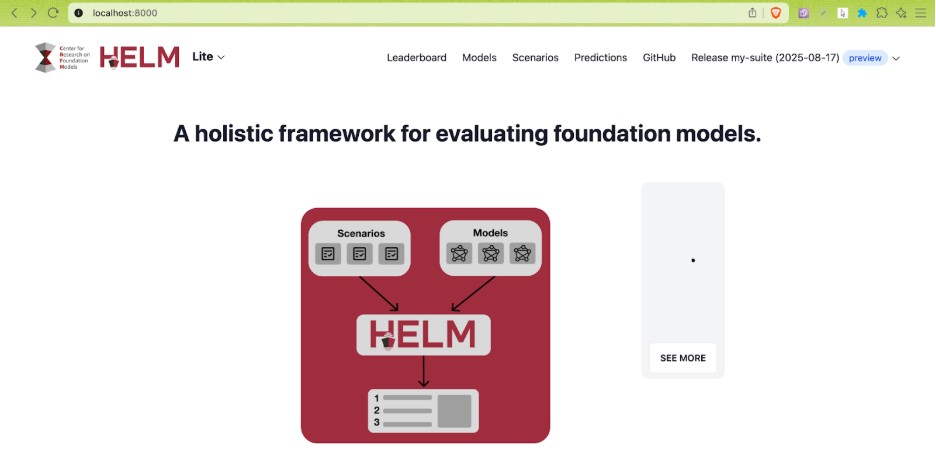
Figure 9: HELM Server in action
Apart from the built-in models supported by HELM, it is possible to run fine-tuned local LLMs or LLMs like ollama using this framework.
LMArena (formerly LMSys)
LMArena is a crowd-sourced AI benchmarking platform created by the researchers of UC Berkeley. This means that everyone can seamlessly access, explore, and interact with the world’s leading AI models by simply navigating to LMArena AI
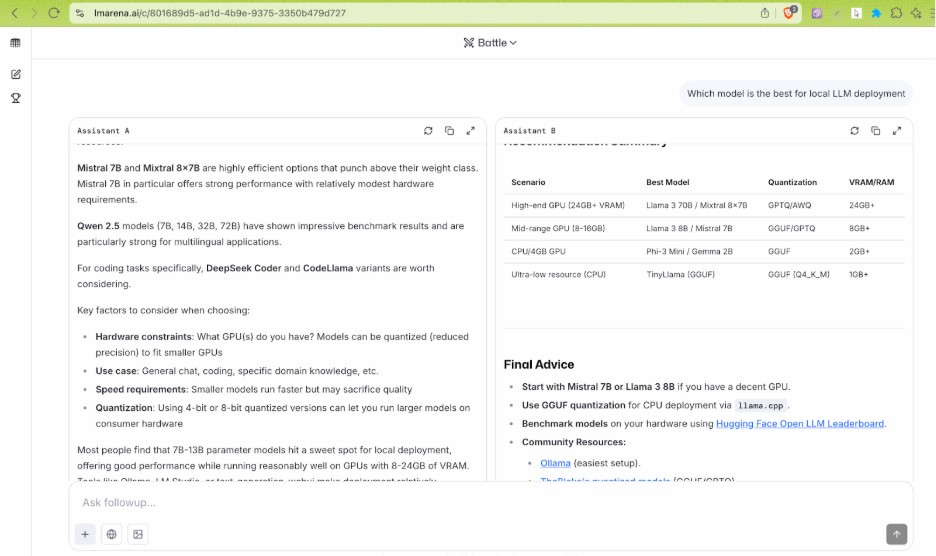
Figure 10: LMArena AI
As seen above, it gives the provision to start a prompt and two anonymous LLMs (Model A and B) provide the answer. Based on the provided information, you can choose which model did better. It offers a simple, yet intuitive way of quantifying LLM performance.
LMArena also provides an LMArena leaderboard where major LLMs are ranked based on the MLE-Elo ratings. They show how each model stacks up against the other for use cases related spanning across text, image, vision, and beyond.
Apart from the above-mentioned tools, we suggest checking out NVIDIAGenAI-Perf – a client-side LLM-focused benchmarking tool that provides key metrics such as TTFT, ITL, TPS, RPS and more. benchllama is another oprtn-source tool for benchmarking local LLMs. Feel free to check out this detailed NVIDIA GenAI-Perf blog that deep dives into the nuances of the said benchmarking tool.
Best Practices in Benchmarking LLMs
Though the framework for LLM benchmarking needs to be aligned with your product use case, it is still essential to follow the below-mentioned Best Practices in Benchmarking LLMs:
- Always start with an existing open-source (or a closed-source) LLM.
- Next, fine-tune your LLM to the desired use case. This can be done either via prompt engineering or via vector databases in RAG to provide more contexts.
- Deploy the LLM into production with robust guardrails and integrate it with the requisite backend services and APIs. This is needed for dynamically supplying domain-specific data as input.
Its A Wrap
In this blog, we looked at the benefits of running local LLMs along with covering some of the frameworks/tools for deployment and benchmarking the LLMs. For improved reliability, performance, and scalability; you could also leverage managed GPU infrastructure and MLOps tooling by AceCloud.
It mirrors local setups while adding enterprise reliability, observability, and cost transparency. Following the best practices for local LLM deployment, benchmarking, and execution can be instrumental in faster-movement of LLMs into production.


![Best Open-Weight Models for Vibe Coding [2026]](https://acecloud.ai/wp-content/uploads/2026/09/best-open-weight-models-vibe-coding.webp)