
Introduction
Major decisions are hard. We plan to deliberate, strategize, do cost-benefit analyses, and make major decisions. These decisions could be personal life decisions about choosing a college—a high-stakes decision in the life of a high-school kid—or choosing our life partner. Same with organizations as with individuals.
A decision to shift the organizational headquarters could be one example of a major inflection point or decision point for organizations. NASA’s decision to start a commercial crew program was a major shift in direction in terms of human space exploration. Similarly, migrating to the cloud is a major decision for businesses.
Starting your cloud migration journey can feel like stepping into the unknown. But is it a leap worth taking? Without a doubt!
Whether an organization is already on the cloud in some way and wants to adopt cloud technologies more completely or whether an organization is taking the first steps to transfer its data and applications to the cloud, there will need to be a comprehensive cloud migration strategy.
Cloud migration will need to be divided into several steps. This article will discuss each step in detail. But first…
What is Cloud Migration?
Migration in cloud computing involves moving data, applications, or other business elements to the cloud. A company can migrate to the cloud in several ways. One standard model transfers data and applications from an on-premises data center to a public cloud.
What is the first step to follow in cloud migration?
Cloud infrastructure and public cloud solutions can be enormously beneficial for businesses — among other reasons, there can be significant cost savings, companies will gain anytime/anywhere access to data while enjoying high-performance levels, robust security and scalability, and disaster recovery is faster.
Naturally, the global cloud computing market is growing very fast.
However, to gain the most benefits from cloud migration in cloud computing, you need to map out a comprehensive strategy since you can assign different levels of priority to the cloud migration requirement of various data storages, processes, and applications belonging to your organization.
Indeed, some data may need to be kept on-premises or in an on-premises data center rather than stored on the cloud because of regulatory or compliance requirements.
When it comes to the first step to follow in cloud migration, that step should be to be clear about the reasons for your cloud migration plan. What is causing you to consider a cloud migration will determine the best cloud migration strategy applicable to your organization.
As part of planning a cloud migration, you should determine your cloud server, network, storage, database, and security/firewall needs.
Cloud Migration Checklist
Checklists have helped airline pilots (as well as surgeons) immensely by helping them keep track of essential steps or components of a complicated process. For organizations, cloud migration is key and complex, and the project proceeds far more smoothly when there are clear steps or checklists on hand.
The particulars of a checklist can vary from organization to organization (or from project manager to project manager). Here are a few suggested items to include:
- Find out which IT workloads will move to the cloud and classify them using different criteria like complexity, criticality, etc.
- Find the right cloud provider that offers the kind of cloud services you need.
- Carefully work out the cost of the migration.
- Assign a team to execute the cloud migration efficiently.
- Provide clarity to the migration team about the goals of the cloud migration.
- Carefully determine the migration tasks that will be handled internally versus those that the cloud provider will handle.
- Carefully prioritize the workloads for migration — which ones have to be moved to the cloud, which ones come next, and so forth.
- Prepare a plan containing the roadmap and schedule for the cloud migration.
- Keep all stakeholders updated about what to expect during and after the cloud migration.
- List any cloud-based applications the organization uses and determine what to do about them — leave them ‘as is’ or replace them with other cloud-based applications or services.
- Have a security plan in place for the cloud migration and post-migration phase.
- Have KPIs for different aspects of migration, such as user experience, application performance, and so forth.
- Fully test every application and workload; make adjustments where needed after review.
Types of Cloud Migration Strategies
Once you decide upon the kind of cloud environment or model—public cloud, private cloud, hybrid cloud, or multi-cloud — you can analyze which type of cloud migration best suits your requirements.
The six most widely adopted strategies for cloud migration, initially identified by Gartner as the “five R’s,” in 2011 have since evolved into what are now commonly referred to as the six R’s of migration:
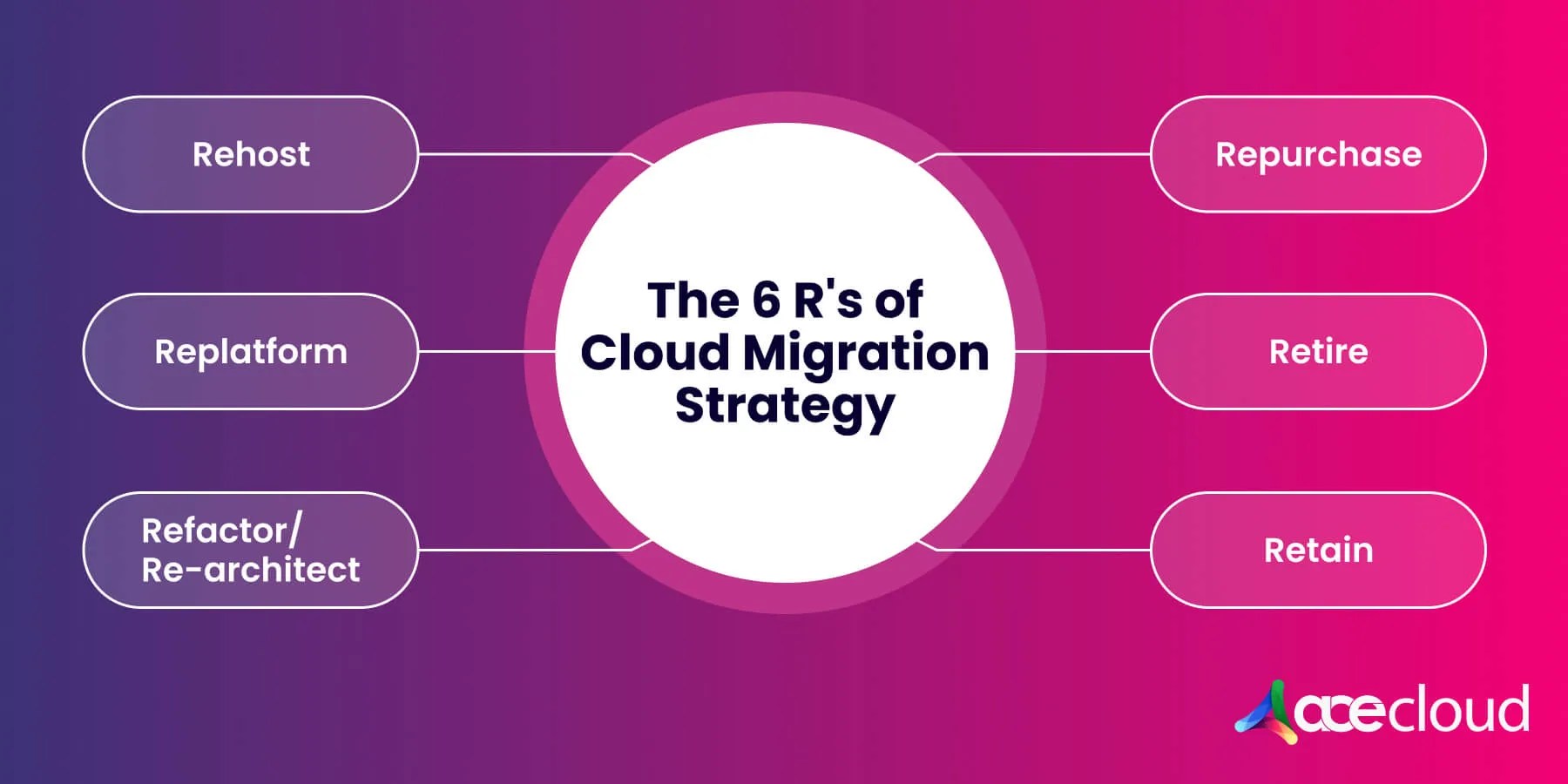
- Rehosting (“lift and shift”): If you want to adopt a conservative approach to cloud adoption, you could lift your entire software/product stack and shift it from on-premises hosting to cloud hosting.This makes for the quickest way to migrate to the cloud — and the least risky way. But you are also skipping some powerful and advanced cloud computing features and capabilities such as CI/CD, monitoring systems, recovery automation, containerization, or open-source compatible services. You are merely lifting and shifting an application, VM, and OS from its current location to a public cloud environment. Companies adopting this cloud migration approach will choose an Infrastructure as a Service (IaaS) provider and recreate their application with the cloud provider taking care of virtualization, servers, storage, and networking while the application, data, runtime, middleware, and OS are taken care of by the company.
- Replatforming: This is like the rehosting cloud migration methodology with a few tweaks and adjustments to optimize things for the cloud. This methodology might allow you to continue with legacy technology, such as mainframes.Companies adopting this cloud migration strategy can be considered conservative organizations taking their first steps into the cloud or dipping their toes in cloud technologies and want to be sure about the benefits of cloud adoption. Rather than requiring the entire application to be cloud-native, this cloud migration process requires application performance testing to validate any minor changes that may have been made to the code base.
- Refactoring/Rearchitecting: These two terms are used somewhat interchangeably, though rearchitecting tends to refer to a more substantial overhaul of the application code, whereas refactoring refers to optimizing cloud-based applications in a Platform as a Service (PaaS) setup.Refactoring could refer to application component updates such as .NET or Java updates. Rearchitecting could benefit you from cloud capabilities such as auto-scaling, containerization, microservices, or serverless computing. By rearchitecting your application’s logic to make the application cloud-native, you are poised to take advantage of innovative opportunities in the long term.
- Repurchasing/Replacing: If you are finally ready to let go of your legacy infrastructure and move to the cloud, adopting various cloud-native apps, such as Salesforce for CRM, might be best. Moving to the cloud typically happens to be a cloud-based SaaS product, and you’ll need to transfer only the data.This can be quite cost-effective if you are stuck in a legacy system that is no longer up-to-scratch in the contemporary, dynamic, competitive business environment. The only challenge is that employees need training on the new app/platform.
- Retaining: Sometimes, organizations may need to run some applications using on-premises infrastructure. It could be a critical application running on legacy mainframes. Or there may be data that you are required to keep on-premises because of regulatory or compliance reasons.You may not be ready to migrate certain applications to the cloud. In such a scenario, it would make sense to go for a hybrid cloud migration strategy where you keep some of your workloads in their current environment and migrate some to the cloud.
- Retiring: When you assess your application portfolio as part of your cloud migration process, you may come to realize that some of the applications, environments, or other IT workloads can be shut down without affecting productivity or negatively impacting your business in any manner whatsoever.In such a situation, ending those applications or replacing them with other services or components is better. This can lead to cost reduction, storage optimization, savings in licensing fees, and so forth.
Cloud Computing Scenarios
Cloud computing is for any business that wants to stay in business. Yours could be doing well in your business line, but you can see the on-premises technology, like servers, hitting its technical limits or nearing its replacement cycle.
Instead of making expensive hardware and software purchases to upgrade your on-premises setup, which may or may not be an in-house data center, you would be better off stepping foot into the cloud, where you gain access to cutting-edge computing resources and limitless storage with the latest cloud security technologies.
You could be a startup looking to splurge some serious dollars in a marketing campaign. Your marketing budget would become a waste if consumers swarm your e-commerce site, and it will promptly crash. Cloud technologies are elastic, and server capacities can grow automatically to stay in line with web traffic. When you use cloud technologies, your website will not only not crash under increased traffic, but it will also be able to withstand malicious attacks such as DDoS attacks, malware, and worse.
You could be running a software development organization that uses DevOps to get the most out of your developers. You have implemented DevOps practices and successfully removed the siloes. But it would help to make your processes cloud-based to get the most out of DevOps. Cloud DevOps will help automate processes so that DevOps can function at its best and smoothest with automatic provisioning of resources and other benefits.
What Are the Use Cases for Cloud Migration?
There could be hundreds of use cases for organizations migrating to cloud solutions. Here are four broad categories of cloud migration use cases:
- Elastic Web Hosting: Infrastructure as a Service (IaaS) capabilities offered by public cloud service providers are a great boon when website traffic goes through sudden spikes. With cloud management tools at your disposal, it’s easy to scale up as necessary so that users can smoothly navigate your site or make a purchase on your e-commerce site.
- Making Use of Big Data: Businesses of all kinds — retail and social media, among others — gather, analyze, and monetize vast amounts of data about user behavior. In fact, most companies collect data to gain insights and improve product development, marketing, and much more. In such scenarios, big data can be beneficial in analyzing and interpreting this data, which can be a huge competitive advantage for that company.
- Disaster Recovery Made Easy: Cloud offers unlimited data storage, and organizations can use that to create automatic data backups. That, in turn, helps when the unthinkable disaster strikes — with this DRaaS feature, you can be back up and running in no time at all.
- Empowering Software Development: Building, testing, and deploying software used took years before the advent of the cloud. With cloud-based PaaS solutions, software development teams are far more synergistic.
Now, DevOps is happening on the cloud — cloud DevOps leads to faster software releases, continuous deployment of code, and more. Software development in the cloud has made the process more robust thanks to cloud features such as process automation, code compilation, and more.
Future of Cloud Computing
Organizations — just as much as individuals — will benefit when they learn to grow beyond their assumed constraints. Organizations may be limiting their current and future potential based on some past experience.
A technology company CEO once famously opined that people are surely not going to need personal computers in their homes, and a computer magazine once famously predicted that computers would eventually weigh less than 1.5 tons!
We don’t know what the future holds with advances in AI/ML and quantum computing on the horizon. 3D printing, growing vegetables (lettuce) in space, lab-grown meat, photographing the black hole at the center of the Milky Way galaxy, detecting gravitational waves, and electric flying cars — all of these have been accomplished already.
Some concepts—such as 3D printing—have such a wide array of applications that we would need to drill down to specific industries where they are making a difference. For example, 3D printing makes its presence felt in the automobile industry in several ways.
Cloud computing is similarly pervasive already and will be even more so in the future. A study by Grand View Research project that the global cloud computing market will reach USD 1,554.94 billion by 2030. This encompasses business processes, platforms, infrastructure, software, management, security, and advertising services delivered by public cloud services.
Book a free consultation with an AceCloud expert today and kickstart your cloud migration journey.

Related Post









Get in Touch

Credits First!
- 24*7 Human Support
- Pay-as-you-go Pricing
- No Egress Cost
- Multi Tier Security