FREE WEBINAR X NetApp
As per plan, your e-commerce sale goes live at 10 a.m.
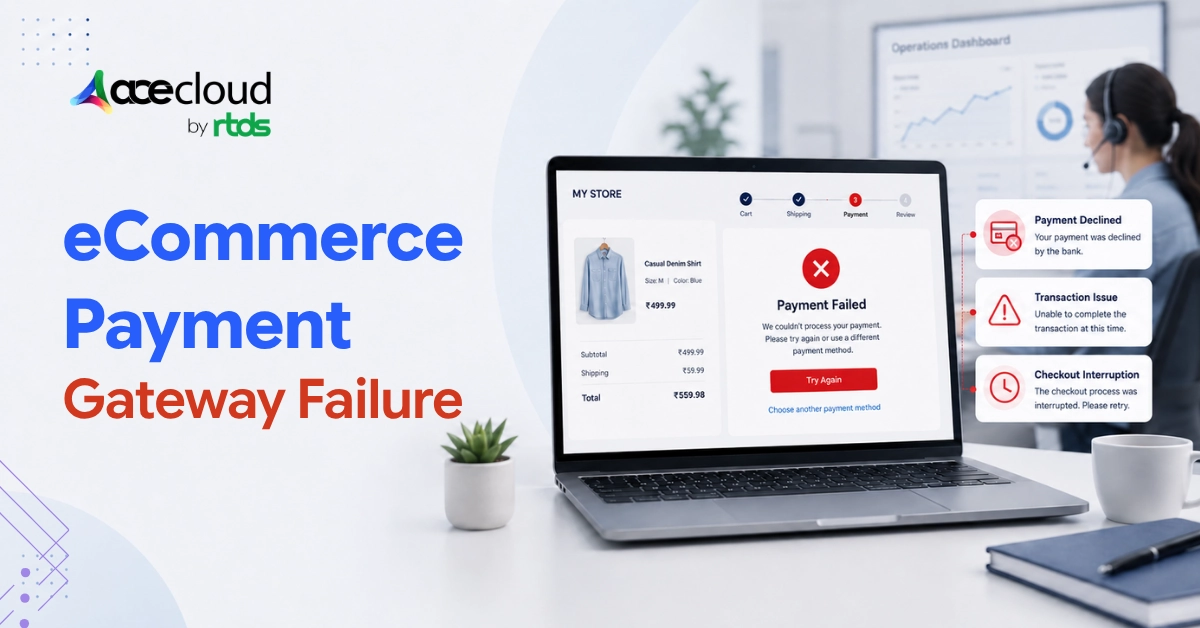
By 10:04, checkout is throwing errors. By 10:11, your Slack is on fire. And by 10:20, customers are posting screenshots of broken pages on X.
Turns out, by the time your engineering team identifies the problem, you have lost four figures in revenue. Your support queue has tripled, and the campaign you spent three months planning is already trending for the wrong reasons.
Catering to retail and eCommerce industry for years, we have seen this happen to brands every festive season.
Flash sale traffic does not behave like normal traffic, and most platforms are never actually tested against it. If you ask us, the problem is rarely just traffic volume. It is that traffic, checkout, inventory, payments, cache layers, third-party APIs, and fulfillment systems all hit their limits at the same time.
If you are planning a festive sale, product drop, or high-traffic campaign, this guide will help you identify the infrastructure risks that should be fixed before launch.
Why Flash Sales Break eCommerce Platforms?
Most eCommerce teams prepare for a flash sale by watching their homepage load time.
Well, that is not enough.
Flash sales create a fundamentally different traffic pattern compared to a normal shopping day. Traffic does not grow gradually. It arrives in a sudden wave driven by email blasts, social ads, app push notifications, influencer posts, and marketplace promotions, often all at the same time.
A few things make this especially hard to handle.
- Users are not browsing. They are buying.
- Everyone is targeting the same products.
- Hot SKUs face thousands of simultaneous add-to-cart requests.
- Bots and scalpers compete with real buyers.
And every third-party system your checkout depends on, from payment gateways to OTP providers to fraud checks, is under pressure too.
The buying journey looks like this:
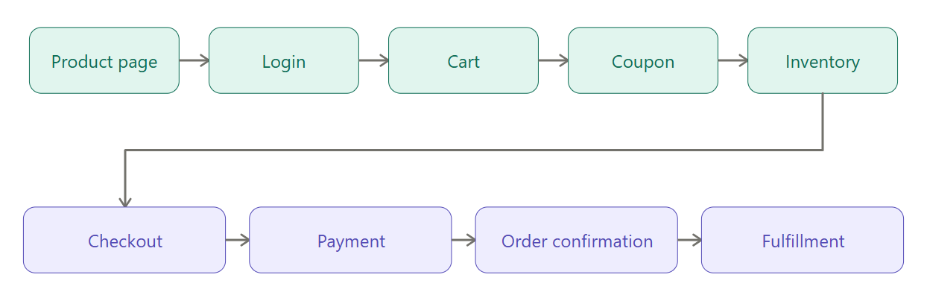
Indeed, your homepage may survive the spike. But if checkout breaks, inventory miscounts, or payment fails, the revenue is gone regardless.
Flash sale readiness means every step in this journey must be fast, observable, secure, and recoverable. Not just the front door.
At AceCloud, we help eCommerce teams identify these risks before campaign traffic peaks through cloud readiness assessments, architecture reviews, CDN optimization, database performance tuning, security hardening, and disaster recovery planning.
What is the Real Cost of Flash Sale Failure?
It is easy to think of downtime as a technical problem. During a flash sale, it is a business problem. And even the world’s largest eCommerce companies are not immune.
During Amazon Prime Day 2018, shoppers hit error pages and checkout issues just as the sale began. Analysts estimated the disruption may have cost Amazon between $72.4 million and $99 million in missed sales in about an hour.
Revenue loss
Every failed checkout is a lost order. Every abandoned cart during payment friction is lost revenue you cannot recover. Wasted ad spend on campaigns that drove traffic to a broken site is money you will not get back. And customers who hit a broken checkout once do not always come back for the next sale.
Brand damage
Social media is fast. Customers who cannot buy share screenshots of error messages, post complaints, and tag your brand. App reviews drop overnight. What could have been a great campaign day turns into a reputation problem that takes weeks to walk back.
Operational chaos
A failed sale does not end when the site comes back up. Duplicate orders need to be resolved. Oversold inventory needs to be managed. Refund requests pile up. Support ticket volume spikes. Warehouses receive conflicting fulfillment instructions. The cleanup can take days.
Leadership pressure
When revenue targets are missed on your biggest campaign day, the conversation gets difficult fast. Engineering teams spend days in postmortems. Blame moves between marketing, technology, operations, and vendors. The focus shifts from growth to damage control.
Every second of downtime on a normal day is a technical issue. Every second of downtime during a flash sale is a revenue leak.
12 Flash Sale Failure Points Your Team Should Assess Before Launch
Most flash sale failures are not random. They follow predictable patterns. Here are the twelve most common ones.
1. Traffic arrives faster than infrastructure can scale
Auto-scaling is helpful, but it is not instant. Cloud instances take time to provision. Load balancers need warm-up time. By the time new capacity is online, the spike may have already caused errors.
In India, Flipkart’s 2014 Big Billion Day became an early reminder of how fast festive-sale traffic can overwhelm commerce systems.
The site threw random errors, some customers did not receive order confirmations after payment, carts behaved inconsistently, and users complained about cancellations after cards had already been charged.
This is exactly why load testing must cover the full buying journey, not just homepage traffic.
What your team should check: Compute capacity, autoscaling behavior, cloud service quotas, API rate limits, CDN configuration, failover readiness, and peak concurrency assumptions.
2. Checkout becomes the bottleneck
Browsing is stateless and easy to cache. Checkout is not.
A single checkout request touches the cart, coupon engine, inventory system, shipping API, tax engine, fraud checker, and payment gateway. If any one of these is slow or unavailable, the whole flow stalls.
What your team should check: Cart performance, coupon validation, payment success and failure flows, inventory reservation logic, shipping and tax API latency, fraud check behavior, and order creation speed.
3. Databases and connection pools saturate
Adding more app servers without tuning your database is a recipe for failure. Every new server opens database connections. Connection pools hit their limits. Slow queries become slower under load. Locks contend. Replication lags behind.
What your team should check: Connection pool limits, slow queries, index coverage, replication lag, database CPU and IOPS, read/write separation, and backup and failover readiness.
4. Inventory systems cannot handle hot SKUs
Limited-stock products create intense contention. Thousands of users may try to buy the same item at the same moment. Without proper locking and reservation logic, the result is overselling, inaccurate stock counts, or add-to-cart failures that frustrate real buyers.
Limited-edition drops are especially risky because traffic and inventory pressure concentrate on the same SKUs. When Target launched its Lilly Pulitzer collaboration, heavy online demand crashed the site twice.
Many shoppers who refreshed later found the limited-stock products already sold out, and some items appeared on resale marketplaces almost immediately. For flash sales, inventory accuracy, and reservation logic are just as important as server capacity.
What your team should check: Inventory reservation logic, stock locking, abandoned cart release rules, inventory sync across channels, overselling controls, and near-sold-out behavior.
5. Cachelayers are weak or misconfigured
Without an effective caching strategy, every product page view, pricing request, and recommendation call hits your origin servers. Under flash sale traffic, origin servers that were fine yesterday can buckle under the load.
What your team should check: CDN cache hit ratio, cache TTLs, cache invalidation logic, origin load behavior, Redis and session cache configuration, personalized content strategy, and product page cacheability.
6. Product pages are fast, but APIs are slow
Many eCommerce teams invest in frontend performance but overlook the APIs that power inventory availability, pricing, cart actions, coupon validation, delivery estimates, and checkout. Slow APIs cause checkout drop-offs even when the page itself loads quickly.
What your team should check: API latency and error rates, backend service dependencies, rate limits, retry behavior, API gateway configuration, and mobile API performance.
7. Bots consume capacity before real customers can buy
Bots do not just scrape prices. They hoard inventory, abuse coupons, test stolen credentials at login endpoints, and hammer your payment and checkout flows.
During a flash sale, bot traffic can spike as sharply as real customer traffic. If your systems are not protected, bots can consume capacity before genuine buyers even reach checkout.
Bot pressure is not theoretical. Nike says bot attacks can account for 10% to 50% of entries for popular SNKRS launches, and that it blocks as many as 12 billion bot calls every month.
For eCommerce brands running limited-stock campaigns, bots can distort demand signals, consume checkout capacity, hoard inventory, and make genuine customers feel like the sale was unfair.
What your team should check: Bot traffic patterns, rate limits, firewall rules, DDoS protection, login and checkout protection, coupon abuse controls, and API security posture.
8. Payment, OTP, and third-party services slow down
Your platform may be performing well. But if your payment gateway is slow, if OTP delivery is delayed, or if your fraud detection service is timing out, checkout still fails. Third-party services have their own capacity limits, and flash sale periods stress them too.
Peak-sale risk does not stop at your own infrastructure. On Cyber Monday 2015, Target said it used traffic metering to manage record demand, while PayPal also reported a brief intermittent interruption.
That combination shows why checkout resilience must include payment gateways, wallet providers, OTP services, fraud checks, and fallback flows, not only the website or app.
What your team should check: Payment provider latency, failed payment recovery flows, payment request idempotency, webhook reliability, OTP delivery rates, third-party timeout configurations, and fallback behavior.
9. Promotion and coupon engines become expensive
Festive campaigns rarely run on simple discounts. Complex rules involving tiered pricing, one-time coupons, loyalty credits, wallet balances, gift cards, bundles, and category-specific promotions can make cart calculation expensive and slow under high traffic.
What your team should check: Promotion rule complexity, coupon validation latency, one-use coupon enforcement, cacheability of discount logic, abuse prevention controls, and cart recalculation performance.
10. Mobile apps create retry storms
When APIs slow down, mobile apps often retry the same requests aggressively. A single slow API endpoint can multiply into dozens of duplicate requests per user. Multiply that across thousands of concurrent app users and the retry storm can make a manageable slowdown into a full outage.
What your team should check: Mobile retry logic, exponential backoff implementation, app-level API throttling, duplicate request detection, payment retry handling, cart retry behavior, and error messaging.
11. Admin, POS, OMS, and support tools are not protected
Customers are not the only ones affected when systems fail. Internal teams need access to admin dashboards, POS system, order management platforms, warehouse tools, and customer support systems.
If these go down during the sale, your operations team loses visibility and control at exactly the moment they need it most. Internal tools matter during peak events.
On Cyber Monday 2025, Shopify reported an issue in its login authentication flow that affected admin and point-of-sale access for merchants.
Reuters reported that Shopify said some merchants may also have seen checkout issues because they could not access POS systems.
For enterprise commerce teams, sale-day readiness must include admin dashboards, POS, OMS, support tooling, and operational access, not just customer-facing pages.
What your team should check: Admin dashboard availability, OMS performance, POS system dependencies, warehouse system readiness, support tooling reliability, internal login systems, and operational fallback processes.
12. There is no recovery plan if something fails
Even well-prepared platforms can degrade during extreme traffic events. The difference between a minor incident and a major outage often comes down to how fast teams can detect the problem, communicate it, and execute a recovery plan.
What your team should check: Backup coverage, disaster recovery documentation, RPO and RTO definitions, failover testing history, rollback process ownership, incident communication channels, and vendor escalation paths.
Flash Sale Readiness Checklist for eCommerce Teams
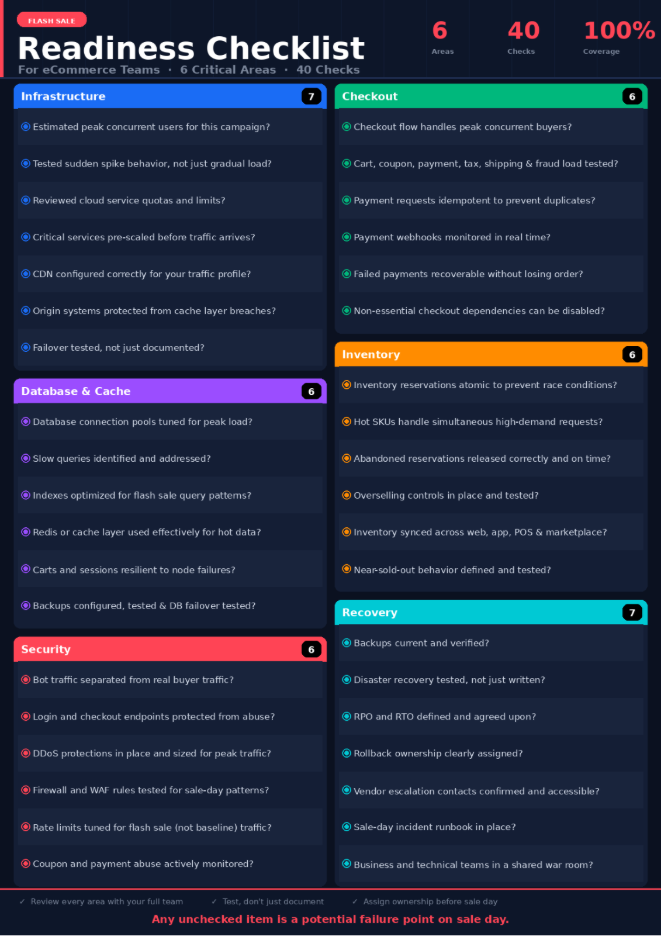
Use this checklist to evaluate your readiness across the six most critical areas. If you answer ‘no’ to more than five items, your flash sale environment needs a readiness review before launch.
Infrastructure readiness
- Have you estimated peak concurrent users for this specific campaign?
- Have you tested sudden spike behavior, not just gradual load growth?
- Have you reviewed cloud service quotas and limits?
- Are critical services pre-scaled before traffic arrives?
- Is CDN configured correctly for your traffic profile?
- Are origin systems protected from traffic breaching the cache layer?
- Has failover been tested, not just documented?
Checkout readiness
- Can your checkout flow handle peak concurrent buyers?
- Are cart, coupon, payment, tax, shipping, and fraud flows load tested?
- Are payment requests idempotent to prevent duplicate charges?
- Are payment webhooks monitored in real time?
- Can failed payments be recovered without losing the order?
- Can nonessential checkout dependencies be temporarily disabled if needed?
Database and cache readiness
- Are database connection pools tuned for peak load?
- Have slow queries been identified and addressed?
- Are indexes optimized for your most common flash sale query patterns?
- Is Redis or another cache layer used effectively for hot data?
- Are carts and sessions resilient to individual node failures?
- Are backups configured and tested?
- Has database failover been tested under load?
Inventory readiness
- Are inventory reservations atomic to prevent race conditions?
- Can hot SKUs handle simultaneous high-demand requests without errors?
- Are abandoned reservations released correctly and on time?
- Are overselling controls in place and tested?
- Is inventory synchronized across web, app, POS, and marketplace channels?
- Is near-sold-out behavior clearly defined and tested?
Security readiness
- Are bot traffic patterns separated from real buyer traffic?
- Are login and checkout endpoints protected from abuse?
- Are DDoS protections in place and sized for peak traffic?
- Have firewall and WAF rules been tested against sale-day traffic patterns?
- Are rate limits tuned for flash sale traffic, not just baseline traffic?
- Are coupon and payment abuse patterns actively monitored?
Recovery readiness
- Are backups current and verified?
- Has disaster recovery been tested, not just written?
- Are RPO and RTO defined and agreed upon?
- Is rollback ownership clearly assigned?
- Are vendor escalation contacts confirmed and accessible?
- Is there a sale-day incident runbook?
- Are business and technical teams coordinated in a shared war room?
Flash Sale Readiness: Startups vs Enterprises
The risks are the same. But the priorities are different depending on where you are in your growth stage.
What startups should prioritize
Startups need speed, stability, and cost control.
Startups often face their first major sale with infrastructure that was built for normal traffic. The goal is not to build enterprise complexity overnight. It is to build a stable, cost-conscious foundation that protects the buying journey and avoids preventable downtime.
Key priorities:
- Scalable cloud foundation that can handle sudden spikes
- Checkout stability and payment flow reliability
- CDN setup and basic caching
- Managed database reliability
- Redis or session cache architecture
- Payment flow testing under load
- Basic bot and DDoS protection
- Backup configuration
- Simple incident response plan with clear ownership
- Cloud cost controls to avoid surprise bills after the sale
What enterprises should prioritize
Enterprises need ecosystem resilience, governance, failover, and vendor coordination.
Enterprise eCommerce failures are rarely caused by a single server going down. They happen because many connected systems degrade at once. The storefront holds up, but checkout breaks. The checkout holds up, but OMS cannot keep pace. The web app survives, but the mobile API falls over.
Key priorities:
- Architecture review covering web, app, POS, admin, OMS, and warehouse resilience
- AWS Well-Architected Review or equivalent cloud architecture review
- Multi-AZ or multi-region readiness
- CDN optimization and edge delivery
- Kubernetes and microservices scalability validation
- Database and cache high availability
- Bot, DDoS, and API abuse protection
- Backup and disaster recovery with tested failover
- Vendor coordination across payment, logistics, fraud, and support providers
- Incident war room planning with business and technical stakeholders
- Cloud cost optimization to avoid peak-season spend surprises
Assess your cloud infrastructure, checkout flow, databases, CDN, cache layers, bot protection and recovery plan with AceCloud before your next festive sale, product drop or high-traffic campaign.
Where AceCloud Fits into Flash Sale Readiness?
Once you understand the risks, the next step is strengthening the infrastructure layers that keep the buying journey available when traffic peaks. We at AceCloud help eCommerce startups and enterprises assess, scale, secure, and optimize cloud environments for high-traffic commerce events.
Here is how AceCloud supports readiness across each critical layer.
1. Assess cloud readiness
Cloud Readiness Assessment and AWS Well-Architected Review help identify scalability gaps, reliability risks, security issues, cloud cost exposure, operational weaknesses, and workload dependencies before they become sale-day problems.
2. Scale eCommerce workloads
AceCloud’s Cloud Compute, Managed Kubernetes, and DevOps automation services help scale storefronts, campaign landing pages, backend APIs, checkout services, admin systems, and containerized commerce workloads to handle flash sale demand.
3. Improves speed and reduces origin load
Our Amazon CloudFront and CDN optimization services help deliver faster product pages, accelerate static asset delivery, support dynamic content acceleration, reduce origin load, and improve regional latency.
4. Strengthen databases and cache layers
We offer Managed PostgreSQL, Managed MySQL, Managed MariaDB, and Managed Redis to support carts, sessions, inventory, orders, and checkout flows. These services include high availability, failover, caching improvements, and performance tuning for hot SKU traffic and checkout load.
5. Protect against bots, DDoS, and abuse
AceCloud’s Managed Firewall, DDoS protection, and AWS security services protect storefronts, APIs, checkout flows, login systems, and admin tools from malicious traffic, bot abuse, and targeted attacks.
6. Prepare backup and disaster recovery
Our Backup and Disaster Recovery and DRaaS services support business continuity, backup validation, failover planning, ransomware recovery, and RPO and RTO planning for sale-critical environments.
7. Optimize cloud cost and operations
We offer managed cloud operations, DevOps automation, and cloud cost optimization services help reduce over provisioning, improve deployment reliability, automate infrastructure, and manage peak-season cloud spend.
Turn Your Next Flash Sale into a Revenue Event
Flash sale readiness is not about adding more servers at the last minute. It is about knowing whether your cloud infrastructure, CDN, databases, cache, security controls, checkout systems, and recovery plans can hold up against real buying behavior under pressure.
For startups, that means building a stable and cost-conscious foundation before the first major campaign. For enterprises, it means validating the full commerce ecosystem from storefront and app to POS, OMS, warehouse, payment, and support systems.
AceCloud helps eCommerce businesses identify infrastructure risks, strengthen cloud environments, optimize performance, improve security, and prepare recovery plans before campaign traffic peaks.
Planning a festive sale, product drop, or high-traffic campaign? Book an AceCloud Flash Sale Readiness Consultation to identify infrastructure, checkout, database, security, and recovery risks before your customers do.
Frequently Asked Questions
Because traffic, checkout, inventory, payment, database, cache, third-party APIs, security systems, and fulfillment workflows are all under stress at the same time. A single weak point in that chain is enough to break the buying journey.
Not always. Auto-scaling helps, but teams also need CDN optimization, database readiness, cache layers, security controls, backup, disaster recovery, and checkout resilience. Scaling compute alone does not address bottlenecks in databases, third-party APIs, or connection pools.
Startups should prioritize scalable cloud infrastructure, checkout stability, CDN and caching, managed database reliability, Redis or cache architecture, payment flow testing, basic security controls, backups, and a simple incident response plan.
Enterprises should prioritize architecture review, multi-system resilience, CDN optimization, Kubernetes scalability, managed databases, bot and DDoS protection, disaster recovery, admin and OMS availability, vendor coordination, and cloud cost management.
AceCloud can help assess cloud readiness, review AWS architecture, optimize CDN performance, manage compute and Kubernetes workloads, strengthen databases and Redis, improve security posture, and prepare backup and disaster recovery plans.
Ideally, at least 30 days before the campaign. Enterprise environments or high-risk platforms should start earlier to allow time for assessment, remediation, load testing, and recovery validation.