As businesses scale and diversify their digital operations, traditional VPNs often become a bottleneck. They usually struggle to meet the performance, scalability and security expectations of modern enterprises.
If you’re wondering how to migrate your traditional VPN to a modern cloud interconnect. In that case, the solution is both strategic and technical, i.e., first examining your existing architecture, then adopting a cloud-native encrypted backbone. It provides hybrid connectivity and global reach.
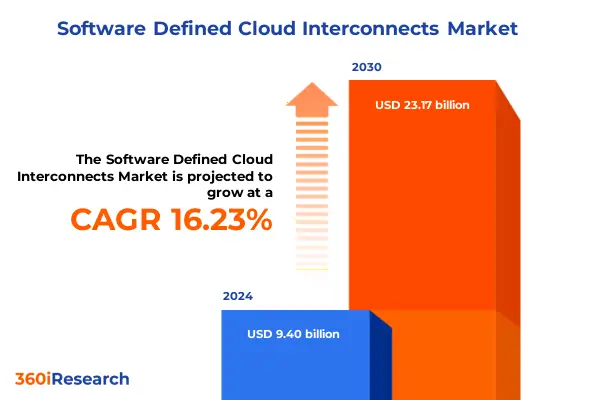
In short, this move allows you to upgrade network infrastructure while providing a hybrid connection across data centers, branches and cloud applications.
This blog will walk you through everything you need to plan, prepare and execute this migration with clarity and control.
Steps to Migrate Traditional VPN to Cloud Interconnect
A modern interconnect gives you a private, SLA backed path into and between clouds. You get predictable latency, steady throughput and fewer surprises than the open internet.
In practice this means faster replication, quieter dashboards and fewer late-night pages when traffic spikes. The goal is not a shiny circuit. The goal is a calmer network and happier apps.
Also Read: How to Build Resilient Cloud VPNs Across Multiple Regions
Step 1: Define scope and success
Start with outcomes, not links. List the applications that you want to move, the users they serve and the specific flows that matter. Besides, list the specific data, where they are and where you want to move them. Capture one week of latency, jitter, loss and throughput on the current VPN so you can prove the change helped.
Define measurable success areas. For example, cut average RTT by 30 percent for database replication, keep jitter within 3 ms of baseline for voice and raise sustained throughput to 2x with no loss. Add guardrails. If error budgets breach for 15 minutes during cutover you revert.
Build a small risk register with named owners. Include data residency, PCI or HIPAA needs and regional restrictions. Get written sign off from security, networking, platform and app owners so everyone is aligned before a single port lights up.
Step 2: Choose the interconnect model
Select the interconnect type and location. For AWS, look at Direct Connect with dedicated or hosted ports. In Azure, consider ExpressRoute. In Google Cloud, choose Dedicated or Partner Interconnect for on-prem to cloud and Cross Cloud Interconnect when you need cloud to cloud paths. Decide on port speeds, number of virtual circuits and term.
If you need speed to value or multicloud reach, a network fabric like Equinix or Megaport helps. You can spin up virtual cross connects in minutes, point to new clouds without fresh fiber and scale from 1 to 100 Gbps as usage grows. Place terminations in neutral colos that give you diverse carriers and real physical separation.
Step 3: Design routing and addressing
Overlapping IP space creates years of trouble. Reserve clean CIDRs for each environment and document them. Map segments to VLANs or virtual circuits and keep a simple one to one relationship where possible.
Plan BGP early. Assign ASNs, set max prefix limits and decide how you will steer traffic. Use local preference to make the interconnect primary. Use AS path prepending to keep the old VPN as a warm standby during transition. Summarize routes to reduce churn.
Filter inbound and outbound prefixes so only what you expect is exchanged. Where supported, enable Graceful Restart or Long-Lived Graceful Restart to smooth planned changes. Pair conservative BGP timers with BFD so you detect failure quickly. Avoid NAT unless overlapping IP or legacy constraints force it.
Step 4: Decide on encryption and segmentation
The interconnect gives you private transport. Policy may require encryption on every hop. You have two common choices. Use IPsec as an overlay if you want device independence and clear boundaries.
Use MACsec when you control layer 2 and want line rate encryption on the wire. Document where encryption starts and ends so auditors are comfortable. Decide who owns the keys and how often they rotate. If you use a central HSM or cloud KMS, integrate it now rather than later.
Segmentation matters as much as encryption. Separate prod, non-prod and shared services with VRFs, route domains and security zones. Map those to cloud constructs such as AWS Transit Gateway route tables, Azure Virtual WAN hubs and Google Cloud Router attachments.
Reach PaaS privately through PrivateLink, Private Service Connect or service endpoints, so traffic stays off the public internet and follows the same inspection path as IaaS.
Step 5: Engineer resilience
Redundancy is not just two ports on one box. Aim for different devices, different providers and different meet me rooms with different duct paths. Ask for evidence of path diversity rather than a promise. Spread circuits across line cards or chassis where you can.
Enable BFD on BGP sessions to cut failure detection to sub second where supported. Tune hold timers with care so you converge fast without false alarms. Keep the VPN up as a tertiary path during migration. Decide in writing which events trigger failover and how routes should shift.
Step 6: Build the cloud landing zone
Set the edge before you order circuits. In AWS, connect Direct Connect on a Direct Connect Gateway then attach to Transit Gateway for multi account reach. Keep separate route tables per environment and control propagation. Plan PrivateLink for PaaS and third-party services that should remain private.
In Azure, Virtual WAN simplifies hub and spoke as you grow. Attach ExpressRoute to hubs. If you need site to site through the Microsoft backbone, add Global Reach. Use Network Security Groups and route tables as policy as code so new VNets inherit the right defaults.
In Google Cloud, use Dedicated or Partner Interconnect for on prem and Cross Cloud Interconnect when moving between clouds. Place Cloud Router at the edges. Keep import and export policies tight. Use Private Service Connect for private PaaS access.
Step 7: Order and provision
Order cross connects or partner virtual circuits. Coordinate LOA and CFA with the colo. Reserve VLAN IDs and write them into your build sheet. Confirm optics, port speed and expected light levels. Align maintenance windows across carrier, fabric and cloud teams. Share a short comms plan so app owners know when to test. Prestage read only credentials for monitoring, so visibility is live as soon as the first light turns green.
Step 8: Configure on-prem and cloud edges
Stand up subinterfaces for each circuit. Set MTU end to end. If you want jumbo frames, verify every hop supports them. Keep QoS simple and observable. Preserve DSCP markings through the fabric and into the cloud edge so control traffic and voice do not fight with bulk transfers.
Build BGP with authentication, explicit neighbors and clear route maps. Apply prefix lists so only intended networks move in either direction. Turn on telemetry for interface counters, BGP state and flow logs. Send it to your NPM and SIEM from both sides so you can watch the same picture.
Step 9: Validate with a pilot slice
Pilot with a low-risk slice that still looks like production. One app, one environment or one tier is enough. Drive synthetic tests for RTT, throughput and jitter at realistic load.
Create failure on purpose. Drop one port, one device and one provider path and watch convergence. Verify that alarms fire and that dashboards tell a clear story.
Compare results to the baseline you took in step one. Look at time of day effects. Public fabrics can feel different at peak. Share the numbers and get a clear yes from stakeholders before you move production.
Step 10: Migrate production in phases
Prefer the interconnect by adjusting BGP policy. Increase local preference for routes learned across the interconnect. Push the VPN to second place with AS path prepending. Migrate the flows that benefit the most first.
Database replication and storage synchronization often show the biggest wins. Move backend application tiers next. Shift user traffic last because it touches the most people.
Define stability gates. For example, two full business cycles with no critical incidents or sustained throughput above 70 percent of target with zero loss. Keep a simple change log that records each move so you can correlate any blip with a specific step.
Step 11: Harden and operate
Once production traffic flows over the interconnect, lock in operational hygiene. Set route change alerts so a surprise prefix does not ruin your afternoon. Add capacity alarms at 60 and 80 percent utilization so you scale before queues build.
If you use a network fabric, script upgrades to higher bandwidth when you need them and test downgrades to control cost.
Run quarterly failover drills that bounce a port, a device and a provider path. Rotate IPsec or MACsec keys on a schedule. Review ACLs, Security Groups and route tables for drift.
Keep a brief runbook with tested commands, expected outputs and screenshots. If any internet ingress remains, make sure DDoS controls cover it.
Step 12: Decommission the old VPN
After the stability gates are met, clean up with care. Remove static routes and tunnel objects. Prune firewall rules that only existed for the VPN. Update diagrams and the CMDB. Close carrier circuits tied to the legacy path and stop paying for a service you no longer need. Send a final note to stakeholders and confirm monitoring shows zero traffic on old tunnels.
Modernize Your Network Now: Plan Your Interconnect with AceCloud
Modernize your network with confidence. Replace fragile VPN tunnels with a cloud interconnect that delivers predictable latency, steady throughput and real uptime. Start by baselining performance, then choose the right service, design clean routing, encrypt and segment, build the landing zone, pilot, migrate in phases and decommission safely.
AceCloud makes this plan real. We assess your traffic, map critical flows, select Direct Connect, ExpressRoute or Interconnect, and design BGP, addressing, QoS and MACsec or IPsec. We run a pilot, execute a controlled cutover, instrument observability and train your team. The result is a calmer network and happier apps at a lower cost.
Ready to begin? Schedule an architecture review with AceCloud or talk to our experts today at +91-789-789-0752.
Frequently asked questions
A modern cloud interconnect is a private, SLA backed link into cloud networks. It delivers predictable latency and high throughput, unlike best effort VPN paths over the public internet.
Move when you need steady performance, large data flows or multicloud reach. If backups, analytics or replication saturate your VPN, an interconnect is the next step.
Yes, if policy requires it. Add IPsec or MACsec to encrypt traffic end to end while keeping the interconnect for performance and reliability.
Run both paths in parallel. Prefer the interconnect with BGP policy, move low risk flows first, then cut over production after soak tests pass.
You pay for ports and virtual circuits instead of per tunnel overhead. For steady high traffic, interconnects often reduce total cost by avoiding congestion and rework.
AceCloud plans the design, pilots the cutover and automates monitoring and failover. Book a discovery call to get a tailored blueprint, cost model and a phased rollout plan.

![AWS S3 to Indian Alternative: Complete Migration Guide [2026]](https://acecloud.ai/wp-content/uploads/2026/06/s3-alternative.webp)