
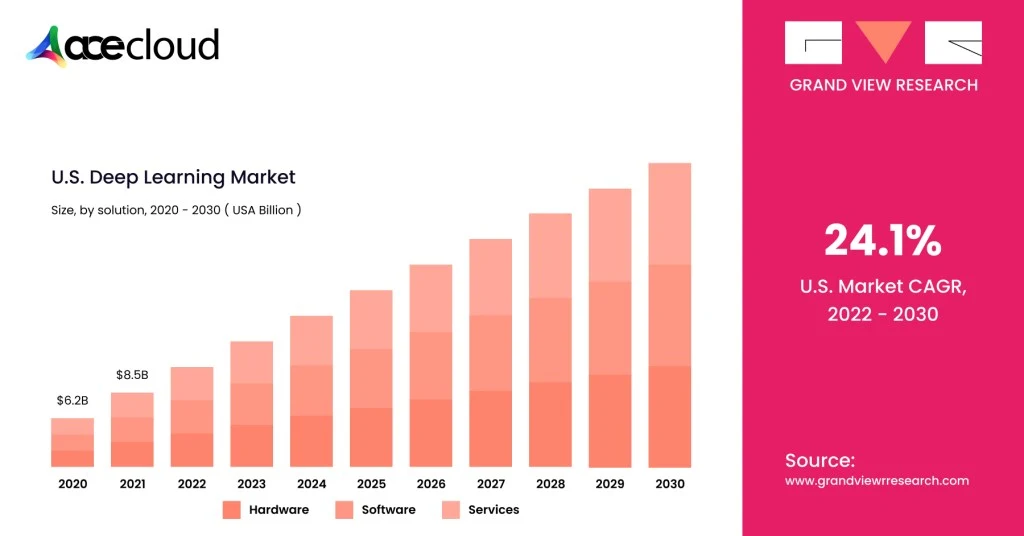
GPU Cluster for AI and deep learning is becoming the new baseline, as generative and agentic AI push compute demands beyond what traditional infrastructure can deliver. In a recent McKinsey report, AI use reached 88 percent of organizations in at least one business function, an increase of ten percentage points from 2024.
Training larger models and serving low-latency agents needs highly parallel GPUs plus fast networking and storage to keep them fully utilized.
A single workstation or even one multi-GPU server build often hits limits in memory, throughput and reliability. GPU clusters solve this by connecting multiple GPU-enabled nodes into one scalable system for distributed training and production inference.
McKinsey report estimates data centers are projected to require $6.7 trillion in capex by 2030 to meet compute demand.
This guide shows a practical blueprint you can execute, review and reuse inarchitecture discussions.
Step 1: Define the Target Workload
This step sets the requirements for compute, networking, storage and the serving layer.
First, separate training from inference, because training is usually network and storage hungry while inference is latency and platform heavy.
Next, document model sizes, sequence lengths, batch sizes and precision targets like FP16, BF16 or FP8, because these control VRAM and throughput needs.
Additionally, list frameworks like PyTorch, JAX or TensorFlow plus your distributed training strategy (DDP, FSDP, ZeRO/DeepSpeed, etc.) because these drive gradient, activation and optimizer-state communication patterns.
What you should write down
- Target time-to-train and scaling goal, such as “8 GPUs to 64 GPUs with at least 70% efficiency.”
- Expected concurrency, such as “ten active experiments and two production inference services.”
- Data profile, including file counts, file sizes and checkpoint frequency.
Step 2: Pick an Architecture: Scale-up, Scale-out or Both
This step determines how many nodes you buy and where performance bottlenecks will appear first.
Choose scale-up when you want fewer nodes with many GPUs tightly connected through NVLink / NVSwitch-class designs (high intra-node bandwidth, very low latency).
Choose scale-out when you want more nodes and accept that inter-node networking (all-reduce, parameter sync, sharded state) becomes the primary limiter for large-scale distributed training.
For large programs, reference designs like NVIDIA DGX SuperPOD show modular “scalable units” (compute + fabric + storage) and a management stack pattern you can adapt.
Practical selection guidance
- You should prefer scale-up for model parallel workloads that benefit from very fast GPU-to-GPU communication.
- You should prefer scale-out when capacity growth and multi-tenant scheduling matter more than single-job peak efficiency.
- You should plan for both when you expect research training and production inference to share the same core platform.
Step 3: Design the GPU Node
A repeatable node design reduces operational variance and makes performance debugging far simpler.
Start with GPU count per server, commonly 4–8, then confirm each GPU’s memory capacity matches your largest planned model footprint.
Next, size CPU and RAM to feed the GPUs, because weak CPUs frequently bottleneck data loading and networking overhead.
Finally, validate PCIe generation and lane allocation, NIC placement (per NUMA node), local NVMe scratch capacity, power draw and cooling headroom before locking in vendors.
Node design checklist you can reuse
- GPU layout and interconnect plan, including any NVLink domains.
- CPU socket and PCIe topology map, including NIC-to-GPU proximity and which GPUs share a PCIe switch or root complex.
- Local NVMe scratch for caching, shuffles and temporary artifacts.
- Rack mounting plan, PSU redundancy and realistic sustained power numbers.
Step 4: Design the Network
You should treat networking as a first-class dependency for distributed training performance and cluster reliability.
Most clusters need two networks, one high-speed fabric for training traffic and one management network for provisioning and monitoring.
NVIDIA’s SuperPOD guidance breaks networking into multiple fabrics, including compute, storage and management networks, which is a useful planning model.
Key points you should apply
- NCCL can use InfiniBand or RoCE, and GPUDirect RDMA reduces CPU involvement while improving bandwidth and latency.
- Large clusters often use rail-optimized, full-fat tree fabrics to avoid oversubscription patterns that degrade all-reduce performance.
- You should separate management traffic from training traffic, because congestion can cause both performance loss and operator pain.
Step 5: Plan Storage for Throughput, Not Just Capacity
In our experience, storage design decides whether expensive GPUs stay busy or sit idle waiting for input batches and checkpoints.
A common pattern uses shared high-throughput storage for datasets and checkpoints plus local NVMe scratch on each node for caching.
If storage cannot stream fast enough, GPUs idle and your effective cost per trained token rises quickly.
Additionally, SuperPOD reference designs treat storage as a core component alongside compute and networking, which matches real-world cluster behavior.
Storage practices that reduce risk
- You should stage datasets locally for repeated epochs, because repeated remote reads amplify contention during peak hours.
- You should write checkpoints locally first, then copy to shared storage, because bursty writes can throttle shared arrays.
- You should test with your real file formats, because many small files stress metadata differently than a few large files.
Step 6: Cost, Power and Facility Planning
Before you commit to hardware, model the true cost of running a GPU cluster over time. Total cost of ownership is not just GPU price. Power, cooling, networking, storage and operations often decide whether the cluster scales reliably or becomes an expensive bottleneck.
Use the buckets below as your baseline checklist.
| Cost bucket | What to include | Why it matters |
|---|---|---|
| Compute capex/opex | GPUs, servers, warranties/support | Dominates upfront spend |
| Network | NICs, switches, optics/cables, spares | Often the scaling bottleneck |
| Storage | Shared storage + backups + expansion | GPU idle time is expensive |
| Facilities | Rack space, PDUs, power, cooling | Limits density and growth |
| Ops | Staffing, monitoring, upgrades, incident response | “Hidden” long-term cost |
Step 7: Choose the Cluster Manager and Scheduling Model
The scheduler determines utilization, fairness and how easy it is for teams to run work safely.
Slurm is common for training clusters and supports GPU scheduling via Generic Resources (GRES).
Kubernetes fits platform and inference workflows. The NVIDIA GPU Operator can automate drivers, the device plugin, the container toolkit, node labeling and DCGM-based monitoring.
How you should decide
- Choose Slurm when most work is batch training with queues, reservations and fair-share policies.
- Choose Kubernetes when most work is services, pipelines and standardized platform operations across teams.
- Avoid “two schedulers for everyone” early, because it doubles operational surface area without doubling value.
Read: CUDA Cores vs. Tensor Cores
Step 8: Standardize the Software Stack and Make it Reproducible
A consistent software baseline prevents unpredictable “host-to-host variation” behavior where identical jobs run differently depending on placement.
Start with a standard OS image and kernel choices, then pin GPU drivers, CUDA and NCCL versions and upgrade deliberately.
NCCL behavior depends on topology and configuration and NVIDIA documents extensive environment controls (including system-wide config files like /etc/nccl.conf) you can operationalize.
Additionally, containers make environments repeatable across teams, which reduces support load and accelerates onboarding.
Baseline components you should standardize
- OS image, time sync, SSH access model and patching approach.
- NVIDIA driver, CUDA toolkit, NCCL version and firmware requirements.
- Container runtime, internal registry and approved base images.
- Logging, metrics agents and audit trails for multi-tenant environments.
Step 9: Validate Right Benchmarks Before Opening to Users
In our experience, validation protects you from discovering bottlenecks only after teams depend on the cluster for critical delivery.
Run NCCL collectives tests to measure all-reduce bandwidth and latency across nodes, then compare results after each major change.
Next, run storage throughput tests with your real dataset mix, because “peak bandwidth” numbers rarely match production read patterns.
Finally, run a standard training smoke test, then run your real model, because real frameworks expose scheduler, I/O and networking interactions.
What “good” validation looks like
- Single GPU baseline, then single-node multi-GPU scaling, then multi-node scaling.
- Clear attribution of bottlenecks, such as network-limited all-reduce or storage-limited data loading.
- Repeatable test scripts, because you will need the same tests after updates and expansions.
Read: How To Find The Best GPU For Deep Learning
Step 10: Productionize Operations
Operations turn a working lab cluster into a reliable shared platform with predictable cost and performance.
Implement monitoring and alerting for GPU health, ECC errors, throttling, NIC errors and link flaps, because many failures degrade throughput quietly.
Define a firmware and driver update process with rollback, because coordinated changes reduce outage risk in multi-node training environments.
Maintain spares for NICs, PSUs and disks, and keep a plan for GPU failures when replacement lead times are long.
Multi-tenant controls you should implement
- Quotas and fair-share to prevent one team from starving the rest.
- Preemption or QoS policies for mixed research and production workloads.
- Standard job templates and runbooks, because consistent workflows reduce incidents.
Security, governance, and access control
- Centralize identity with SSO where possible, enforce RBAC (Slurm accounts or K8s RBAC) and log administrative actions.
- Segment networks and restrict the management plane (bastion access, least privilege).
- Secure containers with an approved base image set, image scanning and patching cadence.
- Define data access rules per dataset, including encryption requirements and auditability when needed.
Reliability and disaster recovery
- Remove single points of failure where practical (control plane redundancy, config backups, spare capacity).
- Back up scheduler config, cluster state and critical storage metadata.
- Define checkpoint retention and restore drills so you can recover after failures without guessing.
Build vs buy checkpoint you can apply here
- You should build on-prem when utilization is predictably high and you can support facilities and operations with clear ownership.
- You should buy or rent cloud GPUs when demand is bursty and timelines are tight, then bring steady-state, predictable workloads in-house later if economics justify it.
Ready to Launch your GPU Cluster on AceCloud?
Building a GPU Cluster for AI and Deep Learning is not just about hardware. It is about aligning performance, scalability and operational control with your AI roadmap. Whether you are training multi-billion-parameter models or deploying low-latency inference services, AceCloud’s high-performance cloud GPU infrastructure delivers enterprise-grade clusters built for reliability, speed and scale.
Our experts help you design, deploy and optimize GPU environments that balance cost and compute power on-prem, hybrid or in the cloud.
Start transforming your AI workloads today with AceCloud’s GPU cluster solutions.
Get a free consultation with AceCloud’s GPU specialists and build your next-generation AI infrastructure with confidence.
Frequently Asked Questions
A GPU cluster is a group of GPU-equipped nodes connected with networking and managed by an orchestration layer to run workloads in parallel.
You should start from model size and VRAM needs (e.g., parameters × bytes per parameter × replicas, plus optimizer and activation overhead for training), then validate with a baseline run and scaling tests aligned to your throughput target.
Yes for learning or small workloads, but power, noise/heat, networking, and storage constraints show up quickly compared to a colo or cloud setup.
Common choices include Slurm for HPC-style scheduling and Kubernetes for platform-style orchestration, often combined with the NVIDIA GPU Operator and device plugins for stable GPU scheduling.
Cost depends on GPU class and count, networking, storage and power and cooling, while cloud shifts costs to usage-based spend.
Ethernet is often sufficient for many clusters. But if you’re chasing high multi-node scaling efficiency for large training jobs, InfiniBand/RoCE designs are common; validate them using NCCL collectives tests (and compare scaling efficiency vs cost).

Related Post









Get in Touch

Credits First!
- 24*7 Human Support
- Pay-as-you-go Pricing
- No Egress Cost
- Multi Tier Security