
Compute in Cloud Computing powers modern apps, data pipelines and AI tasks without needing hardware. Synergy Research Group estimates cloud infrastructure service revenues reached $119.1B in Q4 2025 and $419B for 2025, driven largely by GenAI. This growth shows why picking the right compute model is crucial.
Compute, along with storage and networking, forms the core of cloud infrastructure. It determines how fast teams can implement changes. When using on-demand servers, success depends on smart resource allocation, provisioning and orchestration across different environments.
The best approach differs: some workloads require VM-level control for legacy systems, while others thrive with containers for portability and easy scaling. Serverless options can handle event-driven spikes with little server management.
In this blog, you’ll explore key compute concepts, service types and real-world examples to help you choose wisely.
What is Compute in Cloud Computing?
Cloud compute is the processing layer that runs applications and workloads. It includes CPU, RAM and the runtime environment. Storage and networking are provided separately.
Cloud providers deliver these compute resources on demand, so teams can provision and scale capacity without buying or maintaining physical servers.
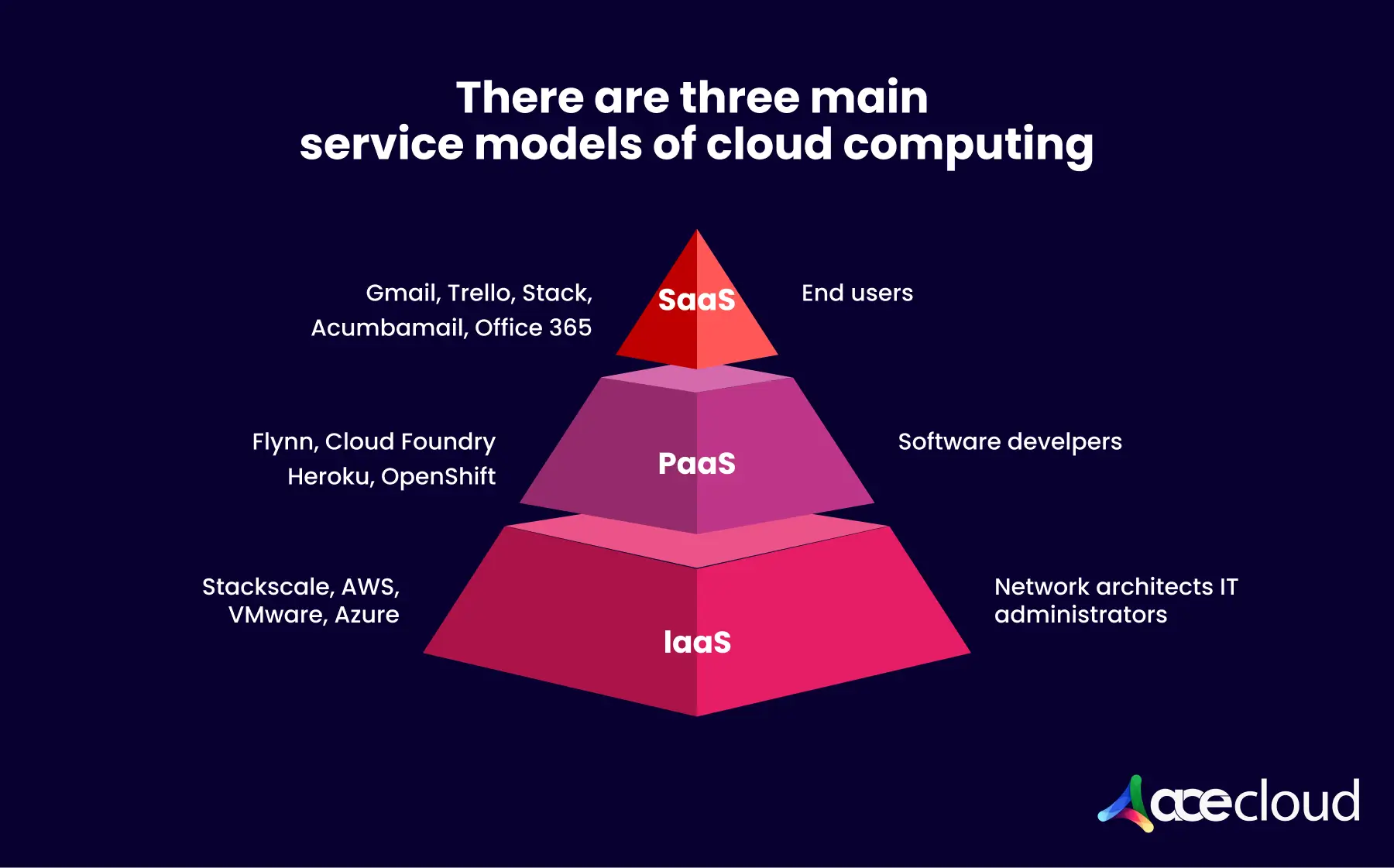
In practice, cloud compute is consumed through models such as virtual machines (VMs), containers (often orchestrated with platforms like Kubernetes) and serverless functions.
These options power everything from simple websites and APIs to data pipelines, big-data analytics and machine learning. Compute is a foundational building block of cloud infrastructure.
Here is a list of compute service types:
Virtual machines
VMs provide OS-level control and predictable isolation, which suits legacy stacks, regulated environments and steady enterprise workloads. Teams provision an instance, attach storage, configure networking and then manage patching and hardening through standard runbooks.
Containers and Kubernetes
Containers package applications with dependencies, which improves portability across environments and reduces configuration drift. Kubernetes adds orchestration for scheduling, scaling and rolling updates, which helps platform teams standardize delivery at scale.
CNCF reports 82% of container users ran Kubernetes in production in 2025, which signals mature operational adoption.
Serverless functions
Serverless runs code in response to events, which fits bursty traffic, async workflows and automation jobs. Teams manage code, configuration and permissions, while the platform scales execution and manages capacity behind the scenes.
Edge compute
Edge compute places processing closer to users and devices, which reduces latency for interactive and IoT workloads, typically by running lightweight clusters or appliances at edge sites that are managed from a central cloud or platform. Teams often run filtering, aggregation and inference at the edge, then ship curated data to centralized systems.
GPU compute
GPU compute accelerates parallel processing for AI training, inference, rendering and simulation workloads. Architects typically plan around GPU memory capacity, interconnect bandwidth and scheduler behavior because these factors drive throughput and job completion time.
What are the Key Benefits of Compute in Cloud Computing?
Below is the list of top benefits which show how compute choices influence provisioning time, runtime performance and governance consistency.
Agility through faster provisioning
Faster provisioning turns infrastructure into an on-demand capability instead of a long request cycle. Teams create environments in minutes, which accelerates project starts and reduces delays during releases, change windows and incident recovery activities.
Elasticity for scalable infrastructure
Elastic scaling lets capacity track real demand instead of peak estimates. Organizations scale workloads up for traffic spikes and scale them down when demand drops, which maintains performance and avoids paying for idle compute capacity.
Recommended Read: Top 7 AI and Compute Trends Shaping the Future in 2025 & Beyond
Pay-as-you-go to reduce CapEx
Usage-based billing replaces large upfront purchases with operating expense that matches consumption. Finance teams forecast spend more accurately because costs align to workload activity, while procurement teams remove delays tied to hardware acquisition cycles.
Higher experimentation velocity
Rapid access to compute increases the speed of experimentation. Engineering teams spin up isolated dev, test and sandbox environments, validate changes quickly and roll back safely because experiments do not compete with production resources.
Reliability and resilience patterns
Cloud compute enables resilient designs that reduce downtime risk when you architect for multi-zone/region and automated failover. Platform teams deploy across multiple zones, automate failover and replace failed capacity quickly.
Modernization enablement
Modern compute options support consistent deployment workflows and standardized operations. Teams adopt containers, CI/CD pipelines and managed runtimes, reduce configuration drift between environments and deliver releases more reliably across services.
Expanded performance options
Compute families and accelerators let teams match performance to workload characteristics. Architects choose high-memory shapes for data-heavy services, GPUs for AI and rendering and high-throughput networking for distributed systems, which improves completion time.
Reduced operations burden through automation
Automation reduces repetitive operational work through policy and platform controls. Ops teams use orchestration, managed services and guardrails, cut manual effort and enforce consistent compliance through standardized access controls, tagging and logging.
Real-World Use Cases of Compute
The following practical use cases highlight how compute supports peak scaling, disaster recovery, analytics pipelines and modern development workflows.
Infrastructure scaling
Cloud compute lets organizations scale capacity up or down as demand changes. Retail teams can add CPU, memory and even GPU resources during peak seasons to keep checkout and inventory systems responsive, then reduce capacity when demand drops to control compute spend.
Disaster recovery
Cloud compute reduces the need to build a second data center for recovery. Teams can replicate workloads, images and configurations to another region or zone, then start replacement compute quickly during an incident as part of a designed and tested DR plan to restore services and meet recovery targets.
Data processing
Cloud platforms store large datasets cost effectively, while cloud compute powers the processing around that data. Teams can run backup jobs, indexing and analytics near the data, reduce on-prem pressure and support secure sharing across distributed teams with controlled access.
Application development
Cloud compute speeds development by providing ready-to-use environments for builds, testing and deployment. Developers can launch consistent runtimes, integrate managed services and automate provisioning through templates, which keeps focus on code while reducing setup and maintenance effort.
Big data analytics
Elastic compute makes large-scale analytics practical because capacity expands for heavy processing, then shrinks when jobs finish. Teams can run distributed queries, data transformations and model training faster, since compute scales with dataset size and processing complexity.
How to Choose the Right Compute Model
A simple selection method prevents platform sprawl and keeps architecture reviews consistent across teams and business units.
- Start with demand shape, including steady versus spiky patterns and known peak windows.
- Next, define latency requirements, statefulness and data gravity because those constraints affect scaling and placement.
- Additionally, confirm compliance scope, identity integration needs and budget guardrails that Ops can enforce.
A practical decision framework
- VMs: Best when OS control, legacy dependencies or steady workloads drive the requirements.
- Containers and Kubernetes: Best when portability, standard scaling and microservice delivery matter most.
- Serverless: Best when event-driven bursts and minimal server management outweigh runtime constraints.
- GPUs: Best when AI, rendering and parallel compute drive throughput requirements.

Keeping hybrid placement in view
Hybrid decisions usually follow data residency, latency to users, sovereignty controls and existing investments. Therefore, network design, logging consistency and identity federation should be defined early, not after migrations start.
Turn Compute Decisions into Faster Delivery on AceCloud
Compute in Cloud Computing only creates value when the model fits your workload and the platform supports consistent operations. Start by selecting VMs, Kubernetes, serverless, edge or GPUs based on demand shape, latency and governance requirements. Then validate outcomes with a focused pilot that measures performance, reliability and cost per unit of work.
AceCloud helps teams run production-ready compute with GPU-first infrastructure, flexible provisioning and platform controls that IT Ops can standardize.
Ready to move from planning to execution? Explore AceCloud compute options, run a 30-day workload pilot and request migration support to accelerate your next deployment.
Frequently Asked Questions
It is the on-demand processing resources (CPU, RAM and networking, plus optional GPUs) used to run cloud workloads.
It is typically billed by usage, with options like on-demand, commitment or reserved pricing and spot or preemptible for flexible jobs.
Compute runs and processes workloads, while storage persists data such as files, objects and databases.
Any industry with variable demand or heavy processing, especially ecommerce, media, finance, healthcare analytics and AI-driven products.
When workloads are fault-tolerant and can restart safely, such as CI jobs, batch processing, ETL and non-critical analytics.

Related Post







Get in Touch

Credits First!
- 24*7 Human Support
- Pay-as-you-go Pricing
- No Egress Cost
- Multi Tier Security