Terraform, developed by Hashicorp, is the most popular Infrastructure-as-Code (IaC) tool that helps businesses define, provision and manage infrastructure automatically.
It allows organizations to replace manual cloud provisioning with simple configuration files that deliver predictable, repeatable and scalable results.
Whether you manage AWS workloads, hybrid environments or Kubernetes clusters, Terraform enables speed, consistency and cost optimization.
According to a recent survey, the global IaC market is expected to reach over USD 7.1 billion by 2034, growing at a compound annual growth rate (CAGR) of 24.1% from its 2024 valuation of USD 850.6 million.
In this blog, we will discover Terraform’s uses, architecture, benefits and how it works. Let’s break it down step by step.
What is Terraform Architecture?
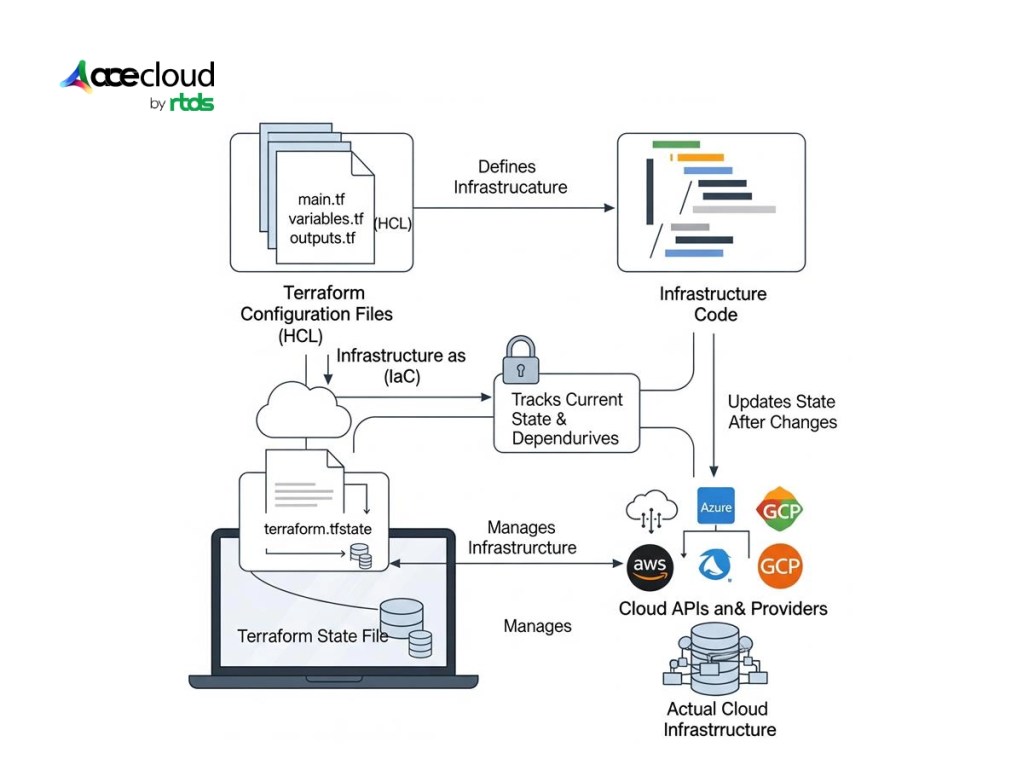
Terraform is built on a few core components that work together to define, manage and maintain infrastructure efficiently.
Understanding these building blocks helps you see how Terraform translates simple code into reliable infrastructure across clouds and on-prem environments.
1. Terraform Configuration Files
Terraform configuration files define the desired infrastructure state using HashiCorp Configuration Language (HCL).
These files include resources, input variables, outputs and modules that describe how the infrastructure should be provisioned.
By writing these files, teams gain consistency, reusability and clarity in infrastructure management, making deployments predictable and collaborative.
2. Terraform State File
The Terraform state file is a local or remote snapshot storing resource identifiers and tracked attributes; it enables Terraform to map configuration to real resources.
Note: State may contain sensitive attributes, can drift from reality if not refreshed, and should be stored in a remote backend with locking (e.g., S3+DynamoDB, Terraform Cloud) for team use.
This file ensures Terraform knows what already exists, preventing duplication or drift. By aligning actual infrastructure with configuration files, the state file guarantees accuracy and reliability.
3. Infrastructure as Code
Terraform introduces the concept of Infrastructure as Code where infrastructure is defined and managed through code rather than manual clicks.
This approach enables version control, peer reviews and automation.
Teams collaborate more effectively, reduce human error and ensure every infrastructure change is transparent, reproducible and scalable across multiple environments.
Teams migrating from proprietary cloud solutions can maintain this collaborative approach by converting existing CloudFormation templates to Terraform modules for seamless infrastructure portability.
4. Cloud APIs or Other Infrastructure Providers
Terraform communicates directly with cloud provider APIs or on-prem interfaces to provision resources.
Whether it is AWS EC2, Azure Storage or Kubernetes clusters, Terraform translates configuration into API calls.
This abstraction simplifies complex operations, allowing teams to focus on outcomes instead of the intricacies of underlying provider-specific commands.
5. Providers
Providers are Terraform’s essential plugins that integrate with infrastructure platforms like AWS, Azure, AceCloud and Google Cloud.
They enable Terraform to provision, manage and update resources across diverse ecosystems.
With hundreds of providers available, Terraform gives organizations the flexibility to operate in multi-cloud, hybrid or even niche environments efficiently and consistently.
How Does Terraform Operate?
Terraform uses provider plugins to call cloud and service APIs; Terraform itself orchestrates the plan/apply workflow while providers translate Terraform resources into provider-specific API requests (or you can implement a custom provider when needed)
These APIs serve as a link between Terraform and the target platform, while providers operate as plugins that convert Terraform instructions into API requests.
Terraform can manage platforms that have a Terraform provider, if a provider exists (official, community or custom-built). Terraform can interact with that platform’s API.

HashiCorp, along with a highly active community, has already developed thousands of providers.
This ecosystem covers a vast range of technologies, from leading cloud platforms such as Amazon Web Services (AWS), Microsoft Azure and Google Cloud Platform (GCP), to container orchestration systems like Kubernetes and Helm, as well as popular SaaS solutions like GitHub, Splunk and DataDog.
All publicly available providers are listed on the Terraform Registry, which acts as the central hub for discovery, documentation and reuse.
The core Terraform workflow includes three stages:
Write
In the Write stage, users define the desired infrastructure in configuration files, which can span multiple platforms. For example, you might create a VPC network, configure security groups, set up load balancers and launch virtual machines for an application deployment.
Plan
During the Plan stage, Terraform generates an execution plan, showing the exact actions, it will take. This includes creating, updating or destroying resources based on your configuration and the current state of infrastructure. The plan provides visibility and prevents surprises before any changes are made.
Apply
In the Apply stage, Terraform executes the proposed operations in the correct order while respecting resource dependencies. For instance, if you update a VPC and change the number of virtual machines, Terraform will update the VPC first and then scale the virtual machines. This ensures predictable, consistent and safe deployments.

Key Advantages of Terraform
Using Terraform offers several key advantages that make infrastructure management more efficient and reliable:
Declarative Configuration
Terraform uses a declarative configuration language. It allows you to define the desired state of infrastructure rather than listing step-by-step instructions. This approach simplifies complex deployments, making them easier to understand, manage and scale.
Multi-Cloud and Hybrid Support
With support for multiple cloud providers, on-premises systems and open-source tools, Terraform allows you to manage all resources from a single configuration. This flexibility enables teams to adopt multi-cloud strategies and reduce vendor lock-in. Organizations looking to maintain complete control over their infrastructure can leverage Terraform for building and deploying private cloud environments with consistent IaC practices across hybrid setups.
Reusable and Modular Code
Terraform promotes reusability by enabling you to structure infrastructure as modular, repeatable code. By using modules and variables, teams can standardize patterns and reduce errors across large deployments.
Collaboration Through Version Control
Terraform configurations integrate seamlessly with Git and other version control systems. Teams can collaborate effectively, review changes and track infrastructure history, ensuring consistency and transparency across projects.
Efficient Resource Management
Terraform handles resource dependencies automatically and provisions them in the correct order. This ensures efficient resource management, avoids duplication and provides a smoother lifecycle for creating, updating, or destroying infrastructure.
Use Cases of Terraform
Terraform proves its value in several real-world scenarios. Let’s explore a few common examples where it makes a significant difference.
Rapidly Build and Tear Down Environments
Most IT organizations maintain multiple environments such as development, testing, staging and production. With Terraform, you can define all infrastructure resources and their dependencies as code using HashiCorp Configuration Language (HCL). This approach allows you to quickly spin up a new environment whenever needed.
For instance, if you want to test a new feature in an environment identical to production, you can replicate the production setup with a single command. This ensures your changes work as expected before moving them live.
Similarly, when developing a new feature, you can create a temporary development environment and dispose of it once the work is complete. The same method also applies to recovery environments, which can be deployed instantly during outages or disasters.
For enterprise teams planning comprehensive infrastructure transformation, Terraform fits perfectly into a structured 5-step enterprise cloud roadmap that ensures scalable, secure and compliant deployments.
Run Applications Across Multiple Clouds
Relying on a single cloud provider can expose applications to unnecessary risks. If one provider experiences an outage in a specific region, your application may go down with it. Running workloads across multiple cloud providers creates built-in fault tolerance.
Many businesses even combine public cloud resources with on-premises infrastructure, building hybrid environments that balance performance, security and cost.
Terraform simplifies this process by offering a cloud-agnostic approach. It deploys applications across different clouds in a consistent and repeatable way. Instead of learning provider-specific deployment tools, your team uses one framework (Terraform) for a uniform multi-cloud experience.
Deploy and Scale N-Tier Applications
Modern applications often follow an N-tier architecture, where each tier serves a distinct purpose. For example, a web application might include one tier for databases, another for web servers and a load balancer to distribute traffic. Dependencies between these tiers must be carefully managed.
Terraform handles these relationships seamlessly. Databases can be provisioned first, ensuring web servers function correctly once deployed. Scaling is also straightforward.
If you need an additional database server, you only modify the configuration and apply the change. Terraform provisions the new resource and integrates it into the environment, improving resilience without manual intervention.
Integrate with Popular PaaS Tools
Provisioning infrastructure is just one part of modern application deployment. Many teams rely on platform-as-a-service (PaaS) tools for critical functions such as orchestration, caching and routing.
Kubernetes, for example, is a leading orchestration platform used to manage containers across distributed hardware.
Terraform Providers can interact not only with infrastructure hosts but also with API-driven platforms like Kubernetes. This makes Terraform a single tool for both provisioning infrastructure and configuring PaaS tools.
By centralizing these processes, you streamline deployments and reduce operational complexity.
Transform Your Infrastructure with Terraform and AceCloud
Terraform has redefined how modern teams approach infrastructure. By treating infrastructure as code, it brings speed, reliability and consistency to every deployment.
From building test environments to scaling multi-cloud applications, Terraform ensures that infrastructure adapts as quickly as your business evolves.
At AceCloud, we help DevOps engineers, infrastructure specialists and automation teams unlock the full potential of Terraform. Our cloud expertise, combined with Terraform’s power, enables you to reduce costs, improve scalability and deliver infrastructure that simply works.
Ready to streamline your infrastructure journey? Connect with AceCloud today and discover how we can help you deploy smarter, faster and with confidence.
Frequently Asked Questions:
Terraform is an Infrastructure as Code (IaC) tool developed by HashiCorp. It helps you define, provision and manage infrastructure automatically. You should use it because it delivers consistency, scalability and cost efficiency across multi-cloud and hybrid environments.
Terraform works by turning your configuration files into infrastructure. You define resources in code, Terraform plans the changes and then applies them safely. It ensures infrastructure is created, updated or destroyed exactly as you specify.
Yes, Terraform is cloud-agnostic. It supports AWS, Azure, Google Cloud, Kubernetes, VMware and many other platforms. With one tool, you can manage multi-cloud and hybrid setups consistently without relying on provider-specific solutions.
Terraform provides faster deployments, predictable infrastructure, reusable code and smooth collaboration through version control. It reduces manual errors, improves scalability and enables DevOps teams to deliver infrastructure that adapts quickly to business needs.
Absolutely. Terraform scales from small projects to large enterprise deployments. With Terraform Cloud and Enterprise, organizations gain advanced collaboration, policy enforcement and secure state management, making it ideal for enterprise infrastructure automation.