The block storage vs object storage debate sits at the core of modern apps, analytics and AI pipelines, shaping everything from latency to recovery time. Forrester projects the public cloud market will grow to $1.03 trillion by 2026, which shows how quickly cloud-first infrastructure has become the default.
So, the real question is not “Should we use cloud storage?” It is “Which storage type fits my workload, performance needs and cost model?”
Block storage and object storage solve different problems. Many teams end up using both, but for different parts of the stack. This guide keeps the decision practical, so you can map storage choice to real workload behavior.

What is Block Storage?
Block storage stores data in fixed-sized blocks. Your operating system treats it like a raw disk. You format it, create partitions, mount it, then your applications read and write through the file system.
Think of block storage as the best option when your application expects disk-like behavior. Databases, boot volumes, transactional systems and stateful services often fall into this bucket.
Block storage shines when you need:
- Low latency for small, frequent reads and writes
- High IOPS for random I/O patterns (common in OLTP databases)
- Predictable performance for steady production traffic
It also gives you OS-level control. That control is useful, but it also means you own the tuning decisions. File system choice, mount options, queue depth and caching strategy can change real-world performance.
How Block Storage Benefits Businesses?
Here are some of the major reasons why block storage is a boon for businesses like yours.
1. Better performance and low latency
Block storage is optimized for fast reads and writes. It is a strong fit when your workload does many small random operations and you cannot tolerate wide latency swings.
2. More control at the OS level
Because it behaves like a disk, you control partitioning, file systems, encryption approach and performance tuning. This matters when you have compliance requirements or need to standardize how storage is provisioned across environments.
3. Easy expansion without re-architecting the app
In many cases, you can grow a volume, extend the file system and keep going. That is simpler than refactoring an application that was never designed around API-based storage.
4. Works well for structured data and frequent updates
If your workload overwrites and updates data in place, block storage fits naturally. Object storage can store updated objects, but it does not behave like a database volume or file system.
What to Check Before Choosing Block Storage?
Block storage is not “always faster.” It is faster when the workload matches. Before you commit, evaluate:
- IO pattern: Random vs sequential, read-heavy vs write-heavy.
- Concurrency: How many threads and nodes hit the same data?
- Failure model: What happens if a node or volume becomes unavailable?
- Snapshots and backups: How will you capture consistent copies of data?
For example, databases usually need consistent snapshots and tested restore workflows. A snapshot is only useful if you can restore it quickly and validate data integrity.
Key Use Cases for Block Storage
- Databases and transactional systems (SQL, NoSQL with heavy random I/O)
- Business-critical apps that need consistent latency under load
- VM and container platforms that rely on attached volumes for stateful workloads
- Boot volumes for instances where the OS and application run on the same disk device
What is Object Storage?
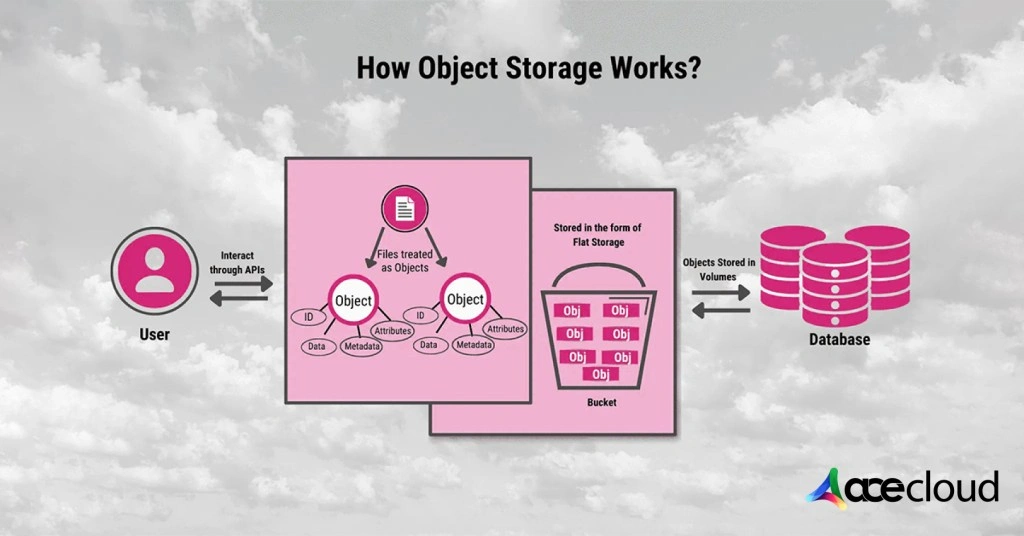
Object storage stores data as “objects” inside buckets. Each object includes the data itself, a unique identifier (key) and metadata. Instead of mounting it like a disk, you access it through APIs, commonly S3-compatible APIs.
This difference changes everything. Object storage is built to scale horizontally and store massive volumes of unstructured data. It also supports policies that help you manage retention and cost over time.
The IDC’s datasphere projection helps explain why object storage has become core infrastructure. When data volume grows at this scale, you need storage that is simple to expand, easier to govern and cost-friendly for long retention.
Object storage works best when:
- You mostly write and read whole objects, like images, logs, parquet files or model artifacts
- You want a shared storage layer for many apps and teams
- You need durable storage for backups, archives and long-term datasets
- You want metadata and tagging to improve discovery and lifecycle control
It is also a strong fit for modern data platforms. Data lakes and lakehouses commonly rely on object storage because it handles large files and large namespaces well and it integrates with analytics tooling.
How Object Storage Benefits Businesses?
Here are some of the reasons why businesses like yours should opt for object storage.
1. Built for unstructured data
Media, logs, documents, datasets and backups do not fit neatly into rows and tables. Object storage handles this naturally and stays manageable as you scale.
2. Scales without complex capacity planning
You do not manage disks and partitions the same way. You store objects in buckets. Scaling tends to be operationally simpler, especially when multiple teams share storage.
3. Strong economics for retention and archives
Object storage pricing is often optimized for keeping data over time. Many platforms also offer multiple tiers, so you can align cost to access frequency.
4. Metadata improves organization and governance
Metadata, tags and prefixes can help you enforce policies, track ownership, classify sensitivity and simplify retrieval at scale.
What to Check Before Choosing Object Storage?
Object storage is not a drop-in replacement for a file system. The most common surprises are:
- POSIX expectations: Apps that assume rename, locking or append semantics may break.
- Small file sprawl: Too many tiny objects can increase request overhead and slow listings.
- Hot partitions: Poor key design can create uneven performance for specific prefixes.
- Egress and request costs: API calls, retrieval charges and data transfer can dominate bills.
For many teams, the cost issue shows up during backup, analytics and disaster recovery testing. You store data cheaply, then you discover retrieval, requests or movement costs during restores and replays.
Key Use Cases for Object Storage
- IoT data storage (telemetry, sensor logs and time-series dumps)
- Email and content storage (attachments, documents, images and videos)
- Backup and recovery (long-term retention, immutable copies and DR datasets)
- Data lakes and analytics (datasets for BI, ETL, feature stores and ML pipelines)
When you plan business continuity, think beyond storage capacity. Outages can be expensive. Uptime Institute reports that 54% of respondents said their most recent significant outage cost more than $100,000 and one in five said it cost more than $1 million.
Block Storage vs Object Storage: Which to Choose?
Block storage and object storage solve different problems. The right choice depends on what your workload expects and how your team operates.
| Feature | Block Storage | Object Storage |
| Best for | Databases, transactional apps, boot volumes, stateful services | Backups, archives, datasets, media, logs, analytics |
| Access method | Mounted volume via OS | API access (often S3-compatible) |
| Performance profile | Low latency, high IOPS, predictable random I/O | High scale, throughput-friendly, latency depends on request pattern |
| Data update pattern | Frequent updates and overwrites | Write once, read many, full-object updates |
| Shared access | Usually attached to one instance at a time (varies by provider) | Naturally shared across many clients |
| Operational model | You manage file system, tuning, snapshots | You manage buckets, keys, policies, lifecycle |
| Common pitfalls | Mis-sized IOPS, noisy neighbors, weak snapshot discipline | Small objects sprawl, request costs, POSIX mismatch |
Choose block storage when you need:
- Mounted volumes with file systems
- Low-latency random I/O
- Frequent in-place updates (common in databases)
- OS-level control and tuning
Choose object storage when you need:
- API-based access across many apps and teams
- Large-scale unstructured data storage
- Lifecycle tiers for retention and archives
- Metadata-driven governance and discovery
Object Storage vs Block Storage: A Practical Checklist to Finalize

Here are the aspects of cloud storage to consider when making the final call.
1. Performance(What matters more, latency or throughput?)
Databases care about latency. Data lakes care about throughput. Many production stacks need both, so splitting storage layers is common.
2. Recovery(What are your RPO and RTO targets?)
If you need fast restores, confirm snapshot speed, restore process and cross-region options. Your recovery plan must be tested, not assumed.
3. Data movement(How often do you copy or export data?)
Analytics pipelines often move data between storage, compute and external tools. If you frequently pull data out of the cloud, egress and retrieval can dominate.
4. Security and governance(Who can read what and how do you audit it?)
Object storage often supports bucket-level policy models. Block storage security often maps to instance identity, network boundaries and OS permissions. Make sure your model matches how your org works.
Also Read:IaaS vs. PaaS vs. SaaS- What are the differences?
Choose AceCloud for Reliable Cloud Storage
There you have it. We have shared everything you need to know when comparing object vs block storage. In our experience, most production environments use both storage types:
- Block storage for OS disks, databases, stateful services and performance-sensitive application data
- Object storage for backups, archives, logs, datasets and analytics-friendly storage
Therefore, when you compare providers, focus on two things. First, performance options that map to your workload. Second, pricing clarity across storage, requests and retrieval.
At AceCloud, we are keen on sharing transparent storage pricing by region. Connect with our cloud storage experts using your free consultation session and get answers to all your queries!
Frequently Asked Questions
Block storage is usually faster for low-latency random I/O and frequent in-place updates, which is why it is common for databases and stateful apps. Object storage is often better for throughput-heavy workloads and large unstructured datasets accessed via APIs.
Choose object storage when you need massive scale, API-based access, cost-effective retention and an easy way to store unstructured data like logs, images, backups, datasets and archives.
Not directly. Object storage is not a POSIX file system, so apps that rely on file locking, appends or rename semantics can run into issues. If you need a mounted file system, block storage is typically the safer default.
Object storage is usually the better fit for backups and DR copies because it supports long-term retention and scale. That said, your recovery plan should factor in restore speed and real outage impact.
The big ones are request/API charges, data retrieval fees for certain tiers, data transfer/egress costs and operational inefficiencies like storing too many tiny objects that increase request overhead.
Teams often under-size IOPS, ignore burst limits, over-rely on defaults for queue depth and file system tuning or skip snapshot/restore testing. Block storage can be very fast, but it needs the right configuration for your workload.
Yes, many production stacks do. A common pattern is block storage for active application and database data, then object storage for backups, logs, exports, media and analytics datasets, often governed by lifecycle policies.
Use block storage for active training/inference scratch space, high-IOPS databases and low-latency state. Use object storage for datasets, feature archives, model artifacts and logs. If your pipeline repeatedly reads many small files, consider consolidating into larger formats to reduce request overhead.