

Introduction to IaaS
Over the past decade, cloud computing has taken over the business world, with every organization prioritizing migrating legacy IT infrastructure. However, cloud computing is a diverse technology that comprises various models and approaches. One of the most preferred cloud service delivery models is Infrastructure as a Service (IaaS).
IaaS is a service offered by third-party providers that offers you a part of their cloud infrastructure to host your apps and data. IaaS offers businesses cloud capabilities that the traditional IT setup lacks, such as remote access, automated scalability, enhanced data security, and multi-user collaboration.
Let’s discuss some vital aspects of Infrastructure as a Service that make it a perfect IT solution for organizations.
Understanding IaaS Architecture
Overview of IaaS Architecture
The IaaS architecture aims to deliver IT resources to remote devices. However, every IaaS layer should work in sync to ensure the best performance. IaaS architecture typically consists of a large pool of physical resources, divided into virtual computing, storage, and networking resources, available to end-users through a self-service model.
Here are the core layers of IaaS architecture.
Core Layers of IaaS Architecture
1. Physical Layer
The physical layer is the primary layer of the IaaS architecture. It consists of two parts – the data centers and the server infrastructure.
The data centers are the physical establishments that host the servers. These are large facilities with the equipment required to create a cloud environment. The second part of the physical layer is the server setup. Multiple servers are clustered to create a cloud environment to facilitate the sharing of IT resources. This server setup forms the fundamental part of IaaS infrastructure.
2. Virtualization Layer
The virtualization of IT resources forms the second layer of the IaaS architecture. The physical servers’ IT resources are virtualized to facilitate efficient resource utilization and allocation. Here are the essential parts of the virtualization layer.
- Hypervisor – Hypervisors can be hardware or software solutions that abstract physical hardware resources (CPU, memory, storage, networking) and allocate them to Virtual Machines.
- Virtual Machines (VM) – Virtual Machines are created on physical servers with their dedicated IT resources. These VMs can be allocated to different users (customers) and are completely isolated.
3. Network Layer
The network layer consists of all the protocols, hardware, and software tools required to deliver IT resources over the network. It is also responsible for the communication between different nodes and physical servers.
4. Resource Management Layer
The resource management layer efficiently allocates, manages, and provides IT resources across different virtual machines. Some IaaS providers have their proprietary resource management portal, where users can easily manage their VMs. The layer can also be used to scale and remove VMs.
Key Components of IaaS
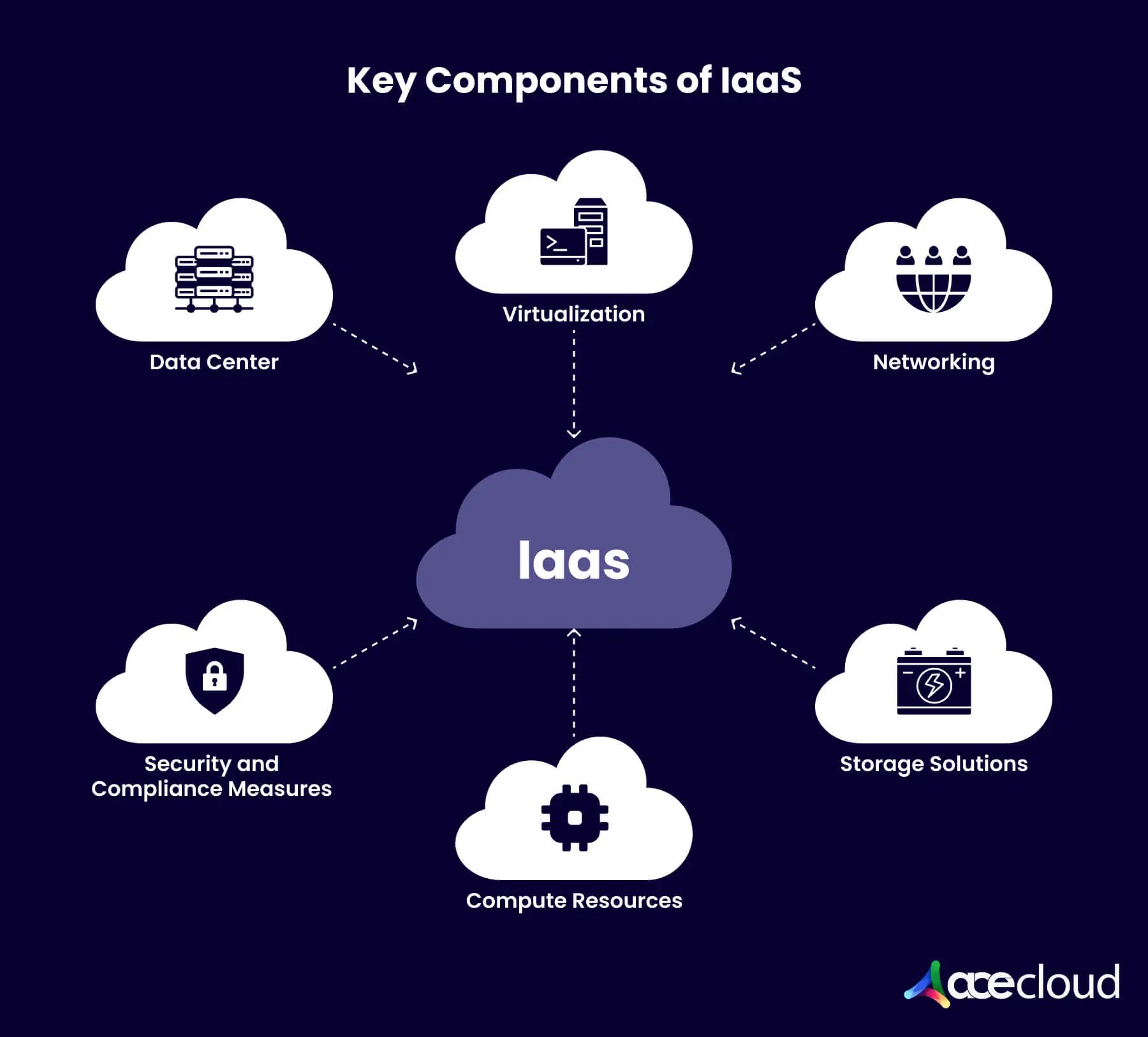
Here are the key components that constitute Infrastructure as a Service.
Data Centers
Data Centers are the physical facilities that host the servers required to create the IaaS infrastructure. Some IaaS providers own the data centers, while others rent a part of them. These data centers can accommodate the hosting of thousands of servers by deploying redundant supporting systems, like power distribution, cooling, security, and more. Depending on specific parameters, data centers can be classified from Tier 1 to Tier 5.
Virtualization
Virtualization is a technology that enables the creation of multiple virtual machines on a single physical server. Virtualization creates a separation between the physical machine’s OS and the underlying hardware through a hypervisor, making it possible to create virtual machines with their dedicated operating systems and server resources.
Networking
The networking components, like virtual routers and switches, connect the other components of IaaS. They enable communication between systems, services, and users and enable remote users to easily access virtual machines.
Storage Solutions
Data is stored in block, file, or object storage solutions. It is also replicated on redundant servers to ensure access even in the event of hardware failure. Most IaaS providers prefer object storage simply because of its low costs.
Compute Resources
Compute resources are IT resources such as RAM and CPUs. However, with virtualization, IaaS provides customers with virtual machines with virtualized computing resources. Users can create VMs with their preferred compute resources and storage on a centralized platform.
Security and Compliance Measures
Data security is the primary concern for any business planning to adopt Infrastructure as a Service. Therefore, IaaS providers offer a range of security measures, including data encryption, Identity and Access Management (IAM), Intrusion Detection and Prevention System (IDPS), firewalls, multi-factor authentication, incident management, threat analysis, and more.
Moreover, if they want to offer their services, IaaS providers must comply with various regulations, such as SOC 2, GDPR, and HIPAA.
Best Practices for Implementing IaaS in 2025
Are you planning to implement IaaS in 2025? Here are the steps to do so.
Assessing Business Needs and Goals
Before moving to the cloud, it is imperative to analyze the current business requirements and future business goals. For instance, if you are a small business just starting out, your current business needs would be limited. However, your future growth forecast would require on-demand scalability. This could be contrary to the requirements of an established enterprise.
To get a clear picture, include all critical professionals, such as the CIO and CFO, in assessing the business needs.Reviewing the current IT infrastructure
Once you know your current and future business requirements, you must analyze the current IT infrastructure; only then will you be able to draft an efficient cloud strategy.
You can opt for a multi-cloud or hybrid cloud strategy, depending on the current IT infrastructure. For instance, if you have already invested in an advanced in-house IT infrastructure, you can implement a hybrid cloud strategy, where the critical functions are migrated to the cloud, and the non-critical functions remain hosted on-premise. This helps you save costs and build trust in the IaaS infrastructure before moving all in.Selecting the Right IaaS Provider
Once you have evaluated your business goals and IT requirements, the next step is to choose the right IaaS provider. It is vital to choose the right service provider, as switching to different providers frequently poses several challenges. Therefore, you must look for an IaaS provider with whom you can have a long-term partnership.
Here are some factors that will help you select the right IaaS provider.
Reputation
Before choosing an IaaS provider, you must research the company. Getting access to the popular opinions can help you make the right decision. You can ask about the company’s customer support, downtime history, and security lapses from the current clients. You can also check the company’s website to read the customer testimonials. Moreover, you must research the company’s reputation on popular review sites and community forums, such as G2 and Capterra.
Data Security
When moving your business process to the cloud, data security is paramount. You must be able to trust the IaaS provider with confidential client and financial information.
Ask the provider about their data security infrastructure. Go with your research and enquire about the vital security protocols and standards. The IaaS provider must provide data security at all levels, be it physical, network, admin, or endpoint.
Some safeguards you can check for are 256-bit AES data encryption, multi-factor authentication, 24/7 network monitoring, firewalls, OS patching, Intrusion Detection and Prevention (IDPS), threat monitoring, DDoS protection, antivirus, and OS patching.Disaster Recovery and Backup Planning
Disaster recovery is a setup that ensures data security and continued operations, even in the case of a natural or human-caused disaster, such as an earthquake, flood, or fire.
IaaS providers ensure disaster recovery by replicating your data in multiple data centers spread across distant locations. Ensure the IaaS provider deploys a robust disaster recovery plan, ensuring all-time availability. Moreover, the IaaS provider must also offer efficient backup services as part of their plan so you can easily recover your data.- Uptime Guarantee
Every IaaS provider must offer an uptime value for their services. However, the value differentiates the good IaaS providers from the rest. The best providers in the market offer 99.99 percent uptime, which means there can’t be a downtime of more than one hour in a year. Also, the uptime value should be part of the provider’s SLA and not just on their website.
IaaS Infrastructure
For an IaaS provider to offer exceptional services, it is imperative to have the cloud infrastructure created on best-in-class infrastructure. The infrastructure comprises the data centers where the servers are located and the server setup itself.
The IaaS provider’s data centers must be Tier-4 or above, with fault-tolerant systems and redundant cooling and power distribution systems. Moreover, the IaaS providers must host your business process in a high-performance computing (HPC) environment, which ensures optimum performance and an uninterrupted process.Customer Support
Once you have opted for an IaaS provider, your team will need regular help and assistance from their team on major and minor issues. Every IaaS provider offers customer support. However, the support quality depends on the expertise level and timing. For instance, some providers might offer support only during working hours.
Pick an IaaS provider that offers 24/7/364 customer support, even on weekends and holidays. Moreover, they must offer support on multiple platforms like phone, call, and chat.Flexible Pricing
Most IaaS providers offer a pay-as-you-use pricing model, where you choose the plan based on the resources you utilize. However, if the pricing plan does not suit your requirements, you end up either spending more or not getting enough resources.
Ask the provider if they can customize the pricing plans according to your exact business needs. Also, check for any hidden charges, such as data egress and transactions, to avoid surprises later.Regularly Reviewing and Updating IaaS Strategy
Even though you have opted for an IaaS provider to manage your IT requirements, it is vital to assess the IaaS strategy based on the changing business needs. Evaluating your IT needs periodically will help you take the best cloud approach and reduce budget overheads.
Recommended Read: IaaS vs. PaaS vs. SaaS- What are the differences?
Case Studies: Successful IaaS Implementations
Netflix
When Netflix, an entertainment giant known for streaming movies and TV shows, experienced massive growth, it needed infrastructure challenges to facilitate the requirements immediately. Earlier, the company’s process was hosted on physical data centers, leading to limitations like agility and scalability. Netflix needed a highly available, globally distributed infrastructure to meet increasing demand without facing performance bottlenecks.
Netflix adopted AWS as its cloud provider in 2008, which offered it a platform with high scalability and performance. Necessary for streaming services. Netflix was also able to reduce IT dependencies and associated costs.
Airbnb
Airbnb’s business model relies heavily on its online platform that connects millions of hosts and travelers worldwide. As the platform grew, managing the influx of users, handling peak traffic, and ensuring consistent performance became increasingly complex. Airbnb initially used a combination of physical data centers and cloud services. However, this setup lacked the flexibility and scalability required to support exponential growth.
Airbnb chose Google Cloud Platform (GCP) as its primary IaaS provider. GCP offered the reliability, scalability, and machine learning (ML) capabilities necessary for Airbnb to improve its platform’s performance and provide personalized services to its users.
Conclusion
Infrastructure as a Service offers businesses the perks of agility, flexibility, scalability, and security they need to compete in the current global market scenario. Adopting IaaS before your competitors will give you an early mover’s advantage, boosting growth. However, planning well before migrating your entire business operations to the cloud is essential. Choosing the right IaaS provider is a big step on that path.
AceCloud is an award-winning IaaS provider that offers customized solutions for businesses of all sizes. We offer around-the-clock customer support, advanced security protocols, and state-of-the-art infrastructure to ensure uninterrupted operations from remote locations. Book a free consultation with an AceCloud expert today to know more about our IaaS services.

Related Post




Get in Touch

Credits First!
- 24*7 Human Support
- Pay-as-you-go Pricing
- No Egress Cost
- Multi Tier Security