

Cloud computing, as it is apparent in managing, storing, and accessing data, is spreading widely among business organizations. Below this change lies a key technology: “Hypervisor.” Its role is most important to understand in grasping how cloud environments work and support virtualization.
This blog gives a step-by-step overview of hypervisors, including the different kinds and their importance for cloud computing, clarifying the topic for veterans and novices alike.
What is a Hypervisor?
A hypervisor is a virtualization technology that allows multiple virtual machines (VMs) to run on a single physical machine. Acting as a bridge between hardware and software, a hypervisor manages resource allocation and ensures efficient operations.
What is a Hypervisor in Cloud Computing?
In cloud computing, hypervisors enable virtualization, allowing cloud providers to deliver scalable, flexible, and cost-effective services. Virtualization is the backbone of cloud environments, and hypervisors make it possible to create, manage, and optimize virtual machines.
Types of Hypervisors within Cloud Computing
There are two main types of hypervisors in cloud computing:
1. Type 1 Hypervisor (Bare-Metal Hypervisor):
- Runs directly on the physical hardware.
- Provides great performance and stability.
- Mainly used in massive, enterprise-grade cloud environments.
2. Type 2 Hypervisor (Hosted Hypervisor):
- Runs on an OS.
- Setup is easier and more manageable, making it ideal for smaller-scale applications like testing.
Role of Hypervisors in Cloud Computing: How Hypervisors Facilitate Virtualization
Virtualization is the process of creating virtual versions of physical resources such as a server, storage, and network. The hypervisor generally abstracts these resources and distributes them among virtual machines.
Key Functions of a Hypervisor:
- Resource Allocation: Allocate the CPU, memory, and storage across virtual machines by their respective requirements.
- Isolation: Keeps all the VMs independent so that a problem with one machine does not affect others.
- Hardware Abstraction: Allows multiple instances of the OS to be run simultaneously but aren’t directly accessing the hardware.
In a Cloud environment, hypervisors-
- Allow providers to offer multitenancy on shared hardware securely.
- Support for the on-demand provisioning of resources is a necessary prerequisite for the scalability of the cloud.
- Flexibility for running multiple applications on a common fabric.
Importance of Cloud Hypervisors:
Hypervisors ensure the efficient use of physical hardware, which is essential in cloud computing. They enable:
- Dynamic Workloads: Cloud platforms can scale resources up or down to meet user demands.
- Cost Efficiency: Businesses reduce costs by sharing physical hardware resources among multiple VMs.
- High Availability: VMs can be migrated to other hardware without downtime in cases of failure.
Exploring the Types of Hypervisors
1. Type 1 Hypervisor (Bare-Metal Hypervisor)
A Type 1 hypervisor runs directly on physical hardware without an operating system. Virtualized environments, which also run the hypervisor directly on physical hardware, can increase performance by orders of magnitude. Also, enterprise-grade cloud environments tend to prefer Type 1 hypervisors.
Examples of Type 1 Hypervisors
- VMware ESXi: Robust in private clouds due to reliability and feature set.
- Microsoft Hyper-V: Included as part of Windows Server; hybrid cloud usage scenarios.
- Citrix XenServer: Optimized for large-scale deployments with advanced management tools.
Advantages of Type 1 Hypervisors
- High performance due to minimal overhead.
- Enhanced security as the attack surface is smaller than Type 2 hypervisors.
- Scalability and robustness are essential for enterprise use.
Use Cases
Type 1 hypervisors are extensively used in:
- Enterprise data centers.
- Cloud service providers: Amazon Web Services (AWS) and Microsoft Azure.
- High-performance computing environments.

2. Type 2 Hypervisor (Hosted Hypervisor)
A Type 2 hypervisor is above an existing OS, which makes it more of a working option for smaller virtualization environments. Although its performance is completely different from that of a bare-metal hypervisor, it remains one of the most in-demand tools on the market because of its ease of use, particularly for personal and development use cases.
Examples of Type 2 Hypervisors
- VMware Workstation: The ultimate tool for developers who need to test applications.
- Oracle VirtualBox: Free and very general use for educational and professional purposes.
- Parallels Desktop: Created to run Windows just like a native macOS systems.
Benefits of Type 2 Hypervisors
- Easy to install and set up in the fastest time.
- Very cost-effective option for small-scale virtualization.
- Very well suited for learning, testing environments, and non-mission-critical workloads.
Applications
Type 2 hypervisors are typically used for:
- Software development and testing.
- Educational environments for teaching virtualization.
- Personal use to run multiple OS instances on a single machine.
Type 1 vs Type 2 Hypervisors at a Glance
| Characteristic | Type 1 (Bare-Metal) | Type 2 (Hosted) |
|---|---|---|
| Architecture | Runs directly on the physical hardware. | Runs as an application on top of a host OS. |
| Performance | High efficiency and low overhead. | Lower performance due to the extra OS layer. |
| Security | More secure with a smaller attack surface. | Less secure as it depends on the host OS security. |
| Complexity | More complex to set up and manage. | Simple to install and use. |
| Use Case | Data centers, cloud computing, enterprise servers. | Desktops, development, testing environments. |
| Examples | VMware ESXi, Microsoft Hyper-V, Xen, KVM. | Oracle VirtualBox, VMware Workstation, Parallels. |
Type 1 and Type 2 hypervisors differ in their architecture and use cases. Businesses choose between them based on their specific needs, balancing performance and ease of use.
Recommended Read: Top 5 Cloud Computing Trends for 2025: AI, Quantum, Hybrid & More.
Advantages and Disadvantages of Hypervisors in Cloud Computing
Hypervisors are a core building block of cloud infrastructure, but like any technology, they come with trade-offs. Understanding both the benefits and the limitations helps organisations choose the right architecture for their workloads.
Advantages of Using Hypervisors in the Cloud
- Improved hardware utilisation
Multiple virtual machines can share the same physical server, significantly increasing utilisation compared to traditional one-app-per-server deployments. - Scalability and elasticity
Cloud providers can rapidly provision, resize, and decommission VMs based on demand. This flexibility allows customers to scale workloads up or down without investing in new hardware. - Isolation and multi-tenancy
Hypervisors provide strong logical isolation between VMs, which is essential when running workloads for different teams, departments, or customers on shared infrastructure. - High availability and resilience
Many enterprise hypervisors support live migration, clustering, and automated failover. If a host fails or requires maintenance, VMs can be moved to another host with minimal disruption. - Hardware and OS independence
The same physical infrastructure can run different operating systems and application stacks side by side, simplifying workload consolidation and migration.
Disadvantages and Challenges
- Performance overhead
Even though modern hypervisors are efficient, virtualization still introduces some overhead compared to running directly on bare metal, especially for I/O-intensive or latency-sensitive applications. - Operational complexity
Designing and managing a virtualised cloud platform requires expertise in networking, storage, security, and capacity planning. Poorly configured environments can negate many of the benefits. - Hypervisor as a security target
Because the hypervisor controls multiple guest VMs, it can be an attractive target for attackers. Vulnerabilities such as VM escape must be mitigated through hardening, patching, and strong access controls. - Licensing and cost considerations
Some enterprise hypervisor platforms involve licensing fees and support contracts. Organisations need to weigh these costs against open-source alternatives and managed cloud services. - Resource contention
If too many VMs are placed on the same host or if quotas and reservations are misconfigured, workloads may compete for CPU, memory, and I/O, causing inconsistent performance.
When these trade-offs are understood and properly managed, hypervisors provide the flexibility and control needed to power modern cloud environments.
Security Considerations for Cloud Hypervisors
Because hypervisors control multiple virtual machines on shared hardware, they are a critical part of the cloud security model. A weakness at this layer can potentially impact many workloads at once.
Here are key security considerations for cloud hypervisors:
1. Hardening and Patch Management
Hypervisors must be treated like any other critical infrastructure component:
- Apply security patches and updates promptly
- Disable unnecessary services and management interfaces
- Enforce strong authentication and authorisation for administrative access
- Use secure configuration baselines and regularly audit compliance
2. Protection Against VM Escape
In a VM escape attack, a malicious actor attempts to break out of a guest VM and interact with the hypervisor or other VMs.
Mitigation strategies include:
- Keeping hypervisor software and drivers up to date
- Restricting direct device passthrough where not required
- Using security-enhanced drivers and paravirtualised devices
- Isolating high-risk or untrusted workloads in separate clusters or accounts
3. Network Segmentation and Micro-Segmentation
Hypervisors often provide virtual switches and distributed networking features. These should be used to:
- Segment tenant environments and critical workloads into separate virtual networks
- Apply firewall rules and security policies at the VM or virtual NIC level
- Limit east-west traffic between VMs to only what is necessary
4. Secure Access to Management Interfaces
Hypervisor management consoles and APIs are high-value targets. Best practices include:
- Placing management interfaces on dedicated, restricted networks
- Enforcing multi-factor authentication (MFA) for administrators
- Using role-based access control (RBAC) and least-privilege permissions
- Logging and monitoring all administrative actions
5. Integration with Cloud Security Monitoring
Hypervisor and VM activity should feed into central security monitoring and incident response processes:
- Forward logs and events to SIEM or monitoring tools
- Use alerts for suspicious VM behaviour, failed login attempts, or unusual configuration changes
- Regularly review audit logs and reports for anomalies
By combining a hardened hypervisor layer with strong identity, network, and monitoring controls, organisations can significantly reduce the risk of compromise in virtualised cloud environments.
Why Hypervisors Are Indispensable to Cloud Computing
Hypervisors form the core of cloud computing by facilitating virtualization for developing elastic, scalable, and inexpensive infrastructures. Here’s why they’re important:
- Create a Virtual Machine: Run different kinds of VMs completely independently on the same physical server.
- Resource-intensive Usage: All resources are maximally utilized.
- Isolation and security: To ensure stability and prevent issues in one VM from seeping into others.
- Scalability: Provides support for dynamically changing the assigned resources in real-time instances.
- Cost Efficiency: Reduces the hardware needed for each application or workload separately.
Real-World Applications of Hypervisors
- Private Cloud: Companies create a private space for the workloads.
- Public Cloud: Public Cloud vendors like AceCloud, AWS, Google Cloud, and Azure host millions of VMs belonging to different customers.
- Hybrid Cloud: Companies consume both on-premises and cloud resources seamlessly.
Understanding Virtual Machines vs Containers
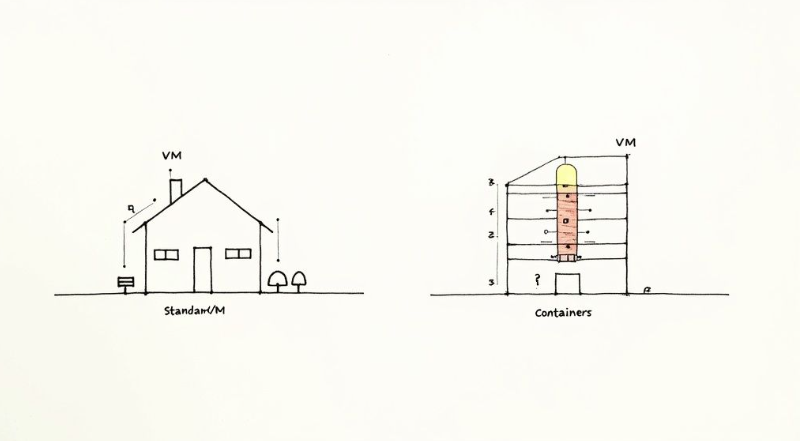
Any time you start digging into hypervisors in cloud computing, one question pops up almost immediately: how do virtual machines (VMs) stack up against containers like Docker? It’s tempting to view them as direct competitors, but they’re really just different tools for different jobs. In many modern systems, they even work together.
We find the best way to think about it is with a real estate analogy. A VM is like a complete, standalone house. It’s built on its own foundation (virtualized hardware), has its own plumbing and electrical systems (a full guest operating system), and is surrounded by its own fence (strong security isolation). This makes VMs incredibly sturdy and secure; a fire in one house isn’t going to burn down the neighbor’s place.
Containers, on the other hand, are more like apartments in a high-rise building. All the apartments share the building’s core foundation and utilities, in this case, the host operating system’s kernel. This shared infrastructure makes them far more lightweight and much, much faster to spin up than a VM.
When to Use VMs vs Containers
The choice between the two really boils down to what you need most: isolation, speed, or resource efficiency.
- Virtual Machines (Houses): Go with a VM when security and total isolation are your non-negotiables. They are the perfect solution for running an application that needs a completely different operating system from the host, or for securely walling off different customers’ environments from one another.
- Containers (Apartments): These are ideal for packaging an application and its dependencies so it runs consistently everywhere. Containers are the backbone of microservices architectures, where you need to launch dozens of small, efficient application components in the blink of an eye.
The core trade-off is simple. Virtual machines offer maximum isolation by virtualizing the entire hardware stack, while containers offer maximum speed and efficiency by sharing the host OS kernel.
Ultimately, this isn’t always an “either-or” decision. One of the most common and secure patterns in modern cloud architecture is to run containers inside a VM. This strategy gives you the best of both worlds: the rock-solid security boundary of a hypervisor combined with the lightweight portability of a container.
For a deeper dive into the technical nuances, you can learn more about the differences between containers vs virtual machines.
Hypervisor Examples in Cloud Computing
Many hypervisors have the vanguard position in the virtualization revolution, such as:
- VMware ESXi: Bare-metal hypervisor with high reliability, scalability, and suitability for running private and hybrid clouds.
- Microsoft Hyper-V: Offers access to seamless integration with Windows environments for Microsoft-centric businesses.
- KVM (Kernel-based Virtual Machine): An open-source hypervisor suitable for nearly all types of environments by its large user base and flexibility.
- Oracle VirtualBox: Extremely popular among developers and testers as it is user-friendly and cross-platform.
The Future of Hypervisors in Cloud Computing
- Container-Based Virtualization: Docker and others allow the utilization of hypervisors with much lighter alternatives for deploying applications.
- Growing Security: Stronger isolation and threat-mitigation capabilities are coming about within hypervisors.
- AI-Driven Optimization: Hypervisors may improve resource allocation and foretell workloads with AI.
Conclusion
Hypervisors form the base of modern cloud computing, from which businesses can operate efficiently and cost-effectively. Whether enterprises are in charge of private clouds or are utilizing public cloud platforms, knowing “what a hypervisor is in cloud computing” with several types of hypervisors leads to informed decisions.
From the difference between Type 1 and Type 2 hypervisors to how hypervisors make virtualization possible, hypervisors demonstrate technological innovation. Their continuing development will eventually lead to scalability, security, and effectiveness in the cloud for businesses worldwide. Book a free consultation with an AceCloud expert today.
Frequently Asked Questions:
A hypervisor acts as a virtualization layer between physical hardware and virtual machines in a cloud environment. It abstracts CPU, memory, storage, and networking resources and allocates them to multiple VMs. This enables multi-tenancy, better hardware utilisation, scalability, and isolation between different workloads or customers.
Most large public cloud providers primarily rely on Type 1 (bare-metal) hypervisors because they run directly on the hardware, deliver better performance, and have a smaller attack surface. Type 2 hypervisors are more common on desktops and laptops for development, testing, and training purposes.
Hypervisors virtualise the entire hardware stack so each virtual machine runs its own full operating system. Containers share the host OS kernel and package only the application and its dependencies. Hypervisors provide stronger isolation and support mixed operating systems, while containers are more lightweight and ideal for microservices and fast-scaling cloud-native applications. In many environments, containers actually run inside VMs that are managed by hypervisors.

Related Post









Get in Touch

Credits First!
- 24*7 Human Support
- Pay-as-you-go Pricing
- No Egress Cost
- Multi Tier Security