Block storage snapshot is a point-in-time copy of your block storage volume. You can either create them manually before or schedule them automatically as part of your backup and DR strategy.
The first snapshot you take is the full snapshot of your data volume. Whereas the subsequent snapshot captures only those data that have changed since the previous ones, reducing storage costs and backup windows.
According to ITIC surveys, 97% of large enterprises with more than 1000 employees say that on average, a single hour of downtime per year costs their company over $100,000.
Application-consistent snapshots go further by coordinating with databases and applications, ensuring that recovered workloads start cleanly, making them a foundational control for meeting RPO and RTO targets.
What is an Application Consistent Snapshot?
An application-consistent snapshot coordinates with the OS and application to quiesce I/O, flush caches, and complete or roll back in-flight transactions before capture. Unlike a crash-consistent snapshot (pure storage-side), it preserves write-order fidelity so the app/database can start cleanly after restore.
How Application Consistent Snapshot Works?
Application-consistent block storage snapshots coordinate with the application to briefly quiesce I/O, flush caches and complete or roll back in-flight transactions before capturing a point-in-time image of the underlying volumes.
By ensuring the application is in a stable state at capture time, restores can be brought online without data inconsistency.
Best Practices for Block Storage Snapshot
Hyperscalers like AWS, Azure and Google Cloud all support block-storage snapshots. But the flows are spread across multiple services and resource types.
- On AWS, for example, you usually start in the EC2 console, navigate to Snapshots, choose Create snapshot, pick a resource type (volume or instance), select the correct volume/instance and then manage retention separately through Data Lifecycle Manager policies with additional IAM roles and tagging rules.
For application-consistent EBS snapshots, orchestrate VSS/fsfreeze + app hooks via AWS Backup/SSM or backup agents; use multi-volume snapshots for disks that form a single application unit (e.g., data + WAL/binlog).
- Azure also takes a similar approach. You go to Create a resource → Snapshot, select the right subscription, resource group, disk and region, then later create a managed disk from that snapshot and finally build or attach a VM from that disk.
Use Azure Backup with the VM Snapshot extension for application-consistent captures (VSS on Windows; pre/post scripts on Linux).
- In Google Cloud, you open the Create a Snapshot page, choose a snapshot type (standard/archived), pick the source disk and storage location (regional/multi-regional), and if you want automation, you must create separate snapshot schedules (resource policies) and attach them to disks.
Use Google-managed backup or guest-agent hooks to invoke VSS/fsfreeze for consistency; attach snapshot schedules (resource policies) and prefer regional multi-disk snapshots for multi-volume apps.
These are powerful tools, but they expect you to think in terms of low-level resources and wire them together correctly for each application.
AceCloud takes the complexity out of the process. Instead of juggling volumes, disks, resource groups and policies, you just work directly with your VMs using a simple, guided workflow.
Key steps to create a snapshot of a block storage
To configure a backup of the VM, follow the steps given below:
Step 1: Login to your account.
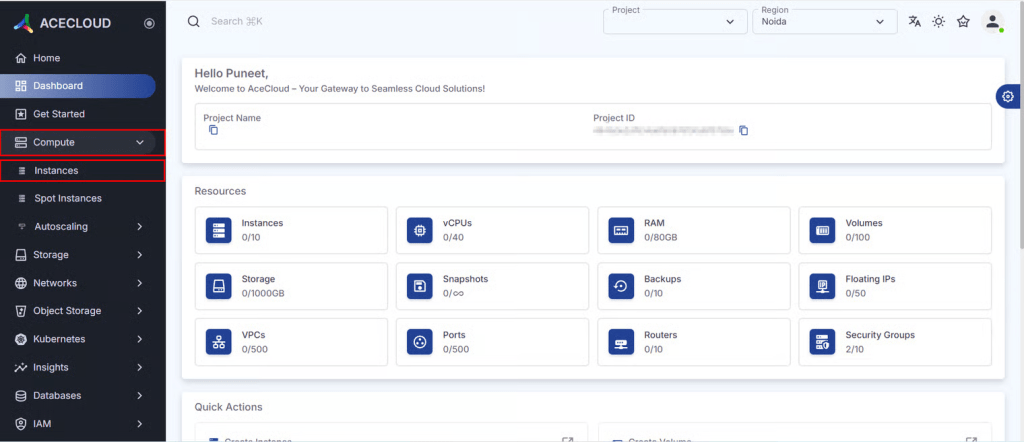
Step 2: Navigate to Compute and then click on Instances.
Step 3: From the list, select your instance, open the drop-down menu, and choose Create Snapshot.

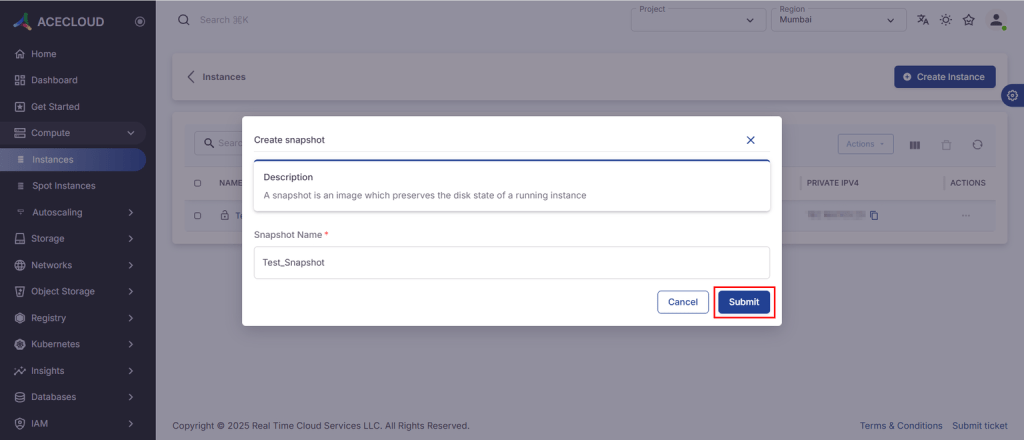
Step 4: Enter the Snapshot Name and hit Submit.
Key steps to create instances with a snapshot image
To create an instance with the snapshot image, you should follow the steps given below:
Step 1: Login to your account.
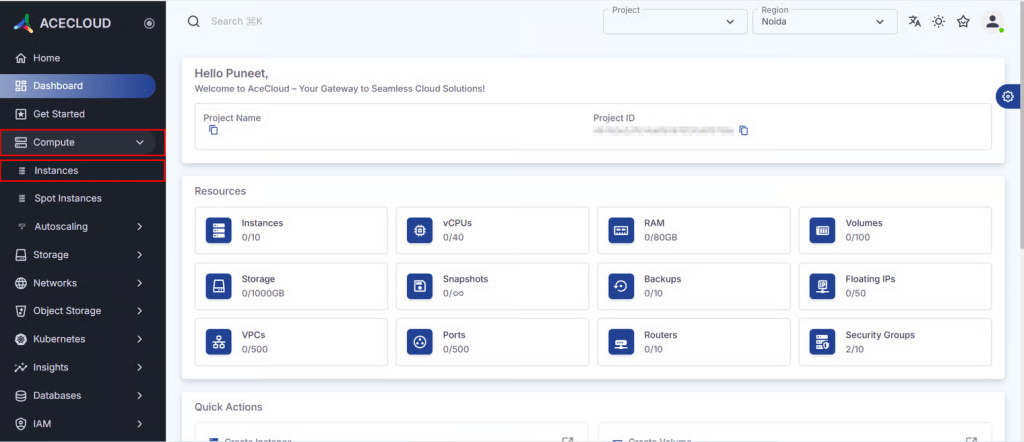
Step 2: Navigate to Compute and then click on Instances.
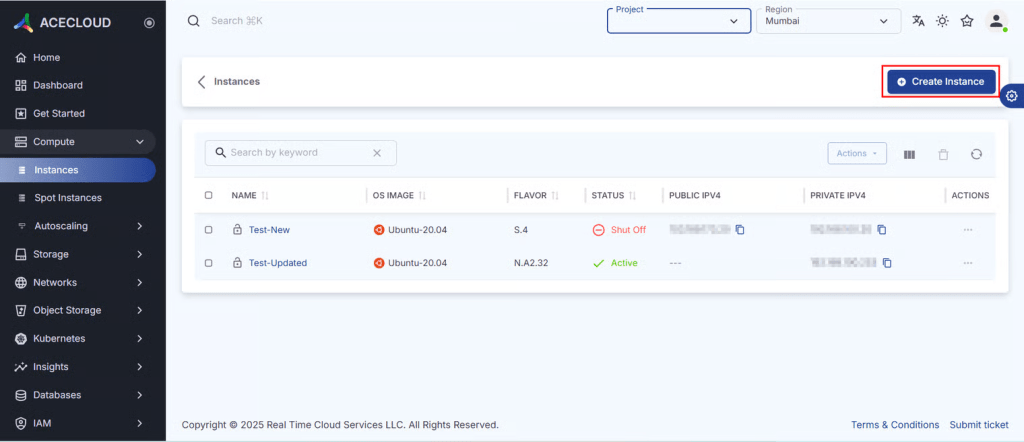
Step 3: Click Create Instance.
Step 4: Enter the instance details and click Next.
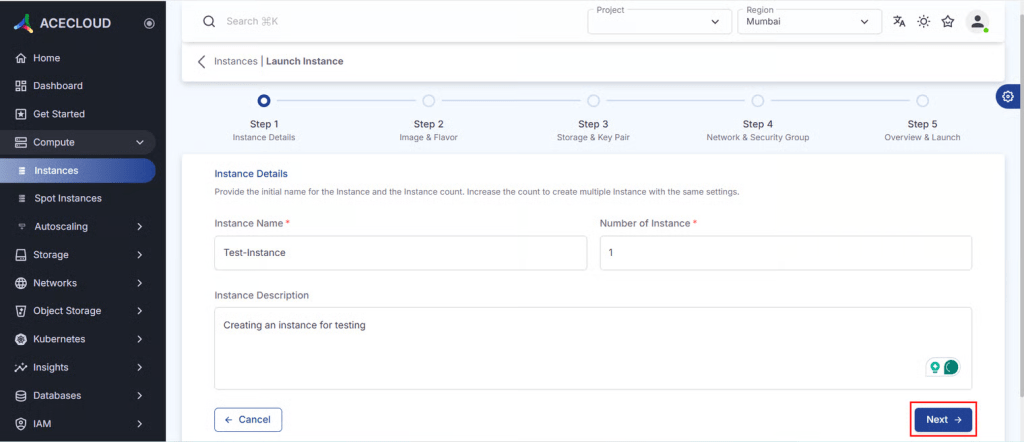
Step 5: Click on Source, then select Instance Snapshot from the Boot Source drop-down and select your snapshot.
Click on Select Flavor, choose your flavor and click Next. If your flavor is unavailable, then create a ticket with your specifications.

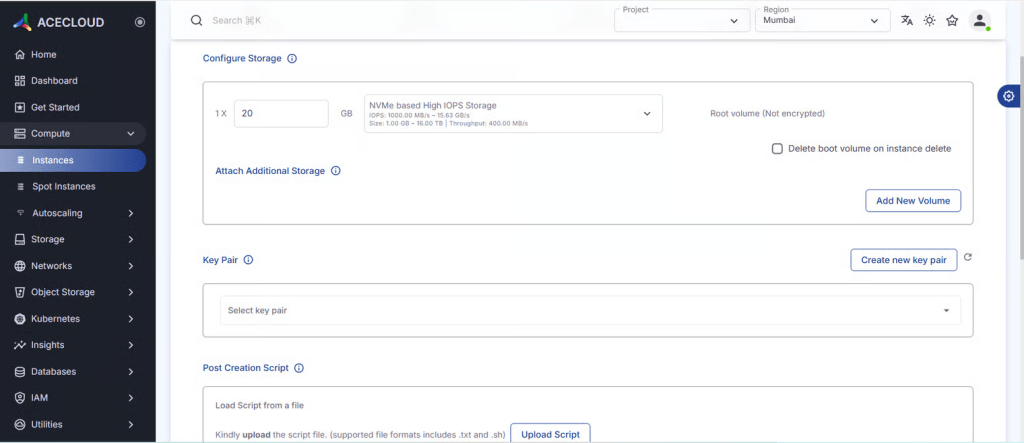
Step 6: Click on Configure Storage and fill in all the required details. Select the Key-Pair drop-down menu to choose your key pair.
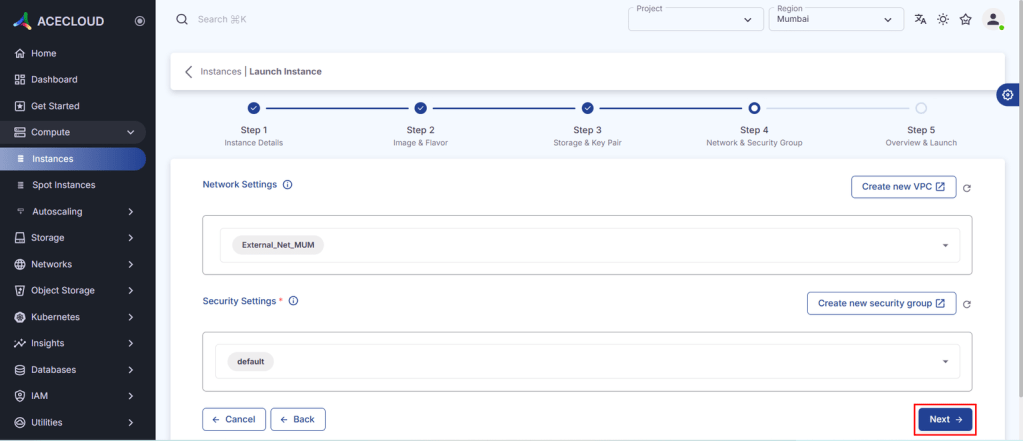
Step 7: Choose a network of your own choice.
Select the Security Groups and then click Next.
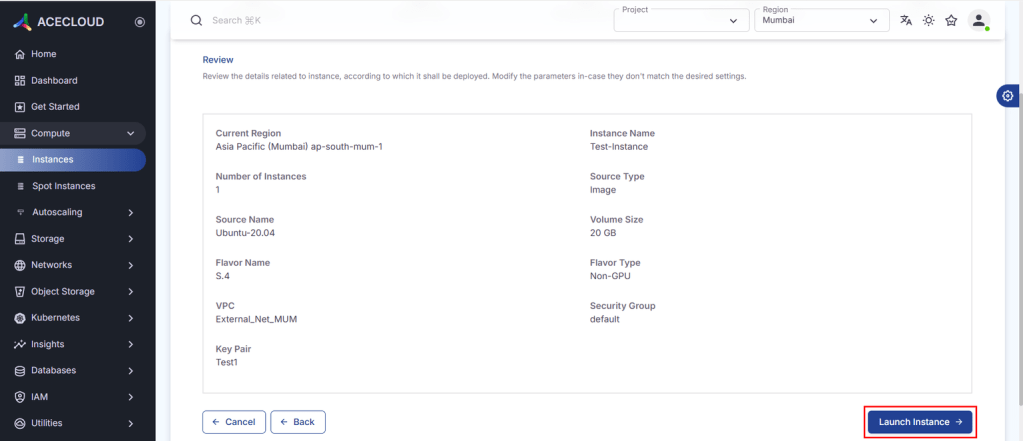
Step 8: Review your details and click on Launch Instance.
Difference Between Application and Crash Consistent Snapshot
Choosing between application-consistent and crash-consistent snapshots significantly impacts your data integrity, recovery complexity and application availability.
Here is the side-by-side comparison table for your reference:
| Aspect | Application-Consistent Snapshot | Crash-Consistent Snapshot |
|---|---|---|
| Definition | Data state after apps are paused and all in-memory data is written to disk. | Data state as if the system suddenly crashed or lost power. |
| Creation | Apps are quiesced/stunned; memory is flushed to disk before capture. | No coordination with applications; some data might still be in memory. |
| Data state | Clean, fully committed, and consistent. | Mostly on disk, some in transit and uncommitted. |
| Reliability | Highly reliable; usually no rebuild needed. | May require rebuild; data consistency not guaranteed. |
| Performance impact | Brief interruption to application processing. | Faster, low overhead, minimal app impact. |
| Best for | Critical apps and databases where integrity is essential. | Less critical workloads (e.g., file/print) where on-disk data is enough. |
| Restore behavior | Typically straightforward restore with minimal extra steps. | Often needs logs replayed or manual recovery steps (some apps automate this). |
| Common usage | Used where application-aware backup is available and required. | Common with array-based snapshots and basic backup/hypervisor features. |
Key Takeaway:
Choosing between crash-consistent and application-consistent snapshots is a trade-off between speed and reliability:
- Crash-consistent snapshots are faster and lighter but only guarantee what’s already on disk and may require rebuilds or log replays during recovery. They’re fine for less critical workloads.
- Application-consistent snapshots briefly pause applications to flush all in-memory data to disk, delivering a clean, fully consistent state. They are the safer choice for databases and other critical applications where data integrity is non-negotiable.
Getting Block Storage Snapshots Right
Block-storage snapshots aren’t just convenience; they’re core controls for availability and integrity. Pick the right consistency level, align RPO/RTO to impact, and automate protection. App-consistent snapshots give critical systems a clean, recoverable state instead of best-effort crash recovery.
AceCloud applies these practices with a VM-centric experience create consistent snapshots, launch from images quickly, and enforce protection across environments without stitching multiple tools.
This gives enterprise architects a more reliable and auditable protection posture so they can focus on strategy and innovation instead of backup plumbing.
Frequently Asked Questions:
A storage snapshot coordinated with the OS/app to quiesce writes and preserve write-order fidelity (e.g., logs before data pages), enabling an immediately usable restore.
Not always. Crash-consistent snapshots can be sufficient for stateless or low-criticality tiers. For databases and Tier-0/1, use application-consistent (and capture all volumes as a group).
Use policy-driven orchestration that combines schedules, retention, pre/post hooks (VSS, fsfreeze, DB scripts), consistency groups, encryption and replication. Monitor quiesce time, success/fail, and RPO breaches.
Windows VSS, Oracle RMAN, PostgreSQLpg_backup_start()/pg_backup_stop() with filesystem snapshots, MySQLFLUSH TABLES WITH READ LOCK (or XtraBackup), MongoDBfsyncLock/Unlock, Kubernetes CSI snapshots with Velero/operators, plus hypervisor/cloud backup agents that orchestrate hooks.