As AI data volumes grow, many teams are overspending on high-performance storage for data that no longer needs it. IDC reported that spending on compute and storage hardware for AI deployments grew 166% year over year in Q2 2025, highlighting how fast infrastructure costs are rising.
Relying only on SSD-backed storage can become expensive, while lower-cost storage alone may not deliver the speed needed for active training, inference and checkpointing. For AI teams managing data across object, block and file storage, that trade-off can directly affect both performance and cost.
This is where storage tiering automation becomes essential.
A common production pattern is to keep object storage as the durable system of record, use block or shared file storage as higher-performance working tiers and move data between them based on access patterns, job state, metadata and lifecycle rules. Done well, this helps AI teams reduce storage waste without slowing down workloads.
What is Storage Tiering Automation in AI Infrastructure?
Storage tiering automation is the process of automatically moving data between storage tiers based on access frequency, performance requirements, lifecycle stage and retention needs. In AI environments, that means keeping latency-sensitive data on faster storage while shifting less active data to lower-cost tiers over time.
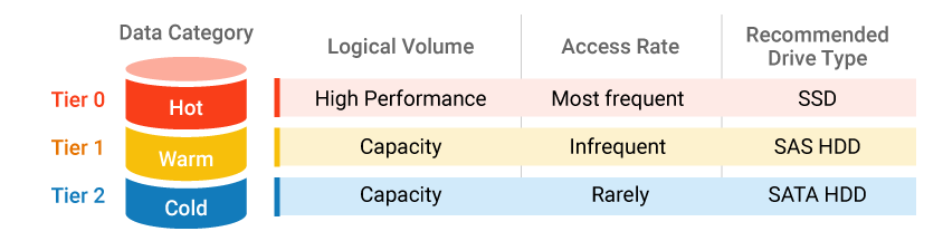
Image Source: Infortrend
For example, active checkpoints, frequently accessed training datasets and live inference dependencies may stay on high-performance block or file storage, while older logs, archived model versions and completed project artifacts move to object storage designed for infrequent access.
The goal is not simply to archive data. It is to align each data class with the right balance of speed, accessibility and cost throughout the AI lifecycle. With the right lifecycle policies, metadata rules and observability in place, storage tiering automation helps teams reduce waste without disrupting workload performance.
In AI infrastructure, storage tiering automation usually works in two layers:
- Native tiering within a storage service, such as lifecycle transitions inside object storage.
- Cross-storage orchestration, where policies move data between object, file and block storage based on workload behavior.
That distinction matters. Many cloud platforms can automatically shift object data into colder object tiers, but very few automatically move active live data between block, file and object without external orchestration.
What Storage Type is Best for AI Training, Inference and Model Operations?
Choosing the right storage type depends on each AI workload’s access pattern, latency needs, sharing requirements and lifecycle stage.
| Factors | Block Storage | File Storage | Object Storage |
|---|---|---|---|
| Best Used When | When low latency and consistent performance matter most | When many users, jobs, or services need shared access through filesystem semantics | When scale, durability, metadata, and lifecycle automation matter more than the lowest possible latency |
| AI Workloads / Use Cases | Active training volumes, checkpoint write paths, metadata services, transactional layers, inference-adjacent services needing predictable IOPS | Collaborative model development, feature engineering pipelines, notebooks, common project directories, curated datasets that need to be mounted | Large training corpora, embeddings, inference logs, archived checkpoints, backups, retained model artifacts |
| Key Strengths | High performance, low latency, predictable IOPS, strong fit for performance-sensitive workloads | Shared access, familiar filesystem structure, strong for collaboration and multi-user workflows | Massive scalability, cost efficiency, strong durability, metadata-rich storage, ideal for lifecycle automation |
| Things to Keep in Mind | Usually more expensive, not ideal for large volumes of inactive or long-retention data | May not be the most cost-efficient choice for massive inactive datasets or long-term retention | Not always the best fit for latency-sensitive workloads or applications that require filesystem-style access |
Key Takeaways:
The best way to choose between block, file and object storage is to evaluate each workload by latency sensitivity, access pattern, sharing requirements and lifecycle stage.
In most AI environments, no single storage type is enough on its own. The real value comes from using all three strategically and automating movement between them as data usage changes over time.
*Note: Object layer is increasingly active in AI stacks, not just passive backup. MinIO’s 2025 report says 51% of surveyed organizations use object storage for AI model training and inference workloads.
Again, that is a vendor-backed survey result and should be treated as directional, but it is consistent with how modern AI platforms use object storage as a central data lake or artifact layer rather than a mere archive.
What is the Best Architecture for Storage Tiering Automation?
The best architecture is policy-driven, not purely storage-native. Instead of expecting one storage platform to move all data automatically across storage types, teams should use object storage as the source of truth and then temporarily hydrate data into file or block storage only when active workloads need higher performance or shared access.
A simple architecture looks like this:
1. Object storage as the durable source of truth
Keep raw training corpora, retained feature sets, model artifacts, logs, completed run outputs, backups and historical checkpoints in object storage. This is the lowest-cost place to keep large volumes of durable AI data while still preserving metadata, governance and lifecycle automation.
2. File storage for shared working sets
You can use file storage for datasets, notebooks, project directories and semi-active artifacts that multiple users, jobs or services need to access through a mounted filesystem. File is useful when collaboration and shared access matter more than the absolute lowest storage cost.
3. Block storage for active low-latency paths
You can use block storage for active training volumes, checkpoint write paths, transactional metadata layers and inference-adjacent workloads that need predictable IOPS and low latency.
4. Policy engine for movement decisions
Use lifecycle rules, metadata tags and job telemetry to decide when to:
- Hydrate data from object to file or block
- Keep data on premium tiers while active
- Move inactive data from file or block back to object
- Archive snapshots and old objects after retention windows expire
5. Observability and control plane
Track last access time, read and write frequency, job ownership, restore frequency, retention class and retrieval latency. Without these signals, automation becomes guesswork.
How Should AI Teams Classify Data into Hot, Warm and Cold Tiers?
Hot, warm and cold tier classification helps AI teams align storage performance, accessibility, and cost with workload demand.
Hot tier
Hot tier data is required to keep current workloads running without delay. You should include current checkpoints, frequently accessed training datasets and active vector indexes. You should also include live inference dependencies that are pulled repeatedly during serving.
Hot tier assets should have tight latency and throughput expectations because they directly impact GPU utilization. That expectation is what justifies premium storage.
Warm tier
Warm tier data supports active work but is not accessed every minute. You should include shared project files, recent experiment outputs, and semi-active model artifacts. Recently used embeddings and features often belong here because they get reused during iteration but taper off over time.
Warm tier design should balance cost and access speed because recall still affects productivity. That balance often maps well to file storage or lower-cost performance classes.
Cold tier
Cold tier data is valuable but rarely used in daily workflows. You should include historical datasets, older logs, archived model versions, and completed project artifacts. These assets still matter for audits, reproducibility, and occasional retraining.
Cold tier storage should minimize cost while keeping restore behavior explicit. Use infrequent-access object tiers when recall must remain online and use archive tiers only when restore latency and minimum-duration rules are acceptable to the workload.
A simple policy example
- Hot: Accessed within the last 7 days or attached to an active training or inference workflow
- Warm: Accessed within the last 8 to 30 days, still reused by teams or pipelines
- Cold: Not accessed for 31 to 90 days, retained mainly for reproducibility or occasional reuse
How Do Lifecycle Policies and Metadata Rules Automate Storage Tiering?
Storage tiering automation works best when teams define rules based on how data is actually used. The most common triggers include last access date, read and write frequency, project status, retention category and metadata tags. These signals help determine when data should stay on a premium tier and when it can move to a lower-cost one.
For AI teams, lifecycle policies can support actions such as moving inactive checkpoints to object storage after a set period, shifting completed training datasets out of shared file storage or archiving inference logs once the main analysis window closes.
Metadata rules make those decisions more precise by identifying which data belongs to active training, collaboration, retention or archive workflows.
The most effective approach is to start with clear data classes, define movement rules conservatively and monitor recall behavior before expanding automation across the full AI environment.
What Does Cross-Tier Automation Actually Look Like in Practice?
In practice, automation between object, file and block storage usually works through workflow integration and policy orchestration.
On job start
The scheduler, pipeline engine or platform control plane identifies which dataset, checkpoint or model artifact is needed. It then hydrates that data from object storage into local NVMe scratch, block storage or shared file storage, depending on whether the workload is single-node, distributed or collaboration-oriented.
During execution
The job runs on premium storage only for as long as it benefits from low latency or shared access. New checkpoints, logs or outputs may be written locally first, but they should be published back to object storage as soon as practical.
After job completion or inactivity
Once the workload finishes or access drops below the defined threshold, temporary copies on block or file storage should be evicted, reduced or deleted. The retained durable copy remains in object storage.
Over longer retention windows
Older objects, backups and snapshots can move into colder storage classes or archive tiers based on lifecycle rules and retention policy.
What Common Mistakes Increase AI Infra Costs in Tiered Storage?
The first mistake is moving data too aggressively. If teams label data cold too early, they create hidden performance problems. Training jobs stall while waiting for recalled checkpoints.
Analysts rerun expensive data prep because archives were slower to retrieve than expected. Inference troubleshooting becomes harder because logs are technically retained but operationally inconvenient. Lifecycle rules should reflect observed access patterns, not wishful thinking.
The second mistake is ignoring hidden costs. Lower storage rates do not automatically mean lower total cost. Retrieval charges, early deletion constraints, egress costs, and duplicate copies can wipe out expected savings. Azure and AWS both document tier transitions and lifecycle actions, but teams still need to model what happens after the move, not just the move itself.
The third mistake is weak observability. If you cannot see what moved, why it moved, how often it is recalled, and which jobs depend on it, you are not really running automated storage governance. You are just moving risk around. This matters even more now because AI cost oversight is mainstream.
The Linux Foundation said in February 2026 that 98% of respondents are managing AI spend, so storage inefficiency is no longer an edge case hidden inside platform engineering.
How Can Teams Measure ROI From Storage Tiering Automation?
To measure whether storage tiering automation is working, teams should track both cost and performance outcomes. Useful metrics include cost per terabyte by storage tier, the percentage of inactive data still sitting on premium storage, retrieval latency after data movement and the number of manual storage interventions required each month.
For AI teams, it is also important to monitor cost per training run, checkpoint retrieval time and the impact of tiering decisions on GPU utilization. If premium storage is still filled with stale data, policies may not be aggressive enough. If recall events become frequent and disruptive, automation rules may be moving data too early.
You should also track:
- percentage of block and file data that is duplicated in object storage
- average time from job completion to data demotion
- snapshot archive rate
- recall frequency for cold and archive tiers
- failed or delayed jobs caused by storage recall latency
The goal is to reduce storage waste without creating delays for training, inference or experimentation. When measured properly, storage tiering automation becomes a repeatable cost-control strategy rather than a one-time cleanup effort.
Build Smarter Storage Tiering for AI With AceCloud
Storage tiering automation works best when compute, storage and orchestration are designed together. AI teams need more than low-cost storage. They need a storage model that protects training speed, supports shared workflows, preserves important artifacts and keeps long-term data growth from pushing infrastructure costs out of control.
AceCloud helps teams build GPU-first AI infrastructure with cloud compute, object, block and file storage options, managed Kubernetes and migration support to simplify adoption. That makes it easier to design tier-aware storage workflows that align hot, warm and cold data with real workload behavior.
The goal is not to keep all data on the fastest tier. The goal is to keep only the right data there for the right amount of time. That is what makes storage tiering automation effective for AI cost optimization.
If your team is scaling AI workloads and storage costs are rising, AceCloud can help you design a more efficient storage strategy that supports performance, governance and cost control together.
Frequently Asked Questions
It depends on the workload. Performance-sensitive training usually needs a hot working tier such as local NVMe, block storage or a high-performance shared file layer. Durable source datasets and retained artifacts commonly stay in object storage
Data should move when it becomes less latency-sensitive, less frequently accessed, or primarily needed for retention, reuse, or archival.
They move or archive data automatically based on age, metadata, and access pattern, which keeps cold data off expensive tiers.
Workloads needing consistent low latency or heavy checkpoint activity often benefit more from block storage than shared file systems.
Yes, if hot data is moved too early or retrieval behavior is not modeled properly before policies are applied.
Teams should begin by classifying data into hot, warm and cold tiers, mapping workload access patterns and applying conservative lifecycle policies to non-critical data first. Once retrieval behavior and performance impact are clear, automation can be expanded across more storage tiers and AI workflows.