AI models are becoming increasingly useful and complex, making it essential to focus on model inference for delivering real-time insights. Model inference is considered an important step of the training phase since it helps infer outcomes or insights from new input data.
Irrespective of the end AI use case, inference latency can dampen the overall performance and usability of the model. NVIDIA L4 Tensor Core GPU’s powered by the NVIDIA Ada Lovelace architecture combined with TensorRT optimization provides a compelling solution that delivers energy-efficient acceleration for video, AI, visual computing, and more.
On many models, converting a framework model to a TensorRT engine and switching to mixed precision (FP16/FP8 where appropriate) commonly reduces inference latency substantially, typical reported ranges are tens of percent to several× speedups depending on model, batch size and workload. Always benchmark your workload across precisions and batch sizes.
We also look at how cloud-based L4 GPU deployments can help cut cloud costs without compromising on the performance.
What is Inference Latency in LLMs
AI Inference is the process of using trained AI or ML models for generating outputs by making predictions, classifications, or decisions on new data. This new data is also termed as an input to the AI/ML model. The difference between training and inference is that training involves using existing labelled data to teach the model, whereas inference is done on a trained model that is inputted with new, unseen data.

Figure 1: Difference between Training and Inference [Image Source]
Inference latency in LLMs is the total time that the model takes for processing the input and generating an output (or response). Though latency does not have an impact on the output accuracy, it is important to lower the inference latency for real-time applications such as chatbots, video analytics, autonomous driving, amongst others.
On the other hand, output accuracy weighs-in higher than the inference latency for decision critical tasks such as medical diagnosis, fraud detection, etc. It is recommended to have a balance between accuracy and latency, where-in the model achieves acceptable accuracy while keeping latency low enough for the use case.
Latency at the inference stage might hamper the user experience, while increasing the operational costs!
| Factors affecting inference latency | |
|---|---|
| Model size and complexity | I/O (Input/Output) length |
| Network conditions | Deployment architecture |
| Concurrency and request queuing | Framework and run-time optimizations |
| Batch size and lower-precision data types | Hardware and accelerator type |
Depending on the use cases, you can use System Profilers for identifying the bottlenecks and implementing the targeted fixes for minimizing the latency. Regular monitoring helps in ensuring that there are performance improvements over a period of time.
Key Metrics for Measuring Inference Latency
Metrics provides an in-depth deeper information about the model’s performance from the time it gets an input to the delivery of the final output. Though the metrics might differ from one AI model or workload to another, the goal is to minimize inference latency and focus on areas of improvement.
Here are some of the key metrics that should be tracked for evaluating the inference latency:
Time To First Token (TTFT)
TTFT is the time the model takes to process the input and generate the first token of output. Input tokenization, loading model into the memory, and performing actions for loading the first token are some of the steps that constitute this particular metric.
A high TTFT can cause sluggishness, even if the subsequent tokens are generated at higher speeds. Here are some of the factors that impact the TTFT:
- Model Size – A larger model has more parameters, which in turn equates to more computations. Though this improves the accuracy, it also prolongs the TTFT.
- Network Speed – The TTFT can get delayed in case of a low or throttling network.
- Input Sequence Length – Every prompt is converted into tokens before being processed by the model. The number of tokens in a prompt affects both the model’s output length and the available space for its response. In some cases, a longer prompt (that provides more context) might provide better response but it requires more processing before it can output the first token.
Time Per Output Token (TPOT) / Inter Token Latency (ITL)
TPOT/ITL is an indication of the efficiency of the model when it comes to token generation speed. TPOT is the average time taken by the model for generating a completion token for every user querying it at a given time.
Dividing the total token generation time (excluding TTFT) by the number of tokens provides the TPOT. The formula of TPOT is:

where:
| Ttotal | Total Latency |
| TTTFT | Time To First Token (TTFT) |
| NOutput tokens | Total number of output tokens generated |
|---|
A lower TPOT indicates that the model is capable of producing tokens at a faster pace, thereby leading to higher tokens per second.
Tail Latency (P95 / P99)
Tail latency (P95/P99) represents the latency experienced by the slowest 5 percent (P95) or 1 percent (P99) of the requests. It provides a more realistic view of the user experience than the average latency.
This particular metric is important if the users expect consistency, or when your SLAs guarantee fast responses for 99 percent of cases.
Throughput
The throughput of the LLM provides a measure on how many requests the LLM can process or how much output it can produce within a certain time frame. It measures how many inferences the system can process per second.
Requests per second (RPS) or tokens per second (TPS) are the two ways of measuring the throughput of the LLM.
1. Requests per second (RPS)
Throughput = Ttotal/ Nrequests
where:
| Ttotal | total number of completed inference requests |
| Nrequests | total time taken to process all those requests |
2. Tokens per second (TPS)
Throughput = Ttotal/Noutput tokens
where:
| Ttotal | total number of completed inference requests |
| Nrequests | total time taken to generate the tokens |
Tokens per second (TPS) is an important metric that highlights the system’s capacity and efficiency in generating tokens under concurrent user requests.
Cold vs Warm Latency
Cold latency is the initial delay that an LLM experiences the very first time it is invoked after a period of inactivity. As far as the model inference is concerned, it is the time taken for the inference request to complete when the model components are not yet loaded in the memory or GPU caches.
Model loading, weight transfer to GPU, graph optimization, and memory allocation are some of the factors that contribute to the initial setup costs incurred due to the cold latency. NVIDIA Run:ai Model Streamer, an open source Python SDK helps in reducing cold start latency for LLM Inference.
On the other hand, warm latency is the inference time measured when the model is already loaded and cached in the memory. In a multi-GPU / multi-node TensorRT setup, GPUDirect RDMA + NCCL reduce latency in tensor exchange between GPUs and batch optimization fine-tunes throughput–latency tradeoff.
Token latency, batch latency, GPU utilization, and kernel/operator time are some of the other key metrics that should be taken into account for measuring inference latency.
NVIDIA L4 GPUs for Low-Latency Inference Workloads
The NVIDIA L4 GPUs family (i.e., L4, L40, and L40s) are based on the Ada Lovelace architecture. The L4 GPU is capable of delivering universal, energy-efficient acceleration for video, AI, visual computing, graphics, virtualization, and more.
The L4 GPU is packaged in a low-profile form factor and offers high energy efficiency, high throughput, and low latency. Here are some of the common architecture and specification-level details of the NVIDIA L4 GPU:
- Based on the Ada Lovelace architecture, is successor to the NVIDIA T4 GPUs
- The GPU comes equipped with fourth-generation Tensor cores and third-generation RT cores
- The support for FP8 and FP16 precisions help in delivering exceptional AI computing performance to accelerate training and inference and deliver faster AI performance
- The L4 GPU comes with 24 GB GDDR6 memory ensuring enough capacity for large-scale AI inference
- There is support for Deep Learning Super Sampling (DLSS 3)
- The NVIDIA L4 has limited FP64 capability, hence it is not suited for handling HPC workloads that need high precision
- The NVIDIA L4 should be the choice for cost-effective, energy-efficient inference and moderate workloads
The NVIDIA L4 GPU excels at throughput per dollar for smaller models, making it an excellent choice for cost-efficient AI inference on smaller and medium-sized models.
Architectural Advancements in NVIDIA L4 GPU for Reducing Inference Latency
Though NVIDIA L4, L40, and L40s are based on the Ada Lovelace architecture, the NVIDIA L4 GPU is best-suited for video processing, real-time inference and lightweight services.
NVIDIA L4 fits best for cloud native inference for video analytics or image recognition, VDI (Virtual Desktop Interface) at a large scale with a low TCO (Total Cost Of Ownership). Here are some of the architectural advancements in the NVIDIA L4 GPU that contribute to reducing inference latency in vision, speech, and transformer-based LLMs:
Ada Lovelace Architecture
As stated earlier, the L4 GPU based on the Ada Lovelace architecture, has the fourth-generation Tensor Cores (with FP8) and third-generation RT Cores. It delivers significant improvements for AI, video, and graphics in the same single-slot, low-profile PCIe form factor.
The L4 is built on Ada Lovelace tensor cores and supports mixed-precision formats (FP8/FP16/INT8) that enable much higher effective throughput compared with prior generations. See the NVIDIA L4 product page for the confirmed micro-architectural and peak throughput numbers for each precision mode.

Figure 2: 2.5x More Generative AI Performance in L4 [Image Source]
The combination of Tensor Cores and RT cores in the L4 provide hardware acceleration for AI and inference tasks. This helps with faster tensor operations and mixed-precision computation. With the L4 GPU, you can expect 2.5x higher inference performance per watt when compared to the previous generation T4 GPU.
Fourth-Generation Tensor Cores with FP8 and FP16 Precision
As seen in the product specification, the NVIDIA L4 GPU supports FP8 and FP16 mixed precision. The FP8 precision improves both memory bandwidth utilization and compute efficiency. On similar lines, FP16 precision enhances compute throughput to 242 TFLOPS while optimizing 300 GB/s memory bandwidth utilization for AI workloads.

Figure 3: NVIDIA L4 GPU Product Specification [Image Source]
The support for FP8, FP16 precisions and dynamic switching between the supported formats like FP8, FP16, and INT8 help in reducing per-token latency & accelerating matrix multiplications and transformer inference.
Improved Memory Bandwidth and Energy Efficiency
The L4 features 24 GB of GDDR6 memory with efficient bandwidth utilization and a max TDP (Thermal Design Power) of up to 72 Watt (W).
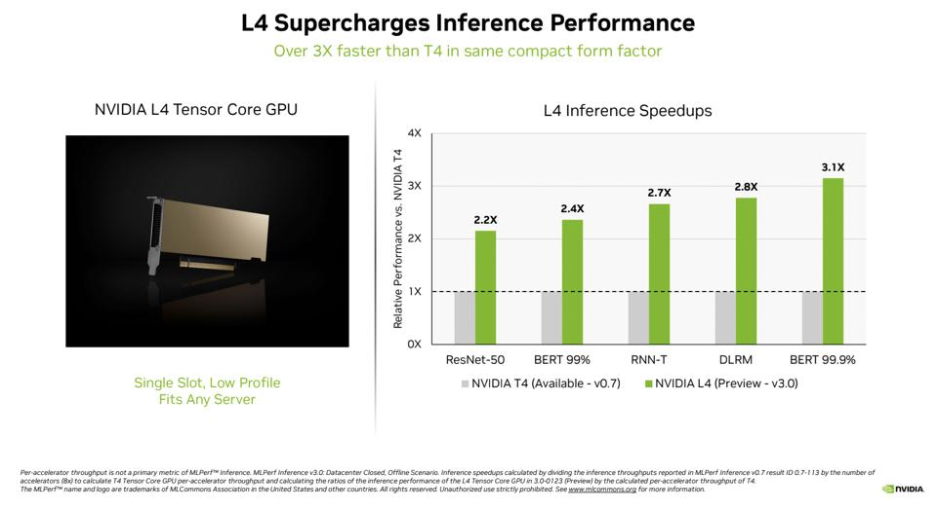
Figure 4: L4 vs T4 Inference Performance [Image Source]
The advanced memory controllers in L4 help in minimizing delays when fetching data, reducing the time spent waiting for model parameters during inference. With a TDP of 72~120W eliminates the need for aggressive cooling, allowing the L4 to maintain peak performance with minimal thermal throttling! This makes it ideal for energy-efficient inference deployments.
Enhanced NVENC and NVDEC
The energy-efficient L4 GPU uses dedicated hardware encoders (NVENC) and decoders (NVDEC) for accelerated video processing. The eighth-generation NVENC and NVDEC engines not only accelerate AI inference but also speed up AI-video pipelines.
With third-generation RT cores and AI-powered DLSS 3, the NVIDIA L4 GPU delivers nearly 4x higher performance than its predecessor. All of this is achieved while maintaining minimal frame-to-frame inference latency.
In a nutshell, the NVIDIA L4 GPU should be the choice for cost-effective AI inference at scale, video streaming/transcoding (efficient video encoding), and edge deployments where power is limited.
Also Read – NVIDIA L4 vs NVIDIA L40s comparison

Understand NVIDIA TensorRT
NVIDIA TensorRT a powerful ecosystem of tools for developers that help with optimizing deep learning inference. TensorRT is built on CUDA, NVIDIA’s parallel programming model.
TensorRT comprises the following:
- Inference compilers
- Runtimes
- Model optimizations
The open-source code of TensorRT is available at https://github.com/NVIDIA/TensorRT. The TensorRT ecosystem includes the TensorRT compiler, TensorRT-LLM, TensorRT Model Optimizer, TensorRT for RTX, and TensorRT Cloud.
Simply put, TensorRT helps in delivering low latency and high throughput, making AI models more efficient when they are deployed on NVIDIA GPUs.
Key Features of TensorRT
Here are some of the salient features of TensorRT:
Large Language Model Inference
The open-source TensorRT-LLM which is a part of the larger TensorRT ecosystem provides easy-to-use Python APIs. It helps in accelerating and optimizing inference performance of LLMs on the NVIDIA AI platform.
It is tailored for transformer-based models and text generation tasks. It supports optimization of popular LLMs like GPT, LLaMA, Falcon, amongst others. At the time of writing this blog, the latest version of TensorRT-LLM is v1.0.0, details of which can be found at https://github.com/NVIDIA/TensorRT-LLM/releases/tag/v1.0.0
Integration with Major Frameworks
TensorRT supports seamless integration with frameworks like PyTorch and HuggingFace models. This integration can be realized via TensorRT-LLM, ONNX Runtime with TensorRT backend, and Optimum NVIDIA.
As stated in the TensorRT official documentation, the integration can help achieve close to 6x faster inference with just a single line of code! The ONNX parser with TensorRT can be used for importing ONNX models from popular frameworks into TensorRT.
Scalable Deployment and Accelerated Execution with Dynamo-Triton
NVIDIA Dynamo Triton, the inference-serving software that uses TensorRT as the back-end is instrumental in deployment and execution at scale. The models are TensorRT-optimized, hence they achieve superior performance-per-watt, and deliver lower latency.
NVIDIA Dynamo Triton is also instrumental in achieving higher throughput primarily due to factors like dynamic batching, concurrent model execution, model ensembling and streaming audio and video inputs.
Automatic Kernel Tuning
TensorRT starts by selecting the optimal kernels and layer implementations to maximize inference performance. Several transformations and optimizations to the neural network graph are done to get to the best layer.
The layers with unused output are eliminated for avoiding unnecessary computations. Wherever possible, factors such as convolution, bias, and ReLU layers are fused to form a single layer. Layer fusion improves the efficiency of running Tensor RT-optimized networks on the GPU.
With auto kernel-tuning in place, TensorRT automatically selects the most-optimal (or best-suited) GPU kernels based on the GPU hardware, model, precision, and batch size. Since the L4 GPU supports precisions like INT8, FP16, you might want to enable/favor kernels (e.g., FP16/INT8 kernels) that exploit the Tensor Cores and the architecture’s positives.
Support for Low-Precision Formats
Quantization in TensorRT enables high-performance inference. With this, the model size is reduced and overall computation is accelerated by representing floating-point values with lower-precision data types.
Here are some of the quantized data types supported by TensorRT:
- INT8 (signed 8-bit integer)
- INT4 (signed 4-bit integer, weight-only quantization)
- FP16 (signed 8-bit floating point)
- FP8E4M3 (FP8, 8-bit floating point with 4 exponent and 3 mantissa bits)
- FP4E2M1 (FP4, 4-bit floating point with 2 exponent and 1 mantissa bit)
You can find more information about Quantization in TensorRT in the official TensorRT Quantization Documentation.
Optimized Resource Utilization
Features like layer fusion, kernel auto-tuning, and precision calibration makes TensorRT efficient enough to run AI models on high-end as well as resource-constrained GPUs. This is because these features play a major role in minimizing memory and computational requirements.
One more notable benefit of TensorRT is that it provides a production-ready runtime environment. This not only helps in saving numerous man-hours but also enables developers to deploy models without the need for extensive manual tuning.
How does TensorRT perform Optimization?
TensorRT speeds inference by 36x compared to CPU-only platforms. Built on the NVIDIA CUDA parallel programming model, TensorRT optimizes inference using quantization, layer and tensor fusion, and kernel tuning techniques.
Here is a deep-dive of the five types of optimization performed by TensorRT for reducing the inference latency:
1. Weight and Activation Precision Calibration
Parameters and activations are in FP32 (Floating Point 32) precision during the training process. Since TensorRT supports other precision formats, the model is converted to lower-precision formats like FP16, INT8, or FP8.
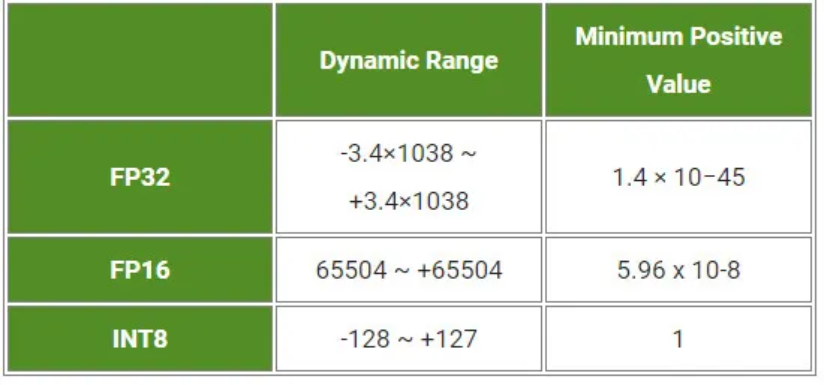
Figure 5: Precision range supported by TensorRT [Image Source]
The conversion not only results in reduction of the inference time but also results in a significant reduction in the model size. However, some weights might shrink due to the lower dynamic range offered by FP16 when compared to the FP32 format. In case of conversion from FP32 to FP16, accuracy remains largely unaffected hence, the FP16 format does not degrade the information or key features.
On the other hand, additional scaling and bias calibration is required when converting from FP32 to INT8 precision as the narrow range (-127 to +127) might cause weight distortion and accuracy loss. TensorRT uses KL-divergence to compare the FP32 activation distribution with its INT8 representation and selects quantization parameters that minimize this difference.
2. Layers and Tensor Fusion
There is a cost and time factor associated with the reading and writing of tensor data for each layer. To reduce the time and overhead costs, TensorRT uses layer and tensor fusion to optimize the GPU memory and bandwidth. It does this by fusing nodes in a kernel, both horizontally as well as vertically.

Figure 6: Layers and Tensor Fusion in TensorRT [Image Source]
On the RHS, TensorRT has identified layers that share the same inputs and compatible filter sizes, then fused them into optimized CBR (Convolution + Bias + ReLU) blocks.
3. Dynamic Tensor Memory
As stated earlier in the blog, TensorRT allocates memory to Tensor only for a duration of the usage. This helps with better reuse of the memory and also results in reduction of the memory footprint.
Since the same memory blocks are reused, additional allocation overhead is avoided resulting in faster and efficient model execution.
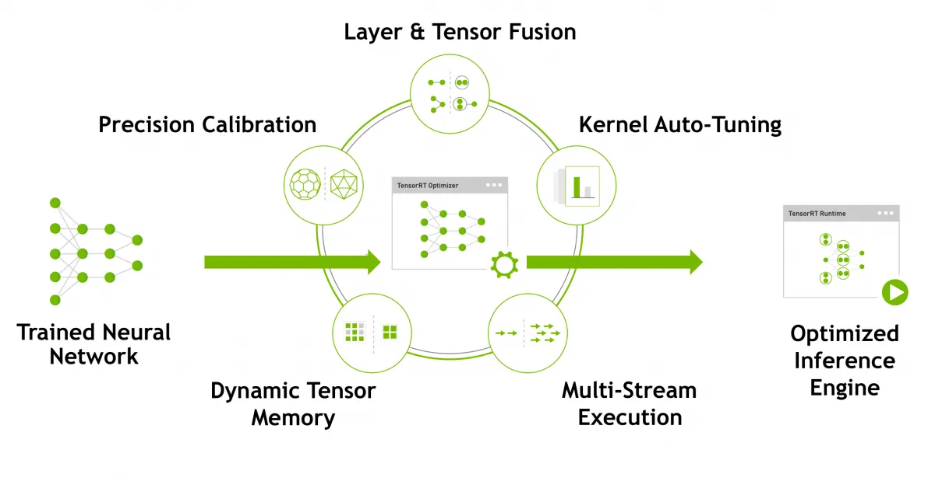
Figure 7: Factors impacting optimization using TensorRT [Image Source]
4. Kernel Auto Tuning
We mentioned about automatic kernel tuning in the earlier section of the blog. With kernel auto-tuning, TensorRT selects the best-suited layers, algorithms, and optimal batch sizes depending on the GPU used for execution.
For instance, there are multiple ways of performing the convolution operation but TensorRT chooses the most optimal option for the platform!
5. Multiple Stream Execution in Parallel
TensorRT is built on CUDA, NVIDIA’s parallel programming model. Owing to this, TensorRT can run different multiple inference requests simultaneously across multiple CUDA streams.
As a result, TensorRT achieves higher throughput and lower latency by overlapping computation & data transfers and serving multiple real-time inference requests.
Demonstration – Optimizing PyTorch Inference on NVIDIA L4 with TensorRT
Till now we have covered the technical nuances of the NVIDIA L4 GPU and the TensorRT, the SDK for high-performance deep learning inference on NVIDIA GPUs. Inference latency can be reduced and better throughput can be achieved by converting a trained PyTorch model into a TensorRT-optimized engine using Torch-TensorRT.
The latency can be further reduced by harnessing the capabilities offered by the Ada Lovelace architecture and low-precision support of the NVIDIA L4 GPU. The optimization can be useful for real-time workloads like image classification, language inference, and more.
LLMs like GPT or Llama generate text one token at a time and each new token depends on all previously generated tokens. TensorRT’s features like kernel auto-tuning, precision calibration and parallel stream execution and capabilities of the NVIDIA L4 can help in accelerating the token generation during inference.
Pre-Requisites and Installation
For demonstration of boosting PyTorch inference speed on NVIDIA L4, we take a small Multi-Layer Perceptron or MLP) and export it to ONNX. The model is exported to ONNX, as ONNX and TensorRT are used together to accelerate AI model inference on NVIDIA GPUs (including L4).
The exporting PyTorch model to ONNX tutorial details the steps used for converting the model to ONNX. Packages like TensorRT and PyCUDA require an NVIDIA GPU and proper CUDA drivers to work correctly. Hence, the dependencies mentioned in requirements.txt can be installed on the host-machine (i.e., Windows or Linux systems) with NVIDIA GPU support.
FileName – requirements.txt
torch>=2.0.0
onnx>=1.15.0
numpy>=1.24.0
tensorrt>=10.0.0
pycuda>=2024.1
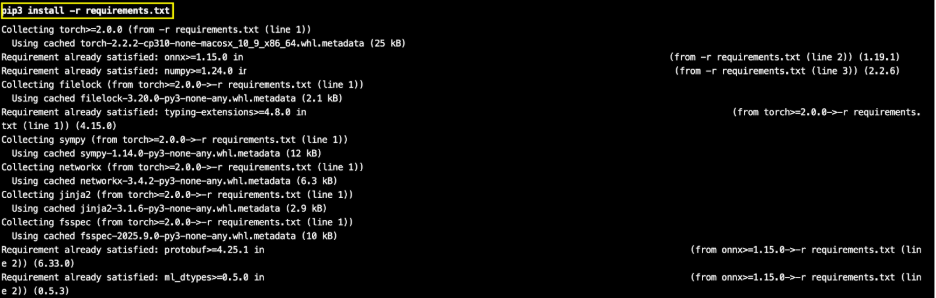
Trigger the command pip3 install -r requirements.txt on the terminal for installing the required dependencies on the host machine.
Folder Structure
Here is the repository folder structure:

– models/simple_model.py: Implementation of a simple feed-forward neural network using PyTorch. It consists of two fully connected layers with a ReLU activation.
– models/export_onnx.py: ONNX export of the model implemented in simple_model.py. It creates a dummy input tensor, runs the model, and saves it as simple_model.onnx for use in inference engines.
– tensorrt/build_engine.py: Implementation that loads an ONNX model and builds a TensorRT engine for optimized inference. It sets up FP16 precision, workspace limits, and dynamic input shapes since FP16 is supported on the NVIDIA L4 GPU.
– tensorrt/infer_simple.py: Implementation that loads the TensorRT engine and runs inference on an NVIDIA GPU (like the L4). For high-efficiency AI inference, we recommend running the inference tasks on L4 GPU Cloud.
– benchmarks/benchmark.py: Implementation that does inference performance benchmarking of a PyTorch model versus a TensorRT engine on the NVIDIA L4 GPU.
Code Walkthrough
Let’s look at some of the important aspects of the PyTorch and ONNX models.
FileName – models/simple_model.py
import torch

import torch.nn as nn

class SimpleModel(nn.Module):

   def __init__(self):

       super(SimpleModel, self).__init__()

       self.fc1 = nn.Linear(10, 16)

       self.relu = nn.ReLU()

       self.fc2 = nn.Linear(16, 5)

   def forward(self, x):

       x = self.relu(self.fc1(x))

       return self.fc2(x)
– We first import the torch library and the neural network module (torch.nn) which provides layers, activations and other building blocks.
– The super(SimpleModel, self).__init__()
constructor initializes the model and calls the parent nn.Module constructor.
– self.fc1 = nn.Linear(10, 16) defines a linear layer with 10 input features and 16 output features.
– self.relu = nn.ReLU() does the ReLU activation for introducing non-linearity after the first layer.
– self.fc2 = nn.Linear(16, 5) defines the second linear layer mapping the 16-dimensional hidden output to 5 output features.
– forward(self, x) defines how input data flows through the network.
The simple feedforward model takes input as a tensor of shape (batch_size, 10) and generates an output as a tensor of shape (batch_size, 5).
FileName – models/export_onnx.py
import torch

import torch.nn as nn

class SimpleModel(nn.Module):

   def __init__(self):

       super(SimpleModel, self).__init__()

       self.fc1 = nn.Linear(10, 16)

       self.relu = nn.ReLU()

       self.fc2 = nn.Linear(16, 5)

   def forward(self, x):

       x = self.relu(self.fc1(x))

       return self.fc2(x)

model = SimpleModel()

dummy_input = torch.randn(1, 10)

torch.onnx.export(

   model, dummy_input, "simple_model.onnx",

   input_names=["input"], output_names=["output"], opset_version=17

)

print("✅ Model exported successfully to simple_model.onnx")
This is the ONNX equivalent of the PyTorch SimpleModel that can be used for cross-framework inference and further optimized with tools like TensorRT. Since the implementation is a ONNX export of the PyTorch model, we just look into the essential aspects of the code:
- dummy_input = torch.randn(1, 10) creates a dummy input tensor with shape (1, 10) for simulating a single input sample for the model.
- torch.onnx.export saves the model in the ONNX format.
FileName – tensorrt/build_engine.py
import tensorrt as trt

TRT_LOGGER = trt.Logger(trt.Logger.WARNING)

def build_engine(onnx_file_path):

   builder = trt.Builder(TRT_LOGGER)

   network_flags = 1 << int(trt.NetworkDefinitionCreationFlag.EXPLICIT_BATCH)

   network = builder.create_network(network_flags)

   parser = trt.OnnxParser(network, TRT_LOGGER)

   # Parse ONNX

   with open(onnx_file_path, 'rb') as f:

       if not parser.parse(f.read()):

           for i in range(parser.num_errors):

               print(parser.get_error(i))

           return None

   # Use new API only

   config = builder.create_builder_config()

   # Set workspace memory

   config.set_memory_pool_limit(trt.MemoryPoolType.WORKSPACE, 1 << 30)

   # Enable FP16 on L4

   config.set_flag(trt.BuilderFlag.FP16)

   # Optimization profile

   profile = builder.create_optimization_profile()

   profile.set_shape("input", (1, 10), (32, 10), (64, 10))

   config.add_optimization_profile(profile)

   # Build engine

   engine = builder.build_engine(network, config)

   return engine

engine = build_engine("simple_model.onnx")

print("TensorRT engine built:", engine is not None)
– import tensorrt as trt imports NVIDIA TensorRT for model optimization and high-performance inference on the L4.
– def build_engine(onnx_file_path) takes the path of the ONNX model and returns a TensorRT engine.
– The ONNX file is loaded and parsed into the TensorRT network.
– config.set_memory_pool_limit(trt.MemoryPoolType.WORKSPACE, 1 << 30)
restricts TensorRT to use up to 1 GB of GPU memory for its optimization workspace.
– config.set_flag(trt.BuilderFlag.FP16) enables the low-precision format (i.e., FP16) for improving speed and reducing memory usage on the L4.
– engine = builder.build_engine(network, config) compiles the network into a high-performance TensorRT engine ready for inference.
– engine = build_engine(“simple_model.onnx”) builds the engine from the ONNX model.
FileName – benchmarks/benchmark.py
import time

import numpy as np

import torch

from models.simple_model import SimpleModel  # Import your class

import tensorrt as trt

import pycuda.driver as cuda

import pycuda.autoinit

# PyTorch Baseline

device = torch.device('cuda')

pytorch_model = SimpleModel().to(device).eval()

pytorch_input = torch.randn(32, 10).to(device)

torch.cuda.synchronize()

for _ in range(100):  # Warmup

   _ = pytorch_model(pytorch_input)

torch.cuda.synchronize()

pytorch_times = []

for _ in range(1000):

   torch.cuda.synchronize()

   start_iter = time.time()

   output = pytorch_model(pytorch_input)

   torch.cuda.synchronize()

   pytorch_times.append(time.time() - start_iter)

pytorch_avg = np.mean(pytorch_times) * 1000

print(f"PyTorch Avg (batch=32): {pytorch_avg:.2f} ms")

# TensorRT (use build_engine from tensorrt/)

from tensorrt.build_engine import build_engine

engine = build_engine("simple_model.onnx")

if engine is None: raise ValueError("Build failed")

context = engine.create_execution_context()

context.set_binding_shape(0, (32, 10))

input_size = trt.volume(context.get_binding_shape(0)) * np.float32(1).itemsize

output_size = trt.volume(context.get_binding_shape(1)) * np.float32(1).itemsize

h_input = np.random.randn(32, 10).astype(np.float32)

h_output = np.empty((32, 5), dtype=np.float32)

d_input = cuda.mem_alloc(input_size)

d_output = cuda.mem_alloc(output_size)

bindings = [int(d_input), int(d_output)]

# Warmup

cuda.memcpy_htod(d_input, h_input)

for _ in range(100):

   context.execute_v2(bindings)

   cuda.memcpy_dtoh(h_output, d_output)

# Time

trt_times = []

for _ in range(1000):

   cuda.memcpy_htod(d_input, h_input)

   start_iter = time.time()

   context.execute_v2(bindings)

   cuda.memcpy_dtoh(h_output, d_output)

   trt_times.append(time.time() - start_iter)

trt_avg = np.mean(trt_times) * 1000

print(f"TensorRT Avg (batch=32, FP16): {trt_avg:.2f} ms")

reduction = (1 - trt_avg / pytorch_avg) * 100

print(f"Reduction: {reduction:.1f}% (Speedup: {pytorch_avg / trt_avg:.2f}x)")

d_input.free()

d_output.free()
– device = torch.device(‘cuda’) and pytorch_model = SimpleModel().to(device).eval() move the model to the GPU (i.e., L4 in our case) and set it to the evaluation mode.
– torch.cuda.synchronize() and pytorch_model(pytorch_input) (in a loop from 1..100) operations run multiple forward passes to warm up GPU for accurate timing
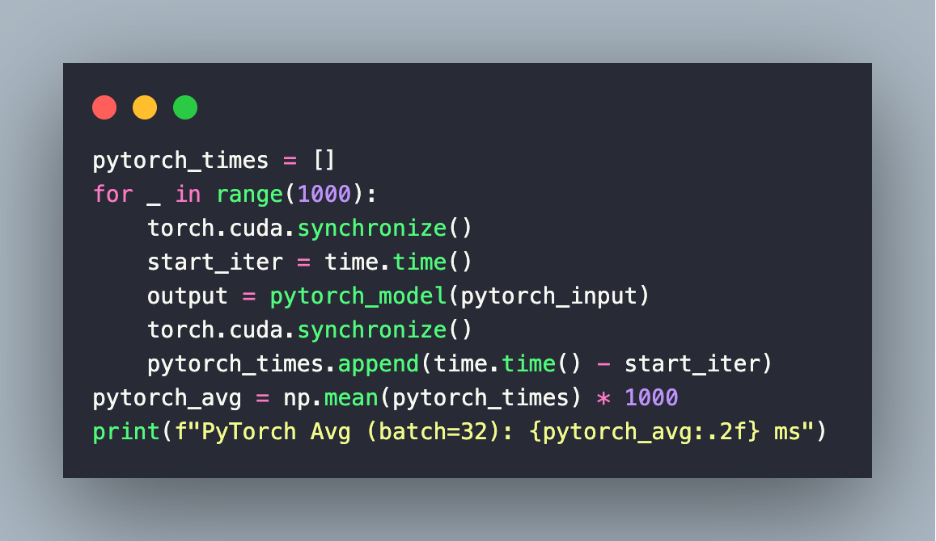
– The below code snippet measures the inference time of the PyTorch model. It measures the latency of each forward pass. Finally, it stores times in pytorch_times and computes average in ms.
– This snippet loads the ONNX model into TensorRT. It sets the dynamic input shape for batch size 32.
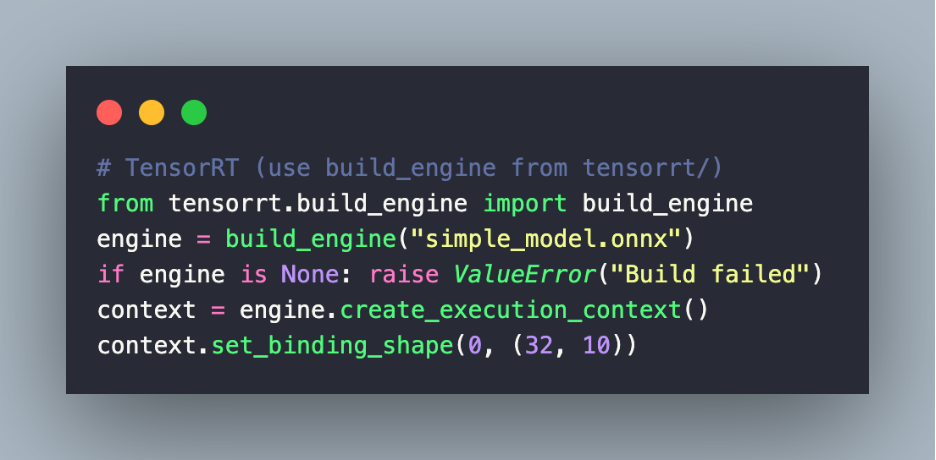
– cuda.memcpy_htod(d_input, h_input) and cuda.memcpy_dtoh(h_output, d_output) copies input to GPU and runs multiple forward passes to warm up the TensorRT engine.
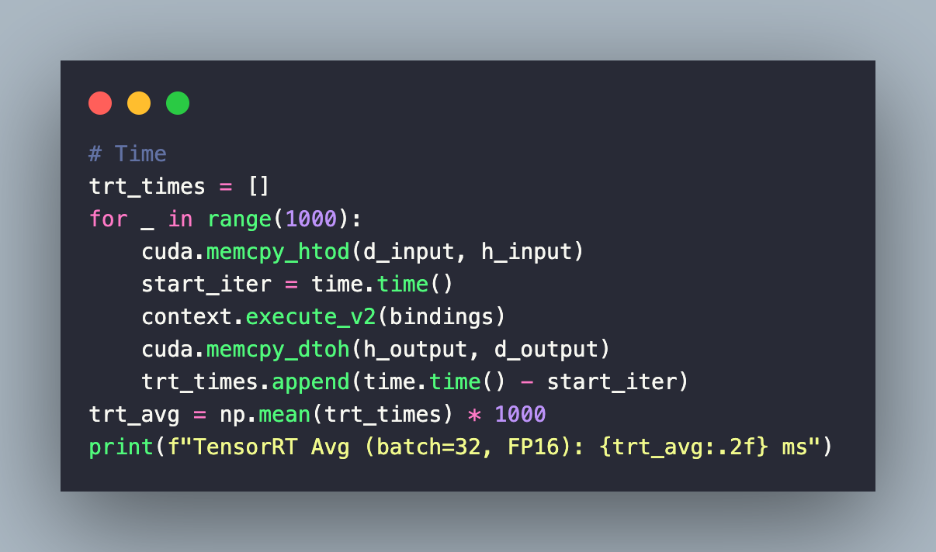
– The snippet measures inference time for the TensorRT FP16 engine. Finally, it stores the timing in trt_times and computes the average latency.
– reduction = (1 – trt_avg / pytorch_avg) * 100 calculates the latency reduction and speedup of TensorRT over PyTorch.
The implementation in tensorrt/infer_simple.py loads the TensorRT engine and runs inference on a sample input using L4 GPU memory managed by PyCUDA.
FileName – tensorrt/infer_simple.py

Execution
Run the following commands on the terminal on the host machine to install the requirements, export the PyTorch model to ONNX and load the ONNX model.
The command python tensorrt/build_engine.py builds the TensorRT engine from the model, applies the FP16 optimization, and outputs the serialized .engine file so that it can be loaded for faster inference on the NVIDIA L4 GPU. The L4 GPU on AceCloud can be leveraged to cut cloud-costs and run large-scale AI inference without compromising on the performance.
Here is the overall sequence of commands that have to be triggered on the host terminal:
Note: Please use pip3 or python3 in case you have more than one Python version installed on the machine.
pip install -r requirements.txt
python models/export_onnx.py
python tensorrt/build_engine.py
python benchmarks/benchmark.py
Both the PyTorch and ONNX models have to be deployed to the L4 cloud GPU on AceCloud so that benchmarking can be performed on both of them. Once both the models are deployed to NVIDIA L4 for inference tasks, you would observe that TensorRT FP16 inference achieves 40%+ lower average latency compared to PyTorch.
Though we have used a simple example for demonstration, you can replicate the same approach with complex models, such Llama 3 or Stable Diffusion for image generation. You can harness the benefits offered by TensorRT by scaling up the batch size, leveraging mixed-precision inference and deploying it across multi-GPU setups on hardware like the NVIDIA L4 for production-grade performance!
Conclusion
The Ada Lovelace-based NVIDIA L4 GPU has path-breaking features like fourth-generation Tensor cores, improved energy efficiency, and enhanced NVENC & NVDEC that are highly useful for accelerating video-related AI inference.
Its capabilities can be further multiplied by combining it with TensorRT optimization. In summary, developers can achieve significant reduction in AI inference latency by leveraging the combination of TensorRT and L4 GPU. This empowers blazing-fast real-time AI applications, delivering uncompromised accuracy and seamless scalability at scale.