

The Architecture, Engineering and Construction industry (AEC) has always been at the forefront of adopting modern design and visualization technologies and GPUs in Architecture can be a good way to implement it.
It has been decades since architects, civil engineers and city planners gave up creating blueprints by hand for the multifaceted benefits of computer-assisted modelling and simulation. Geographic Information System (GIS), Building Information Modelling (BIM) and end-to-end Automation have begun dominating this sector now, manifesting a very wide range of applications ranging from the construction of functional buildings to government tracking of land ownership. These advanced software tools are collectively referred to as Computer-Aided Design software (CAD).
What is Computer-Aided Architectural Design (CAAD)?
CAAD is a specific type of CAD software that civil engineers, building planners and architects use to design and visualize high-quality digital versions of buildings, civil infrastructure, layouts and utilities of all shapes and magnitudes.
These software applications enable architects and engineers to embed extensive information in their designs, consider material specifications and footfall possibilities, and even play around with physics attributes like gravity, illuminations, color interactions, ground strength, building weight, etc. to understand beforehand the properties of the final structure.
Furthermore, many CAAD software also come equipped with inbuilt calculations and geometry algorithms to help engineers precisely calculate the specifics of various implementations. CAAD also supports Building Information Modelling files (BIM) to provide three-dimensional insight into architectural characteristics and physical infrastructure for better planning, design and construction.
Lastly, CAAD enables civil engineers to experiment with structural features to impart buildings the ability to withstand natural disasters like earthquakes and landslides.
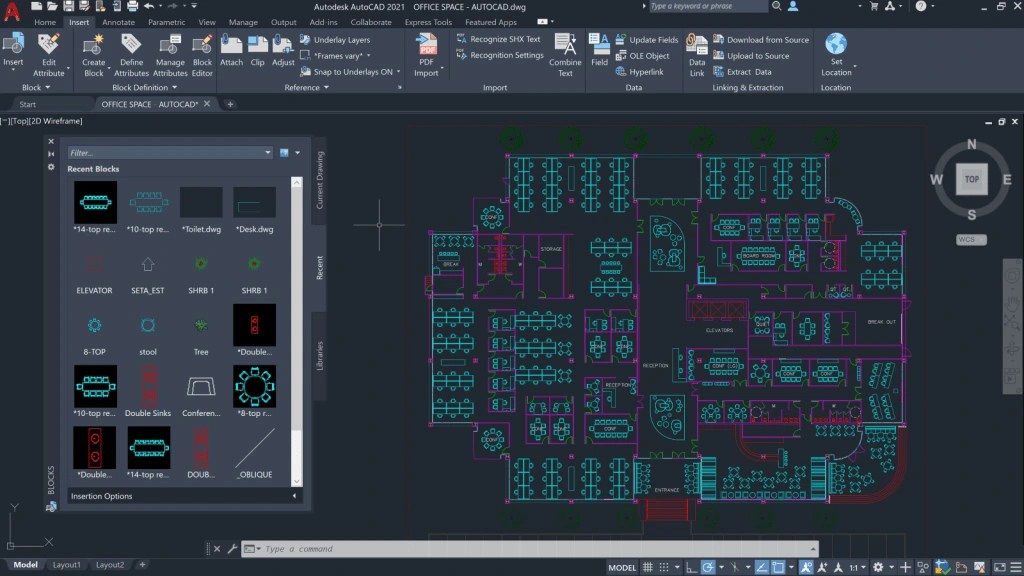
Screengrab from AutoCAD 2021 software (Source)
Which CAAD Software Should You Use in 2025?
Though a plethora of design tools are available in the market offering different functionalities, the most widely-recognized CAAD software are –
1. AutoCAD:
Developed by tech giant Autodesk, this is the most popular CAAD program. It allows professional architects and engineers to create preliminary blueprints of buildings from scratch, or import existing designs, and visualize the entire model prior to construction commencement.
It supports 3D modeling, digital drawing, sketching of individual construction elements, addition of textures, etc. Given sufficient computing power, it can also render highly realistic architectural images and 3D models.
2. Revit:
Another famous offering from Autodesk, this CAAD software supports Building Information Modelling (BIM) for the AEC industry. It comes equipped with multi-CAD functionalities, allowing users to import other file formats.
Users can also easily integrate APIs and plugins with Revit for additional customizations. Furthermore, it can also be deployed in conjunction with 3D printing and CNC machine software.
Most importantly, Revit facilitates Cloud collaboration with other users/ teams/ enterprises via Autodesk 360 and Autodesk 360 BIM.
3. Rhino 3D:
Rhinoceros 3D is another versatile and user-friendly designing tool employed for creating industrial and construction blueprints, landscape designs, and building architecture visualization.
It allows users to create anything from a concept drawing to detailed architectural plans, and its Rhino+Grasshopper feature can be used to create dynamic geometrical shapes. It can also be seamlessly integrated with various BIM tools.
Other notable CAD tools include DraftSight, IntelliCAD, NanoCAD, ZWCAD and SketchUp.
What are the benefits of CAAD?
- Uplifting the design process, introducing consistency, uniformity and precision
- Encouraging experimentation with different architecture styles and design elements
- Facilitating three-dimensional visualization of various functional, landscape and design elements
- Enabling extensive calculations vis-a-vis load bearing, truss forces, thermal expansion, etc.
- Improving productivity, reducing human errors, and authorizing seamless scaling
- Expediting information sharing and seamless collaborations
Do you need GPU for CAAD?
The answer to the question is a resounding “Yes”!
CAAD applications are extremely resource-hungry, both in terms of computing power as well as memory requirements. Designing intricately detailed blueprints and industrial designs necessitates the availability of robust processors (CPU and GPU) as well as system RAM and processor on-chip memory.
Three-dimensional models, high-resolution images and dynamic architectural simulations created using CAAD applications are rendered using graphics cards. Without GPU processing, the system will struggle to execute such high-resolution rendering even without the inclusion of photorealistic illumination and material textures.
GPU has become an indispensable necessity even for content creators churning out high-quality artworks and animations. In such a scenario, it is impossible to imagine resource-intensive software like CAAD programs without GPU.
But can we use CAAD without GPU? Let’s find out.
CPU vs. GPU for CAAD
CAAD using CPU |
CAAD using GPU |
| CPU has fewer processing cores (usually 4 or 8 or 16), but these cores deliver exceptional precision. | GPU has hundreds of processing cores and these can perform calculations and mathematical operations with lightning-fast speed, but accuracy takes a hit during these calculations. |
| CPUs work on the principle of serial instruction processing. Each core handles one instruction at a time. Therefore, it is recommended to use systems with multi-core CPUs for CAAD projects in order to reduce process bottlenecks. | GPUs work on the principle of SIMD which is excellent for graphics manipulation, texture mapping, and other visual operations where the properties of each displayed pixel must be calculated independently of, but simultaneously with, contiguous pixels. |
| Fewer cores equal fewer simultaneous calculations and rendering operations, resulting in extreme lags in displaying highly detailed CAAD projects. | Given their numerous cores, GPU can process given data volumes substantially faster than CPU. Any off-the-shelf GPU, whether integrated or discrete, can generally deliver superior performance vis-a-vis CPU. |
| CPUs are more suitable for ordinary CAAD designs like construction blueprints, not involving heavy-duty tasks like rendering, simulation, and 3D modelling. | Professional architects and engineers dealing with 3D modelling, physics simulation and massive detail-oriented construction rendering necessarily require compute-intensive GPUs. |
| The frequency at which the CPU works (clock speed) is a significant factor when running CAAD applications. | In addition to the GPU clock, the on-chip memory also plays an important role since considerably more data can be loaded on to the GPU in a single go, thus facilitating lag-free display of much larger models. |
| Efficient multi-core CPUs such as Intel Core i7 or i9 and AMD Ryzen 7 or 9 are recommended for architectural and industrial design enterprises. But it is nonetheless recommended to channel CAD calculations through the integrated graphics cards.
| Nvidia Quadro, Nvidia GeForce and AMD Radeon excel at delivering rich visuals and CAAD rendering power. |
In short, if you are an architect/ engineer with a tight budget or you only create 2D designs/ blueprints, you can continue using your CPU for CAD. Upgrade your system’s primary memory (RAM) if it slows/ lags while running the CAD software.
However, if you want high-quality renders and 3D simulations in less time and without lags, experts highly recommend investing in professional GPUs or subscribing to Cloud GPU resources. Professional GPUs deliver high performance, accurate lighting effects, precise physics calculations, and realistic simulations. For optimal 3D CAAD rendering, GPUs with at least 5 GB of VRAM will make things smooth.
Can I Use Gaming Graphics Cards for CAD?
Generally, no.
CAD GPUs require features and APIs not supported by gaming GPUs. On the flipside, GPUs meant for high-res CAD designs are not suitable for rendering 2D/3D and AR/VR games.
Furthermore, the viability of using gaming GPUs for CAD operations also depends on the nature of the software used and the extent of compute requirements. It is normally recommended to use separate workload-specific GPUs for CAD and gaming respectively. But some top-of-the-line GPUs, such as Nvidia’s RTX series can handle architectural designs and simulations as well as graphics-intensive games.
Here are some insights into different GPUs’ performance when it comes to gaming and CAD operations –
>> AutoCAD works well on Asus Strix GTX 1070 which is essentially an affordable gaming GPU.
>> Nvidia Quadro K1200 is known for delivering high-quality CAD graphics, but it lags, and the frame rate drops, when running games or handling 3D visualization.
>> AMD Radeon GPUs like WX 3200, WX 5500, WX 5100, etc., are excellent for design software like AutoCAD and SolidWorks. They also perform well in low-powered games.
>> Nvidia RTX GPUs offer lightning-fast 3D rendering and real-time Ray tracing features which enable architects and engineers to effortlessly streamline their creative design workflow.
>> Workstation GPUs and enterprise-class GPUs can manifolds accelerate computations required for gravity simulation, illumination and shading effects, factoring in construction weight, mapping geolocation, etc. in 3D structures/ construction plans.
Which Factors must be considered when Choosing a GPU for Architecture?
1. GPU Memory:
Every GPU comes equipped with dedicated built-in memory. Having more on-chip memory equals handling larger data volumes in a single go. Therefore, the GPU can effortlessly take up simulations and 3D rendering involving exquisite detail-oriented designs or extensive textures/ illumination.
2. Memory bandwidth:
Memory bandwidth describes the speed of data transfer between the GPU (VRAM) and the system RAM. Enterprises operating in CAD sector must necessarily evaluate the memory bandwidth metric since most of their workloads involve colossal amounts of data pertaining to design elements, textures, calculations, simulations and lighting/shading. Limited memory bandwidth would entail unnecessary bottlenecks and buffering even if the GPU has sufficient memory and processing cores to manage the incoming data in a streamlined manner.
3. Thermal Design Power (TDP):
TDP helps users understand how much power the GPU can produce and how much heat it will generate while delivering that power. This information lets users also work out the temperature control hardware they want to utilize to derive the most optimum performance from the GPU.
Conclusion –
Picking the most appropriate GPU for CAAD and 3D construction modeling can be stressful. Without the right GPU, your system might unbearably lag, and you may be left staring at screen buffering when you could’ve been finetuning your designs. Crisp designs are the crux of architecture, and loss of quality equals loss of reputation.
in this article, we discussed the basics of GPU-accelerated CAAD and understood the differences between CAAD using GPU and CPU. AceCloud offers the most advanced Nvidia GPUs which can maximize your CAD performance in the blink of an eye. Connect with us now to learn more.

Related Post









Get in Touch

Credits First!
- 24*7 Human Support
- Pay-as-you-go Pricing
- No Egress Cost
- Multi Tier Security