NVIDIA Tensor Cores, FP8 & BF16 are no longer niche features. They’re the levers that decide how fast you can train, how big you can scale and how much you spend. Organizations are under pressure to push bigger models and longer contexts without endlessly adding GPUs.
Traditional FP32 training is too slow and uses too much memory. With mixed precision, most tensor operations run in lower-precision formats like BF16 or the newer FP8. This boosts Tensor Core throughput, reduces memory usage and lowers infrastructure costs while still keeping model accuracy where it needs to be.

The training precisions analysis above shows FP16 and BF16 reach about 50% adoption within three years and become the default within five years. If that pattern repeats, FP8 training could be standard by around 2028.
What are NVIDIA Tensor Cores?
Tensor cores are specialized in matrix operations used in deep learning. It powers mixed-precision computing that adapts calculations in real time to boost throughput while maintaining accuracy and strengthening security. They sit alongside general-purpose CUDA cores:
- CUDA cores handle a wide range of FP32 and integer operations.
- Tensor Cores are optimized specifically for dense tensor operations in reduced precision formats like FP16, BF16 and FP8, with higher-precision accumulation paths.
By exploiting these reduced precision formats, Tensor Cores deliver far more operations per clock than traditional FP32 pipelines, boosting throughput while maintaining accuracy when used with well-tested training recipes.
The latest generation offers faster performance across diverse AI and high-performance computing (HPC) workloads, reducing bottlenecks in training pipelines and accelerating deployment readiness.
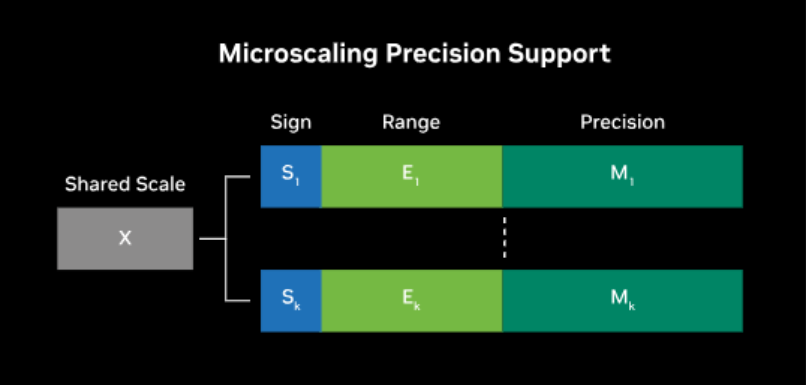
Source: NVIDIA
NVIDIA reports that Tensor Core–optimized GPUs can deliver up to around 4× faster training on very large generative models and significantly higher inference throughput compared with FP32 baselines on previous generations, depending on the workload and configuration.
What is the FP8 Format in AI?
FP8 precision is an 8-bit floating point format. It uses only 8 bits to represent each floating-point value. This is four times smaller than a standard single precision float, which uses 32 bits for each number. However, with so few bits available, a single FP8 value cannot provide much numerical precision or dynamic range.
To make FP8 practical, NVIDIA introduced two specific variants in its Hopper architecture E4M3 and E5M2.
- E4M3: 4 exponent bits and 3 mantissa bits, which yields a smaller range of about ±448 but slightly higher precision.
- E5M2: 5 exponent bits and 2 mantissa bits, which extends the range to roughly ±57344 but reduces precision further.

Image Source: NVIDIA
In practice, E4M3 is typically used for forward passes where extra precision helps, whereas E5M2 is preferred for gradients where range matters.
Even with these designs, 2 or 3 mantissa bits provide extremely low precision, so FP8 must be combined with higher-precision accumulation and careful scaling; using FP8 alone end-to-end for training models from scratch without significant errors.
What is the BF16 Format in AI?
BF16, short for Brain Floating Point 16, is a 16-bit floating point format originally introduced by Google and now common across NVIDIA Ampere and Hopper data center GPUs (such as A100 and H100), Google TPUs and recent Intel CPUs. It uses 1 sign bit, 8 exponent bits (same as FP32) and 7 mantissa bits (significantly less than FP32’s 23 bits).
The exponent field matches FP32, so BF16 has a similar dynamic range but lower precision. That makes it very tolerant to large and small values compared with FP16, which has a smaller exponent.
FP8 vs BF16: The Core Differences
Below is the side-by-side comparison table on how FP8 and BF16 differ across precision, range, throughput and stability, so you can choose appropriately:
| Dimension | FP8 on NVIDIA Tensor Cores | BF16 (bfloat16) on NVIDIA Tensor Cores |
|---|---|---|
| Numeric format | 8-bit floating point formats (commonly E4M3, E5M2 on Hopper) | 16-bit floating point format with FP32-like exponent range |
| Bit width and storage | 8-bits per value | 16-bits per value |
| Dynamic range (conceptual) | Narrower range, managed using scaling and calibration | Wide range, like FP32 |
| Numerical precision (mantissa) | Very low mantissa precision | Moderate mantissa precision |
| Typical use in mixed precision | Often used for activations and some weights in selected layers | Often used for accumulations, optimizer state and sensitive layers |
| Hardware support | Supported on NVIDIA Hopper architecture GPUs | Supported on multiple NVIDIA data center generations including Ampere and Hopper |
| Software and ecosystem | Supported in recent CUDA, cuDNN and framework integrations | Widely supported across major frameworks and NVIDIA libraries |
| Throughput potential | Designed to enable higher arithmetic throughput per Tensor Core cycle | Provides strong throughput gains compared with FP32 |
| Memory bandwidth and capacity | Strongest reduction in memory traffic and footprint | Reduced memory use versus FP32, higher than FP8 |
| Convergence and stability | Requires careful scaling policies and validation per workload | Often behaves closer to FP32 in many established training recipes |
| Model quality expectations | Can reach acceptable quality when recipes and scales are tuned | Often used as a drop-in mixed precision baseline for many models |
| Recommended adoption approach | Pilot on selected models, layers and hardware first | Use as the primary mixed precision format for most new workloads |
Key Takeaways:
- BF16 should remain your default mixed precision format because it is widely supported and usually behaves close to FP32.
- FP8 is a focused optimization for Hopper generation GPUs where matrix multiplication throughput and memory limits dominate total training cost.
- Standardize training recipes on BF16 first, then introduce FP8 gradually on well characterized layers and selected models with clear monitoring.
- Before committing fully, you should validate FP8 through profiling, accuracy checks and rollback plans to preserve predictable behavior in production systems.
When FP8 precision is not worth it?
FP8 precision is powerful but not always necessary. It may not be worth the complexity when:
- Models are small or medium sized and already finish quickly in BF16 precision.
- Architectures have fragile numerics, for example some RNNs or physics informed networks.
- Teams lack bandwidth to design scaling policies, add extra validation or maintain rollback paths if FP8 introduces regressions.
In these cases, BF16 precision plus well-tuned mixed precision usually delivers enough speedup without extra operational risk.
Quick decision guide: FP8 vs BF16 precision
- If your fleet is mostly A100, standardize on BF16 precision mixed training because FP8 is not available for training.
- If you have H100 or H200 and very large transformer models (tens of billions of parameters or more), benchmark FP8 precision against BF16 precision on at least one core model.
- If training stability and reproducibility are critical, use BF16 as the baseline and add FP8 only to selected layers with strict monitoring and an easy path back to BF16.
How Mixed Precision Boosts AI Training Performance?
By using mixed precision on modern GPUs, you can train larger models faster while significantly improving hardware utilization.
1. Faster computations on GPU hardware
Modern GPUs are optimized for low-precision arithmetic. Tensor Cores and similar units execute far more operations per clock with 16-bit or 8-bit numbers than with 32-bit. For example, an NVIDIA A100 has a theoretical peak of roughly 312 teraFLOPs of FP16 or BF16 Tensor Core compute, compared with about 19.5 teraFLOPs of standard FP32 compute.
With mixed precision, the same GPU performs well over 15× more math operations each second in critical layers. This shift turns multi-day training jobs into workloads that finish within hours.
Even consumer GPUs such as RTX 30 and 40 series achieve substantial FP16 speedups, and newer architectures add support for BF16 and, on some SKUs, FP8 for further gains. In practical terms, lower precision lets you extract much more performance from the same hardware investment.
2. Reduced memory usage
Training any sizable model requires memory for parameters, gradients, activations and optimizer state. Storing many of these tensors in 16-bit precision can cut memory needs by as much as half. FP8 can reduce them even further for selected layers, particularly activations and some weights.
This reduction enables larger batch sizes, which improves utilization and can reduce the number of steps needed to cover the dataset. It also allows bigger models to fit on a single GPU, which is critical when working with architectures that contain billions of parameters.
Lower memory footprints reduce data movement between GPU and CPU or across distributed GPUs, easing communication bottlenecks. As a result, mixed precision makes far more efficient use of VRAM, and memory-bound workloads experience substantial speed improvements.
3. Lower power and cost for the same work
Because computations run faster and less data moves through the system, mixed precision training often completes the same job using less energy. On cloud platforms, shorter training time directly reduces cost because billing is typically hourly.
If mixed precision allows a training job to complete in 5 hours instead of 10, the bill is effectively cut in half. In many scenarios, the savings exceed that simple ratio. A higher-tier GPU may cost around three times more per hour yet train a model four to five times faster when using FP16, BF16 or FP8 effectively.
In such cases, precision-aware configurations yield more useful work for each unit of spend. Mixed precision unlocks these gains by fully utilizing Tensor Cores and related hardware paths that excel at low-precision math.
4. Scaling to multiple GPUs more effectively
When you train across multiple GPUs or nodes, mixed precision often improves scaling efficiency. Faster per-GPU computation means each device finishes its share of a batch earlier, which reduces the relative impact of synchronization overhead.
Distributed training frameworks that exchange gradients or parameters benefit because communication occupies a smaller fraction of total step time. Reduced tensor sizes with FP16, BF16 and FP8 also shrink the amount of data transmitted during collective operations.
As a result, mixed precision makes individual GPUs faster and helps larger clusters approach near-linear scaling on suitable workloads.
5. Practical impact and real-world speedups
Actual speedup from mixed precision varies with hardware and model characteristics. Older GPUs without strong FP16 support may see limited benefit because their low-precision paths are not heavily accelerated.
On modern GPUs with Tensor Cores, enabling automatic mixed precision commonly delivers 1.5× to 2× faster training with minimal code changes. Some architectures achieve even higher gains, particularly when they were strongly memory-bound under FP32.
Recent H100 GPUs using FP8 raise the ceiling further, with vendor-reported several-fold throughput improvements over A100 FP16 baselines for some Transformer workloads, though actual gains depend heavily on the specific model and pipeline.
For typical deep learning use cases, mixed precision that includes FP8 where appropriate remains one of the most straightforward techniques to increase throughput and reduce training time.
How to Move from FP32 to BF16 to FP8 in Practice?
Use this phased approach to adopt BF16 and FP8 safely while preserving model quality, stability and observability.

Step 1: Enable BF16 mixed precision on a pilot model
Turn on automatic mixed precision (AMP) using BF16 on a representative model. Compare loss curves, evaluation metrics and training stability against a pure FP32 baseline.
Step 2: Roll BF16 out as the default
Once you have parity on key workloads, standardize BF16 mixed precision as the default for new training jobs on supported GPUs. Document any exceptions that still require FP32.
Step 3: Identify high-impact candidates for FP8
Select a small set of large transformer or multimodal models where memory bandwidth and training time are clear bottlenecks and where you have access to FP8-capable data center GPUs (for example, NVIDIA H100 or newer).
Step 4: Pilot FP8 recipes with rollback plans
Use framework and library support (e.g., NVIDIA Transformer Engine or NeMo FP8 recipes) to run FP8/BF16 mixed precision experiments. Monitor training stability, gradient statistics and final quality. Keep straightforward rollback options to BF16-only runs.
Step 5: Operationalize FP8 where it proves its value
If FP8 consistently delivers better throughput and acceptable quality, incorporate it into your standard training configs for similar models, while keeping BF16 as the general-purpose baseline.
AceCloud Turns FP8/BF16 Strategy into Measurable Gains
NVIDIA Tensor Cores, FP8 & BF16 give you practical control over training speed, model scale and infrastructure cost. Instead of adding more GPUs, you can combine FP8 precision and BF16 precision with the right hardware to finish experiments sooner and reach accuracy targets with fewer runs.
On AceCloud, FP8 vs BF16 decisions map directly to FP8 capable NVIDIA H100 GPU instances, managed Kubernetes and a 99.99%* uptime SLA that keeps long training jobs on track.
Therefore, you can standardize on BF16 as a safe baseline, pilot FP8 where throughput limits dominate and size clusters by measured time to convergence. Start a proof of concept on AceCloud today and evaluate FP8 and BF16 performance for your transformer or multimodal workloads.
Frequently Asked Questions
BF16 preserves FP32-like range with fewer mantissa bits, while FP8 compresses further to raise throughput and reduce training time on Tensor Cores.
They accelerate matrix multiplications and related tensor operations using reduced precision inputs with higher precision accumulations for deep learning workloads efficiently.
FP8 lowers memory and bandwidth demand, allowing more operations per second, which improves AI training optimization and shortens convergence cycles.
BF16 is easier to adopt and numerically forgiving, while FP8 demands calibration yet enables stronger high-throughput computing and AI model scaling.