
Securing users, branches and multi-cloud workloads with scattered appliances is hard, slow and expensive. Firewall-as-a-Service (FWaaS) makes that simple by moving inspection to a cloud fabric you manage from one console.
It’s the right time to adopt FWaaS because encrypted traffic dominates the web, which forces deeper inspection and smarter policy design. In early 2024, Cloudflare reported that Transport Layer Security 1.3 was used in more than 93 percent of observed connections, showing how quickly encrypted traffic has become the norm.
This guide explains what Firewall-as-a-Service is, how it works, where it beats traditional firewalls and how to evaluate it. If you lead security, networking or platform engineering, you will leave with a clear decision path and a short checklist to start a pilot.
What is Firewall-as-a-Service?
Firewall as a Service, often abbreviated FWaaS, delivers next-generation firewall capabilities from a cloud platform you consume as a service. Terms like “FWaaS”, “Cloud Firewall” and “Cloud NGFW” are used interchangeably.
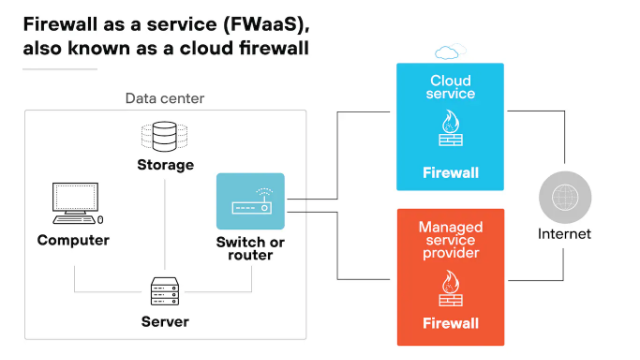
Instead of buying, racking and patching boxes, you focus on steering user, site and cloud egress traffic to the provider’s nearest point of presence and enforcing one policy across everything.
- A complete FWaaS typically includes stateful filtering, application control, intrusion prevention, DNS and URL filtering, TLS inspection with privacy controls and file sandboxing.
- It exposes policy objects for users, groups, device posture, applications and destinations, then logs everything to your SIEM (Security Information and Engineering Management) or data lake.
In most modern architectures, FWaaS lives inside the Security Service Edge family alongside a secure web gateway, cloud access security broker and zero trust network access. Organizations implementing comprehensive cloud security strategies often combine FWaaS with other security measures to create multi-layered protection.
Note: The FWaaS provider runs the fabric and updates protections. You still define policy, manage exceptions, handle data governance and integrate logs with your detection stack.
How Firewall-as-a-Service Works?
Firewall-as-a-Service functions when you connect traffic to it and specify the identity-aware configurations across a cloud environment.
Connect traffic to the fabric
- Sites use IPsec or GRE tunnels, often through SD-WAN.
- Remote users install a lightweight agent or use a device posture-aware client.
- Cloud workloads route VPC or VNet egress through cloud connectors or transit gateways.
- Each path lands at the nearest point of presence so policy applies close to the user.
Suggested read: What is Cloud Networking and How It Can Help Your Business?
Author identity-aware rules
- Instead of only IPs and ports, you match users, groups and device health.
- You target applications by name, not just URLs.
- You set time and geography conditions, then add TLS decryption with strict bypass rules for sensitive categories such as healthcare or banking.
- You enable threat prevention with real-time intelligence, intrusion prevention and DNS security to block known malicious domains.
FWaaS reliability comes from anycast routing and regional high availability. In other words, if one point of presence fails, sessions rehome to another with minimal disruption.
Observability, however, is built in. You stream logs to SIEM or S3-compatible storage, use dashboards for policy hits and threat trends, then automate routine tasks with APIs and Terraform.
How Companies Benefit from Firewall-as-a-Service?
Teams adopt FWaaS to move faster, reduce complexity and improve outcomes that matter in audits and incident reviews.
Speed of deployment
You protect new sites and remote users in days, not months. Sites bring up IPsec tunnels through existing routers or SD-WAN. Remote users install a light client and inherit policy immediately. Standard objects for users, groups and applications make day-one enforcement predictable.
Elastic scale during peaks
Capacity expands with traffic without upgrade projects or box swaps. Product launches and seasonal spikes stop being capacity emergencies. Elastic inspection removes painful size-the-appliance decisions that age poorly.
Simplified operations
One console replaces many device interfaces across branches and clouds. You standardize identity and application objects, then reuse them everywhere. Changes roll out globally in minutes, which reduces drift and missed updates.
Cost clarity and predictability
You trade capital purchases for transparent subscriptions tied to users or inspected traffic. Spares, on-site maintenance and rushed refresh cycles disappear. Finance gains cleaner showback models and fewer surprise purchases.
Stronger compliance and governance
Region pinning and data localization help meet residency rules without custom builds. Immutable logs and role-based access support audits with less scramble. TLS decryption uses explicit bypass lists for sensitive categories.
Better user experience
Traffic exits near the user through the nearest point of presence. Anycast routing shortens paths and stabilizes latency during failures. Split-tunnel choices keep real-time apps responsive while enforcing security everywhere.
Unified visibility and analytics
You see user, device and application activity in one place across sites and clouds. Threat and policy logs stream to your SIEM or data lake for hunting and dashboards. Analysts investigate faster because context is consistent everywhere.
Faster threat response
Providers push protections continuously, which shrinks exposure after new disclosures. You can block indicators globally with one rule instead of touching many devices. Playbooks trigger through APIs and webhooks to close loops quickly.
Consistent policy across hybrid and multi-cloud
Cloud connectors unify egress from AWS, Azure and Google Cloud. When evaluating providers for such integrations, understanding their security framework becomes crucial for enterprise deployments. One set of rules follows workloads as they move, which avoids per-cloud rewrites. Developers ship faster because security requirements stay constant.
Smoother M&A and partner onboarding
Acquired sites and partner users connect with tunnels and clients on day one. Baseline controls apply immediately while discovery continues in the background. That lowers integration risk and speeds policy alignment.
To track and quantify these benefits, we recommend you track these metrics during pilots:
| Benefit | Measure | Target During Pilot |
|---|---|---|
| Speed | Time to onboard a site or user cohort | From weeks to days |
| Scale | Throughput headroom at 95th percentile load | No user impact at peak |
| Consistency | Config drift across locations | Zero drift after cutover |
| Security | Time to deploy new signatures | Same day across estate |
| Visibility | Percent traffic inspected with TLS decryption | Clear baseline with allowed bypasses |
| UX | Median latency to nearest PoP | Within agreed threshold |
| Compliance | Audit artifacts available on demand | Evidence pack in hours |
| Cost | Forecast variance versus actuals | Within planned band |
Cloud Firewall vs. Traditional Firewall

Both models enforce traffic policy yet differ in where inspection happens and how capacity is delivered. Use this comparison to align with your footprint, latency tolerance, skills and compliance needs.
| Dimension | Cloud Firewall (FWaaS) | Traditional Firewall |
|---|---|---|
| Deployment | Provider points of presence | Boxes or VMs per site |
| Scale | Elastic capacity | Fixed throughput per device |
| Care and feeding | Provider updates and tuning | Manual patching and tuning |
| High availability | Built into global fabric | Pairs and spares per site |
| Visibility | User and app identity everywhere | Per-site view, limited correlation |
| Latency | Dependent on nearest point of presence | Local hop on-prem |
| Edge cases | Industrial protocols, offline sites | Better for air-gapped networks |
| Commercials | Subscription per user or GB inspected | Hardware, support and licenses |
If you ask us, we’d recommend you:
- Pick FWaaS when you need rapid rollout, elastic scale, unified policy and global visibility across users, sites and clouds.
- Prefer traditional appliances for air-gapped sites, strict on-prem boundaries or specialized protocols that demand local handling.
Note: Many teams run a hybrid design with FWaaS for internet egress and NGFW VMs for east-west segmentation.
FWaaS Vs. Next Generation Firewall (NGFW)
Think of NGFW as the inspection engine and FWaaS as the delivery model. Many capabilities overlap, including application control, intrusion prevention, TLS inspection and advanced malware protection.
However, the differences appear in scale, reach and operations.
- FWaaS runs as a global fabric, uses identity-centric policy and scales elastically across users, sites and clouds. It centralizes management and exposes APIs for automation.
- NGFW often runs as physical or virtual devices. It is well suited for intra-cloud segmentation, special protocols and scenarios where traffic must never leave a specific boundary.
Confused between the two options? Here’s a simple decision aid that will help:
- Choose FWaaS for distributed users, branches and unified internet egress control
- Choose NGFW VMs for east-west segmentation inside VPCs or VNets
- Mix both in hybrid designs that share policy objects and log pipelines
- Prefer API-first tools so security as code stays consistent across environments
How Much Does FWaaS Cost?
Firewall as a Service uses a subscription model, which moves spending from capital purchases to operating expense. You avoid buying and refreshing hardware while the provider delivers inspection and updates as part of the service.
For the right fit, this can be a cost-efficient alternative to appliance stacks.
Actual pricing varies by a few core factors: traffic volume you inspect, the number of availability zones you run in, and the features you include. One-time deployment effort and the provider’s ongoing maintenance are also part of the total.
In practice, you’ll see plans ladder by capability. Baseline tiers cover standard firewalling and management, while higher tiers add advanced threat prevention and other controls. Since features drive price, scope the policy set you truly need before you scale across users, sites and clouds.
When budgeting, line up three buckets:
- Subscription: recurring fee tied to the chosen tier and included controls.
- Deployment: initial setup and integration effort to bring sites, users and clouds online.
- Operations: the provider’s maintenance and ongoing policy work as coverage grows.
Superior Firewall-as-a-Service at AceCloud
AceCloud delivers Firewall as a Service that makes protection simple across users, sites and clouds. Moreover, nearby gateways keep experiences fast and dependable during spikes.
Furthermore, one policy applies everywhere which reduces box sprawl and cuts busy work for your team. In addition, you get clear visibility, audit-ready logs and push-button updates that stay ahead of threats.
As a result, rollouts move quickly because we plug into your existing network tools. Likewise, pricing stays straightforward per user or per gigabyte with optional add-ons as you grow.
Therefore, if you want confidence and speed, book a 30-minute FWaaS assessment with our cloud experts and start a pilot today. Book your free consultation now!

Related Post









Get in Touch

Credits First!
- 24*7 Human Support
- Pay-as-you-go Pricing
- No Egress Cost
- Multi Tier Security