You often see Terraform and Kubernetes grouped together, which blurs boundaries and complicates ownership during incidents. This is concerning as CNCF’s latest annual survey shows that cloud native adoption reached 89% in 2024, and 91% of organizations use containers in production.
What’s the Difference Between Terraform and Kubernetes?
Terraform and Kubernetes both support application delivery and operations, yet they target different layers in your stack.
Terraform is an infrastructure-as-code tool that declares, creates, and manages cloud resources through automated API workflows. With it, you describe desired infrastructure and Terraform plans and apply the steps required to provision repeatable environments.
Kubernetes, by contrast, is a container orchestration system that schedules containers, groups them into services and coordinates rollouts and scaling. It allocates cluster resources, routes traffic, monitors health and reconciles workloads toward the state you define.
Key Differences Between Terraform and Kubernetes
You avoid overlap and risk by understanding the boundary between provisioning and orchestration.
| Factor | Terraform | Kubernetes |
|---|---|---|
| Primary scope | Provisions cloud infrastructure across accounts and regions | Orchestrates containers inside an existing cluster |
| Typical resources | VPCs, subnets, gateways, IAM, DNS, databases, queues | Pods, services, deployments, jobs, stateful sets, HPAs |
| Execution locus | Runs outside the cluster in CI or on a workstation | Runs inside the cluster through controllers |
| Reconciliation model | Plans once, then applies to reach desired state | Continuously reconciles toward desired state |
| Change cadence | Event driven through pipeline runs | Ongoing through controllers and operators |
| Config format | HCL with providers and modules | YAML or JSON manifests targeting API kinds |
| State storage | Remote backend state file with locking and versioning | Live cluster state in etcd managed by the control plane |
| Idempotency unit | Resource graph in a plan and apply | Workload objects reconciled per controller loop |
| Dependency modeling | Explicit resource graph and module outputs | Owner references and controller relationships |
| Failure recovery | Re-run plan and apply to recreate or replace resources | Controllers reschedule pods and roll back deployments |
| Drift handling | Detects and corrects drift during plan | Detects and corrects drift continuously |
| Access model | Cloud IAM for runners and backends | RBAC, namespaces and admission controls |
| Security focus | Protect state, least privilege for apply, policy as code | Isolate workloads, enforce network policies, verify images |
| Cost levers | Tagging, quotas, scheduled teardown, spot infrastructure | Node sizing, autoscaling, spot nodes, bin packing |
| Typical operators | Platform and cloud engineering teams | Platform and application teams operating workloads |
| Where it stops | Stops at delivering a ready cluster and services | Stops at managing workloads, not foundational cloud resources |
Kubernetes vs Terraform Use Cases
Given the differences, you can reduce complexity by mapping common tasks to the correct layer.
Terraform use cases
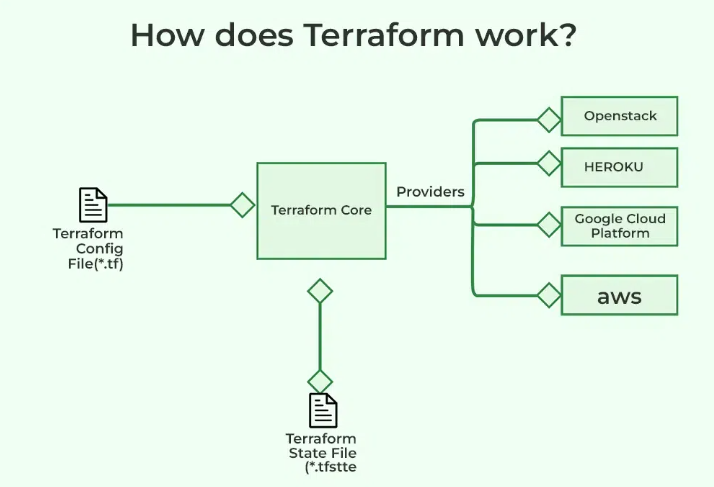
(Source: GeeksforGeeks)
- Terraform fits account setup, VPCs, subnets, gateways, route tables and DNS zones across regions and environments.
- It also fits IAM policies, key management, logging sinks and managed services such as databases or message queues.
- We should prefer Terraform for repeatable environments like development, staging and production because it codifies every resource.
Kubernetes use cases
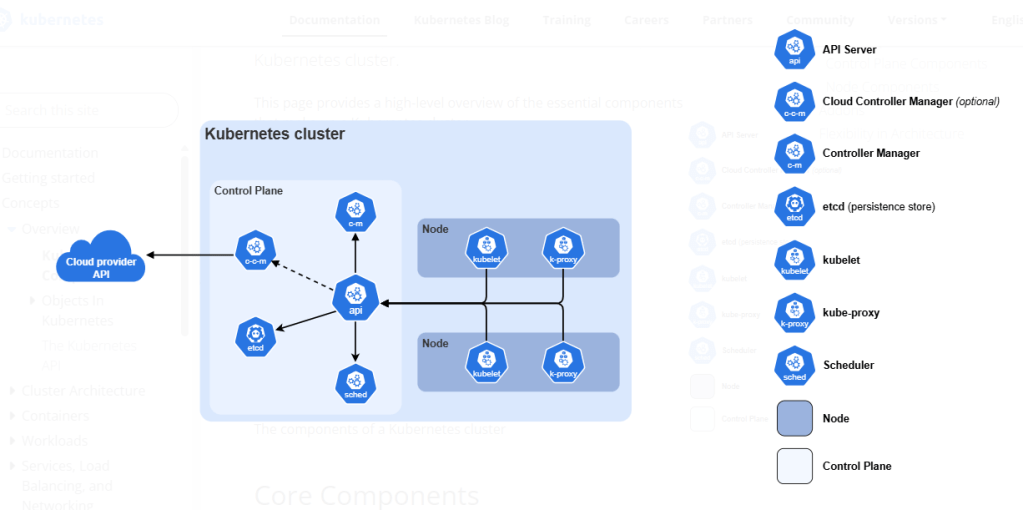
(Source: Kubernetes)
- Kubernetes fits stateless services that need rolling updates, service discovery and autoscaling.
- It also fits stateful sets when storage classes, policies and recovery procedures are defined with care.
- Databases now lead containerized workload categories at roughly 45%, with web and app servers close behind.
- Therefore, you should align storage classes and backup workflows early.
How Kubernetes and Terraform Work Together?
Terraform creates the foundation first by provisioning networking, security boundaries and a managed Kubernetes control plane. It emits outputs such as kubeconfig details, cluster endpoints and DNS records that later steps consume securely.
Next, teams bootstrap cluster add-ons using Terraform providers for Kubernetes and Helm to install ingress, metrics, logging and storage components. Finally, application releases land through CI after the cluster is healthy and policy checks pass.
Most importantly, industry practice supports this model. CNCF’s survey says that 77% of respondents report that some, much or nearly all deployments adhere to GitOps principles. Therefore, you can formalize the handoff by treating Git as the single source of truth for manifests.
Workflow for Using Terraform and Kubernetes
You should use this workflow to move from an empty account to running workloads with confidence.
Stage 0: Foundations and pre-commit quality gates
You need to establish guardrails before writing modules to prevent drift and risky defaults.
- Define naming conventions, tagging rules and ownership labels in a short policy file.
- Configure a formatter, linter and security scanner for Terraform and Kubernetes manifests.
- Add pre-commit hooks that run fmt, validate and static checks on every change.
- Require pull requests with mandatory reviewers for modules and environment code.
Stage 1: Author and structure Terraform modules
Now you will build reusable modules that encode standards and safe defaults.
- Create network, identity and cluster modules with minimal required variables and descriptive outputs.
- Use input validation to reject unsafe CIDRs, weak encryption settings or public endpoints by default.
- Implement opinionated tags for cost allocation and service ownership across all resources.
- Published version modules in a private registry to enable controlled upgrades.
Stage 2: Plan and apply with protected state
You will have to run infrastructure changes through a predictable pipeline with clear artifacts.
- Store state in a locked remote backend with encryption and versioning to support recovery.
- Execute terraform plan on each pull request and attach the plan file as a build artifact.
- Block applies unless plans are approved by owners of affected systems and environments.
- Apply in a dedicated job role with least privilege and short-lived credentials.
Stage 3: Cluster access and baseline add-ons
Make sure to bring the cluster to an operational baseline before any application deploys.
- Publish kubeconfig, API endpoint and OIDC details as pipeline secrets with tight scopes.
- Install ingress, metrics and logging first because most workloads rely on those paths.
- Add a default storage class and test dynamic provisioning with a disposable StatefulSet.
- Enable autoscaling components, then verify node and pod scaling under controlled load.
Stage 4: Namespacing, quotas and RBAC
You will have to align tenancy and permissions with your team structure to reduce the blast radius.
- Create namespaces per product area and environment with consistent labels.
- Apply resource quotas and limit ranges to prevent noisy neighbor effects.
- Define roles and bindings for humans and automations that follow the least privilege.
- Validate access with can-I checks and integration tests that exercise typical actions.
Stage 5: Application delivery and GitOps handoff
You need to separate infrastructure cadence from application cadence through clear gates.
- Store manifests or Helm charts in a repo managed by the owning team.
- Deploy through CI after cluster readiness checks and admission policies pass.
- Use progressive delivery with canary or blue-green strategies to reduce risk.
- Record deploys as release artifacts containing chart versions and config hashes.
Stage 6: Verification, SLOs and performance testing
You can confirm behavior under load and document expected limits before promotion.
- Define availability and latency SLOs that map to customer journeys and SLIs.
- Run synthetic checks, load tests and chaos probes to validate health and recovery.
- Tune HPA targets and disruption budgets to keep error budgets within goals.
- Capture baseline dashboards and alerts that teams must inherit with each service.
Stage 7: Promotion between environments
You must enforce repeatability by promoting artifacts, not rebuilding from source.
- Promote the same plan and chart versions from development to staging to production.
- Require a change advisory or approver list for production applies and deploys.
- Freeze inputs during promotion windows to avoid configuration drift between stages.
- Record environment diffs and reconcile before any production rollout.
Stage 8: Cost, capacity and cleanup
You will have to manage spend and capacity based on measured usage rather than guesses.
- Schedule teardown for ephemeral stacks and archive their state for audits.
- Right-size requests and limits using observed usage since most workloads use less than half of requested memory.
- Since many consume less than 25% of requested CPU, we would prefer HPA for elasticity because VPA adoption remains below 1%.
- Track idle capacity and bin packing since 83% of container costs were associated with idle resources in one large study.
Stage 9: Rollback, disaster recovery and game days
You should practice reversibility to improve confidence during incidents.
- Script rollbacks for Terraform applies and application releases with time-boxed guardrails.
- Test backup and restore persistent volumes and managed data services quarterly.
- Run game days that simulate control plane loss, regional failover and DNS misconfiguration.
- Make sure to document lessons learned and update modules, charts and runbooks after each exercise.
K8 vs Terraform: Make a Better Decision with AceCloud
Terraform provisions cloud resources in a transparent manner that supports repeatable environments and safer changes during growth. On the other hand, Kubernetes orchestrates containers with health awareness and continuous reconciliation that supports resilient services under varying demand.
Choosing between the two or making both work for your specific workload can be a challenging task. So, why not leave it to the professionals? Connect with our cloud experts and learn how both Kubernetes and Terraform meet your business requirements. Book your free consultation today!
Frequently Asked Questions
No, they address different layers of your platform and complement each other rather than compete for the same responsibilities. Use Terraform to provision cloud accounts, networks and managed services, while Kubernetes orchestrates containers, rollouts and scaling within an already provisioned cluster.
Yes, you can manage cluster objects with the Terraform Kubernetes and Helm providers when you need consistent bootstrapping for add-ons like ingress and metrics. However, prefer GitOps or native controllers for application releases because they reconcile continuously and fit the operational cadence of workload teams.
Assign Terraform ownership to platform or cloud engineering for networking, identity and managed services, and assign Kubernetes ownership to platform and application teams for workloads. Define a contract using Terraform outputs and scoped pipeline variables, then enforce access through namespaces, RBAC and admission controls aligned to team boundaries.
Provision networking, identity and a managed Kubernetes control plane with Terraform, store remote state securely, and require reviewed plans before any apply in shared environments. Bootstrap ingress, metrics and storage with Terraform providers, then deploy application charts through CI after readiness checks and policy gates confirm the cluster is healthy.
Tag resources, enable quotas and automate teardown for ephemeral stacks with Terraform, then rightsize Kubernetes requests and limits using observed usage and autoscaling signals. Measure idle capacity and bin packing continuously because most clusters waste resources when requests are static and load patterns change over time.
Avoid managing foundational cloud resources from inside the cluster, storing Terraform state locally, or mixing environment ownership because these patterns complicate recovery and audits. Prefer clear gates between infrastructure and workload stages, practice rollbacks regularly, and document responsibilities to shorten incidents and improve change confidence across teams.